Home Creators Posts Import Register Favorites Logout

Content

Trainer for some games made by Illusion. You can compile this plugin yourself if you don't want to wait - source is available on GitHub.

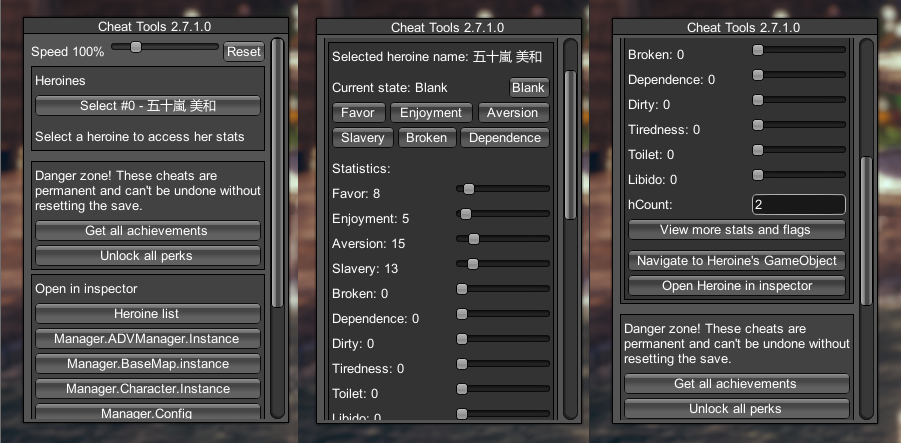
A trainer plugin for BepInEx for games made mostly by Illusion/Illgames. It allows control over player, heroines, and most other aspects of the game (supported features depend on the game). It also integrates with RuntimeUnityEditor to provide useful debugging tools.

Downloads and changelog

View source code

How to use

Get latest versions of BepInEx 5.x, ModdingAPI (if available for the game) and RuntimeUnityEditor (For HC and SVS you need the IL2CPP version of RuntimeUnityEditor).Warning: When updating the RuntimeUnityEditor, make sure that you don't have any old versions in BepInEx\Plugins or this plugin won't work!

Download the latest release for your game from the releases page.

Extract the release in the game directory, the .dll file should end up inside BepInEx\plugins.

Start the game and to turn it on press the Pause key or the F12 key (depends on the game, you can change it in plugin settings, search for "cheat").

It's recommended to turn on the system console to see if there are any issues with your game. This can be done from English launcher or from plugin settings (turn on both "system console" and "Unity message logging", then restart the game).

FAQ

Q: The plugin is making the game run slow.A: This is either the result of using OnGUI in which case there is little that can be done, or because of an incompatibility with the game that is causing many exceptions to be thrown. In the second case it might be possible to fix the slowdown, start a new issue then.

Q: It doesn't workA: Update your game, BepInEx and plugins to their latest versions. You can use a HF Patch to do it easily if one is available for your game. When updating the RuntimeUnityEditor, make sure that you don't have any old versions in BepInEx\Plugins or this plugin won't work!

Q: It doesn't work at all in AI Girl Steam versionA: The Steam version requires a mod compatibility patch to run most plugins, this one included. Install the latest version of AI HF Patch to get both the compatibility patch and this plugin installed.

Q: I found a bug / can't make it workA: Ask on the Koikatsu! discord server in the #help channel.

Files
Comments

Atrain97

I redownloaded the game from sctratch and downloaded the full patch but i cant seem to get the cheat menu to pull up. am i missing something

ManlyMarco

Assuming you installed latest HF Patch for your game, try changing the keyboard shortcut from plugin settings. It's under runtume editor.

Satoshi

Hello Satoshi. KK_CheatTools_3.3.0.0 in HF Patch v3.24 is displayed with F12, is it possible to set it other than F12? If so, I have a problem... I set KK_CheatTools_3.3.0.0 to numeric keypad 8 in HF Patch v3.24, but KK_CheatTools_3.3.0.0 does not appear when I press numeric keypad 8.... Please contact me if you have any countermeasures.

ManlyMarco

You can set the hotkey in plugin settings. Latest version uses the runtime editor hotkey.

Brian Nokusagi

is there a guide/info for useful cheats/settings for HC? Also, what does each stat do like their pros and cons? thank you for the awesome plugins and patch!

ManlyMarco

You can check wiki for HS2 since it's basically the same game.

FearsomeInTexas

Thanks. Is it different than the cheats tab in HS2-HFP 2.14

ManlyMarco

Not sure what you mean, it's the same game and the same plugins work on it.

Hull

Well, actually I'm facing same issue with Aicomi Cheat Tools v.3.6 as well. Would there be any solution for this problem?

ManlyMarco

Update your plugins. If problem persists, send game log on discord.

Kodykid168

Having an issue with KKS. No matter what I do, the only config option for CheatTools is the noclip hotkey. it won't show the menu hotkey. it's in the config file as KeypadMultiply, but even pressing it won't open the cheat menu.

ManlyMarco

Update everything mentioned in instructions.

Arevir Savir Luar

Hi, this update is for the koikatsu game too right? And i have installed i think the last bepinex and everything that the last hf patch has; so i just have to install the same way i have been updating the kkpregnancy archive right?

ManlyMarco

Yes, this update only adds new functions for Koikatsu. If you already have the HF Patch then the chances are you already have everything needed and can just extract the archive in your game directory and replace the old file.

Arevir Savir Luar

Thank you so much, also i read something about new positions for H scenes ; are they in this patch or do i have to download another stuff; or how do i activate them, thanks

ManlyMarco

They are not in the patch yet. They might be added to the automatic updater in KK Manager soon (if not already).

NECROMANCER

Hi, I'm having an issue in KK main game., When selecting a heroine the cheat toolsv2.10 menu, it goes blank and afterwards only works in title screen. Issue is only fixed after restart but issue is repeatable every time.

Danny Marks

I'm having this same issue, if you figure out the fix, please share it.

Danny Marks

Here is the error that appears in console when it happens, posted for Manly Marco. [Error : Unity Log] GUI Error: You are pushing more GUIClips than you are popping. Make sure they are balanced) [Error : Unity Log] NullReferenceException: Object reference not set to an instance of an object Stack trace: UnityEngine.TextEditor.ClampTextIndex (System.Int32& index) UnityEngine.TextEditor.set_text (System.String value) UnityEngine.GUI.DoTextField (Rect position, Int32 id, UnityEngine.GUIContent content, Boolean multiline, Int32 maxLength, UnityEngine.GUIStyle style, System.String secureText, Char maskChar) UnityEngine.GUI.DoTextField (Rect position, Int32 id, UnityEngine.GUIContent content, Boolean multiline, Int32 maxLength, UnityEngine.GUIStyle style, System.String secureText) UnityEngine.GUI.DoTextField (Rect position, Int32 id, UnityEngine.GUIContent content, Boolean multiline, Int32 maxLength, UnityEngine.GUIStyle style) UnityEngine.GUILayout.DoTextField (System.String text, Int32 maxLength, Boolean multiline, UnityEngine.GUIStyle style, UnityEngine.GUILayoutOption[] options) UnityEngine.GUILayout.TextField (System.String text, UnityEngine.GUILayoutOption[] options) CheatTools.CheatToolsWindow.DrawHeroineCheats (.Heroine currentAdvGirl) CheatTools.CheatToolsWindow.DrawGirlCheatMenu () CheatTools.CheatToolsWindow.CheatWindowContents (Int32 id) UnityEngine.GUILayout+LayoutedWindow.DoWindow (Int32 windowID) UnityEngine.GUI.CallWindowDelegate (UnityEngine.WindowFunction func, Int32 id, Int32 instanceID, UnityEngine.GUISkin _skin, Int32 forceRect, Single width, Single height, UnityEngine.GUIStyle style) [Error : Unity Log] GUI Error: You are pushing more GUIClips than you are popping. Make sure they are balanced)

ManlyMarco

Redownload KK_CheatTools_2.10.0.0.zip from the post. For a short time right after release there was a broken version of the plugin attached, when I noticed I replaced the file.

Dracula

Kept pressing the F12 and nothing happened also the game doesnt have pause key to stop it where is that ?

ManlyMarco

Pause key on your keyboard. If you don't have it then you can change the hotkey in plugin settings.