Home Creators Posts Import Register Favorites Logout

Content

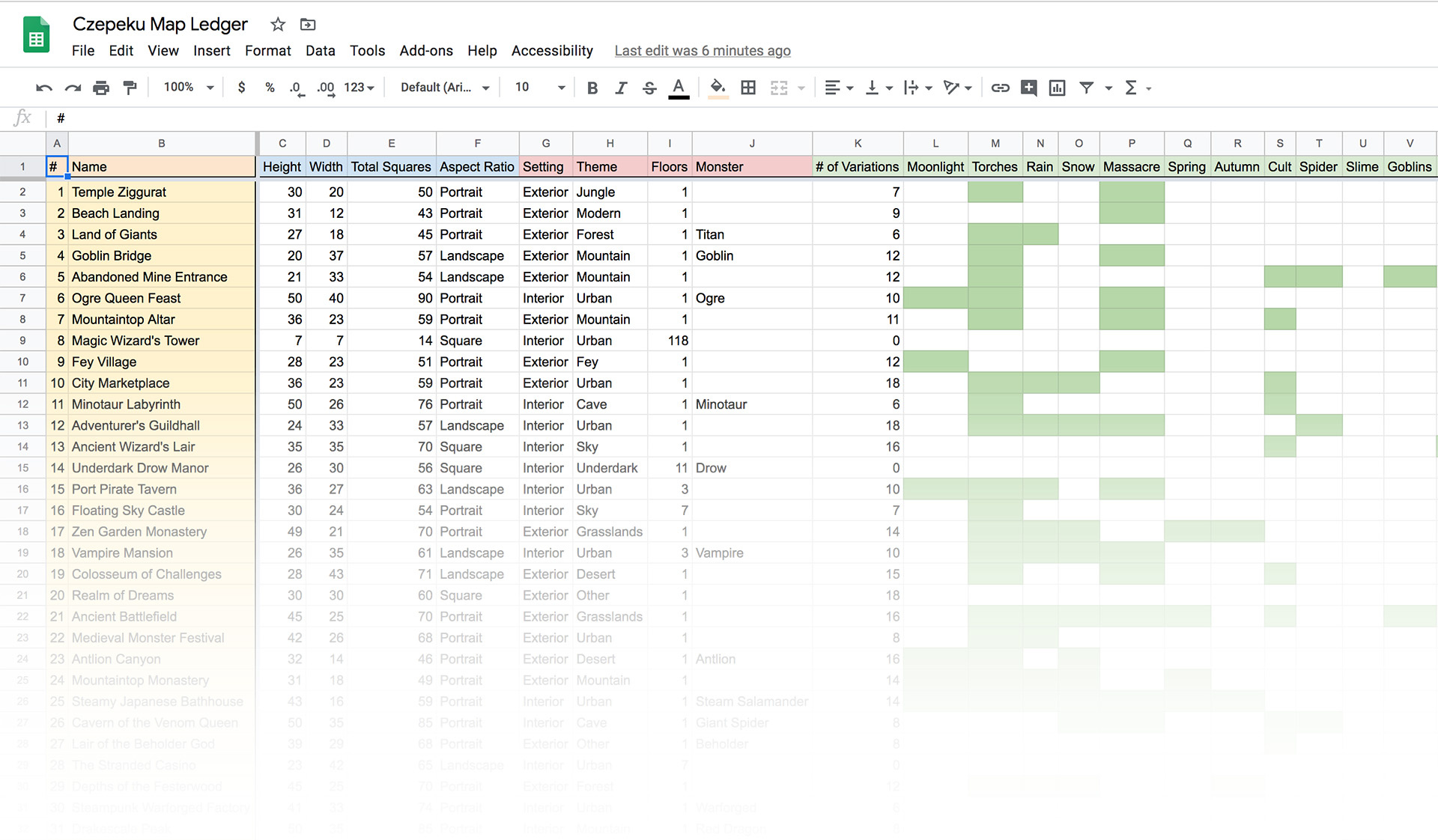
A few patrons have asked for somewhere to see all the maps listed in one place with all the information for them too. So we've put together a Google Sheets with everything you should need.

You can access it here.

A kind patron has offered to help us keep it updated. So a big thank you to them! If anyone has suggestions for fields to add, comment below. :)

We hope this makes your lives easier! This is probably the easiest way to see which maps have a Spring or Fey variation for example, in case you want to collect a theme for your campaign.

There's a link to this in the Ancient Map Room in case you ever lose it.

Files
Comments

Czepeku

Also, due to counting out all the variations we've discovered we've made over 450 so far! :o

Jog Brogzin

Do you find you use it to plan what map you're going to make next, as in, make a map you have less of (eg: we need more fey maps, or whatever)?

Eike Schultz

Finally I can stop keeping my own list xD

Kackman

Super helpful. Thanks!

Devin Brown

You forgot the snowstorm!

Czepeku

Nah, that stuff comes from brainstorming mostly. :)

Czepeku

The greatest of our maps.

Czepeku

I think that column was adding them instead of multiplying them, that was the issue. Fixed it now!

Chris M

In case anyone wants to filter go to "Data->Filter views->Create new temporary filter view". This will allow you to sort and filter on any of the column values without impacting anyone else looking at the file. Note this will not work for the green squares as they do not have values, only formatting. @Cze and Peku - if you want to make these filterable / sortable an easy way is to set the text color to the same green, use a basic value to denote true (like 1), then use conditional formatting to have the square auto-color based on the value 1.

Czepeku

I should have explained this in the original post. If you just click on any of the column heads (like H, O, etc.) and click filter it'll automatically create a new temporary filter for you. If you click on one of the row heads with the colours and go to 'sort by fill colour' it'll sort it for you based on that row.

Czepeku

If anyone else wants to help keep this updated, send us a message here or on Discord! :)