Home
Home

 Creators
 Search
 Recent
 Random
 Posts
Posts
 DMs
DMs
 Tags
Tags
 Random
 Importer
 Import
 FAQ
FAQ
 Account
 Register
 Login
Login
 Favorites
 Keys
Keys
 Logout
 Telegram

CSP Automatic Actions (Patreon)
Content
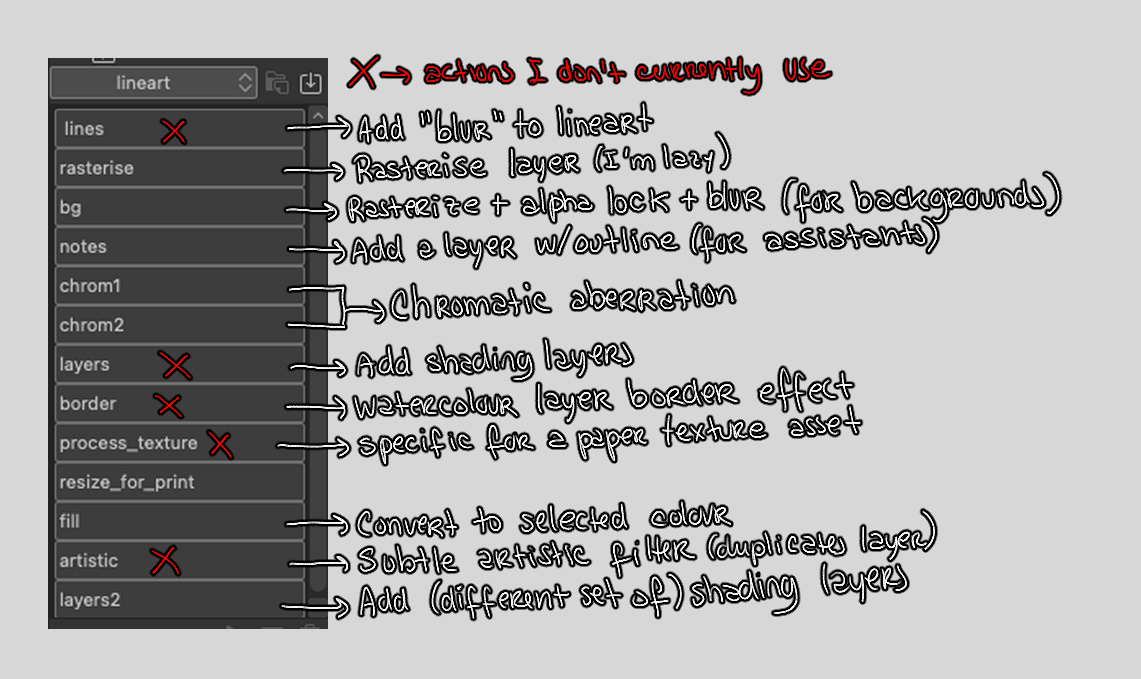
By popular demand I'm attaching my automatic actions set! Some of these I barely or never use, but I didn't feel like editing the set. Some notes:
For the "lines" action: It's a subtle effect I used with some styles of lineart wherein the line gets a shadow/blur effect around it through the "layer properties" menu. If you can't tell the difference, playing around with the settings there after running the action might help.
For the chromatic aberration actions: Unfortunately I haven't figured out how to just press a button to get the full effect, so it's split into two. The first action (chrom1) flattens your image, duplicates it, shifts the colour to the blue tint on the top layer and sets it to Screen mode. You then need to select the bottom layer and apply chrom2 to it, which shifts it to the red tint. In order to get the aberration, you then need to go back to the top layer and move it a little (I usually just use the Move Layer tool and move one pixel to the left and one down. I do also resize the canvas a little after this, because shifting the whole of the top layer will leave that space in red (because of the red bottom layer) on the edges.
Some actions like the fill and layers actions are just there because I'm lazy to press two buttons instead of one, or because it's stuff I can't map directly to a keyboard shortcut but I can do it like this. Also, ignore the fact that the set is called "lineart" , I've had it for years and don't remember why that is anymore lol
Enjoy!
Files