Home
Home

 Creators
 Search
 Recent
 Random
 Posts
Posts
 DMs
DMs
 Tags
Tags
 Random
 Importer
 Import
 FAQ
FAQ
 Account
 Register
 Login
Login
 Favorites
 Keys
Keys
 Logout
 Telegram

[MOD/TV] New CinErotique TV framework - version 7.2 (Patreon)
Content
2024-JAN-23 EDIT:
Mod zip was updated to v7.2a
I would also like to thank everybody who messaged me with reports and suggestions in the past 3 days, I've (hopefully) amended the issues - they were minor ones :) - that have been brought up.
When updating please overwrite not just the framework package and script files, but the ones in the MODULES folder as well.
Thank You!
Helloooo!
A new version of the mod is here! It's mostly a collection of a bunch of "quality of life" improvements, but there are quite a few new features too, so let's get into it, and see...
What's New:
Improved Settings menu
All setting now have been moved into an easy to use picker menu tied to the sim. This provides easier navigation, and a convenient "one-stop-shop" for everything, without the inconvenience of using clumsy sub-pie menus. You can find it by clicking on the sim, then selecting 'CinErotique' from the pie menu.
One thing on the bottom of the list might catch your eye... that's the brand-spanking-new
Collection Tracker
It has been requested by many users to have a convenient way to track your CineMinis figurine collection, but until now I couldn't really think of a good way to do so, as the ingame collection manager seems to be hardcoded in such a way, that it makes it really hard to add anything to it without the high risk of breaking the whole damn thing... so I was like "Fine, I'm going to build my own collection manager!" (with blackjack and hookers :P)
In this new Collection Tracker menu, you can see all the CineMinis listed, with an easy to keep track marking of the ones you already got... You can even click on all of them to bring up a nice info panel that really helps to showcase these gorgeous little pieces of plastics.
Note: the ownership markings are based on the active sim's inventory and (when at home) their home lot. So if the sim has a figurine in either in their inventory or somewhere in the house, then it will be marked owned.
There's also 11 new CineMinis added to the base mod, bringing their total number is up to 30 now!... with even more coming really soon.
New 'Watch P#rn With...' interaction
This is another feature that has been asked for many times, and finally got around to implement it.
It's basically like the 'Watch Movie with..." interaction, just for CinErotique. You can find it on the TV's pie menu, 'Watch P#rn channel' > 'Watch P#rn channel With...' then select up to three other sims from the list, and let the fun begin.
Some Notes on this feature:
- The feature is only implemented for the 7 main channels at the moment, and are not available for the individual Video-on-Demand titles. That would require quite a massive update of all the individual video packages, so it's something that maybe can come at a later date.
- At the moment, You can only select sims to watch with who have at least met with the active sim (I mean, who would watch p#rn with strangers, am I right?! :)... this also means that if there are no matching sim available, the option to 'watch with' will not show up on the TV... but as always, I'm open for suggestions, so if you have any better idea on how this list should be filtered please share it with me in the comments.
- You'll notice that as soon as the interaction is started the TV is turned on to the chosen channel. This is on purpose, so sims don't have to waste time on waiting for each other to arrive. This is especially useful if - let's say - a third sim is coming from somewhere further away, so this way the other 2 sims can just start watching the TV without waiting around like a donkey for the last sim to arrive. :)
New Objects
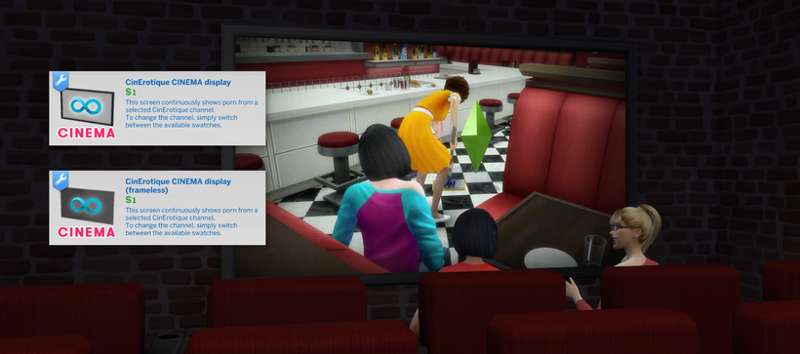
New Watchable Always-On Cinema screens
While we already had the static (decorative) always-on screens in the mod, now I've finally added some that can be watched by the sims (but can not be tampered with :)
These Cinema Displays are ideal for cinema builds (duh), as you can just plop them down, and let your simmies flock to see the show.
There are two versions of this screen, one is framed and one is frameless. They are the same size and do the same thing, so it's just about which look you prefer.
They both feature 5 swatches, which represent the playlist they will show. These are:
All videos - this just plays random videos, like the Shuffle Channel does on the TV.
Movies - this playlist only includes the videos that are marked as movies.
Straight / Lesbian / Gay - these are - quite self-explanatory - only play content that are marked as Straight, Lesbian or Gay respectively.
They can be found in Build Buy > Electronics > Televisions > 'CinErotique CINEMA display'
Note: you can not "change the channel" on the cinema screens once they are placed on the lot. If you want to replace them with a different one you have to do it from the Build-Buy menu... They only cost $1 though, so it shouldn't break the bank to do so :)
PS: don't forget, if you don't like the size, you can always just resize object by using the [ and ] keys.
Also, if you're looking for some sweet cinema seats, ATS4 has you covered.
New Glass Shelf Displays, optimized specifically for displaying figurines
It comes in two versions, one is just a plain old shelf, the other one has built in lights - to better showcase the figurines - as they can look a bit wonky under insufficient room lights.
Not much more to say, lol, they are shelves, you can put stuff on them :)
They can be found in Build Buy > Surfaces > Displays > 'Glass Shelf Display for figurines'
Note: the lit version of the shelf will cast light on the wall behind it, which - depending on the wallpaper - can look a bit too bright. This is something I'm aware of and will fine tune it in later versions, but it's quite a struggle, as the lighting component of modding is rather poorly documented, so I'm kinda just experimenting with changing numbers around and see what happens. :)
Video Rental has been updated
The 'Rent a video' option has been moved from the TV's main pie menu to Watch P#rn Channel > Video Rental. Where once opened it will list all the available videos, but if you click on the top item in the list you can filter the selection further based on genre / orientation.
This is nothing new, just gives you a quicker way to navigate over the old system of using sub-pie menus.
That's it I guess. I hope you like these new additions and improvements (I spent quite a lot of time implementing them - especially the collection tracker, that one I "wasted" like a week on, until it finally looked and felt like I wanted it to be :)
While this mod version - as usual - will be released for free on other platforms as well in the coming days, I would really appreciate if in the meantime you could be my little "experimental lab rats" - erm, I mean "valued supporters with an early access" :) - and give it a spin...
I tested it quite a lot while working on it in the past month, but there could always be circumstances that I can't account for, so if you find a bug, or in general you think that something is not working the way you think it should, PLEASE LET ME KNOW! :)
Worst case, (while you shouldn't) but if you find anything game breaking and would like to roll back to the previous version, you can do so here.
Thank you for your time reading all this, and happy simming!
-p
DOWNLOAD HERE
Files
Previews only