Home
Home

 Creators
 Search
 Recent
 Random
 Posts
Posts
 DMs
DMs
 Tags
Tags
 Random
 Importer
 Import
 FAQ
FAQ
 Account
 Register
 Login
Login
 Favorites
 Keys
Keys
 Logout
 Telegram

Polarity-MD (Beta3) (Patreon)
Content
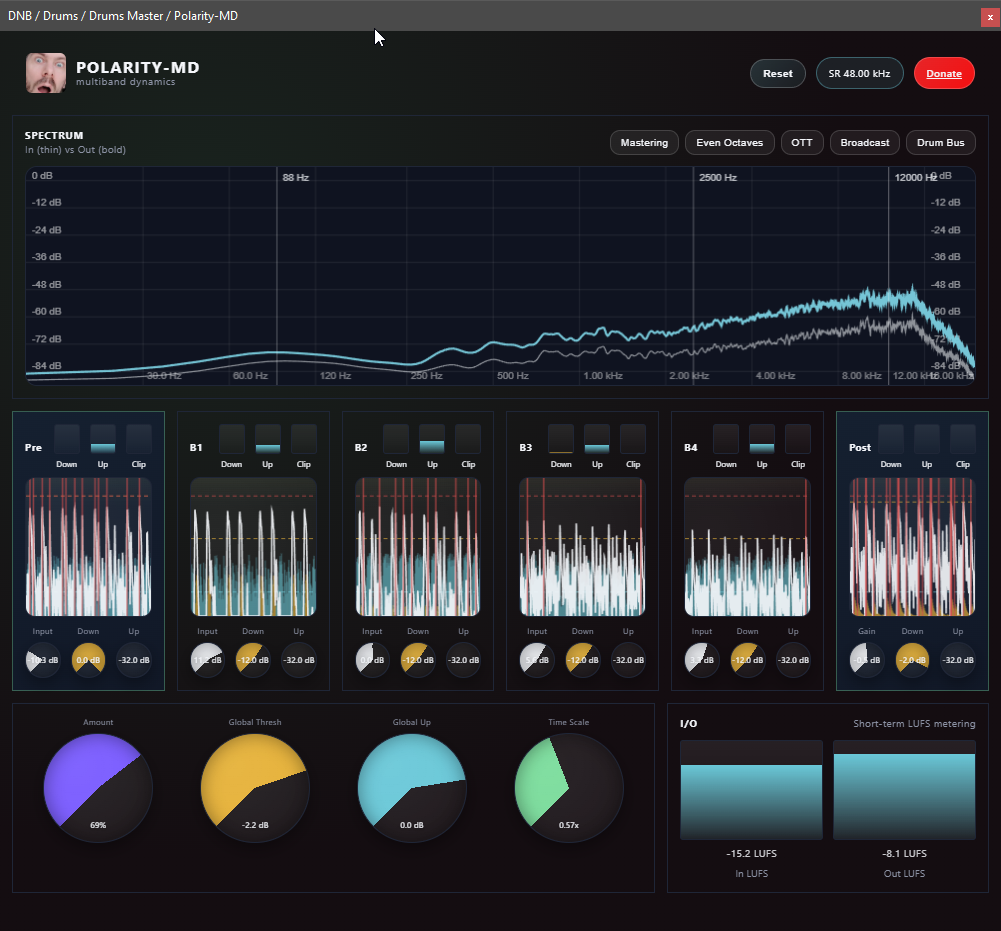
Polarity-MD is a 4-band clipper and up/down compressor with added pre/post up/down compression and clipping VST/Clap Plugin. It will be available for free soon, for all platforms.
It allows you to make drums or masters really loud without exceeding 0 dB. It's essentially what I do in Bitwig with the crossover plugin, but with the added features of an up/down compressor to bring in more movement and control.
The most important control is the big purple “Amount” knob, which scales the ratios of all compressors across all bands. At Amount = 0, no processing occurs.
You can also globally scale the threshold of the up (blue) and down (yellow) compressors across all bands.
The green “Time Scale” knob lets you globally scale the attack and release times of all compressors. Lower values mean faster compressor response times.
The pre-FX section allows you to level the input effectively, and you can even push it into clipping (0 dB hard clipper), with clipped portions shown in red. You can push it even further using the up compression.
The audio then goes into a band splitter, where you can compress and clip the different bands.
After that, it goes into the post-FX section, where there’s another up/down compressor with a clipper at the end, ensuring the audio stays below 0 dB.
The plugin will be freely available for all users on major platforms soon (Windows, Linux, and macOS) as VST3 and CLAP formats.
No costs, no login, no subscription. It probably will be open source at some point in the future too. But for now, let me know what you think and give me some feedback.
Download Beta / Drop Feedback
macos coming soon (i need a computer first lol)
Just copy the files in the zip into your windows "C:\Program Files\Common Files\VST3" and "C:\Program Files\Common Files\clap" directories. On Linux it's "~/.clap" and "~/.vst3"
Files