Home
Home

 Creators
 Search
 Recent
 Random
 Posts
Posts
 DMs
DMs
 Tags
Tags
 Random
 Importer
 Import
 FAQ
FAQ
 Account
 Register
 Login
Login
 Favorites
 Keys
Keys
 Logout
 Telegram

Lines — Tutorial 2: Building Palettes (Patreon)
Content
Hey everyone,
while the Lines Kickstarter campaign is only one week away from the finale, I've been working on the tutorials.
Here's Part 2 in a 95%-finished version for you, as an exclusive preview:
In the first tutorial, we’ve covered the theoretical stuff - now let’s finally get to the fun work! Let’s take a look at different contrasts and types of palettes that help you build a palette from scratch.
The starting point: Monochromatic Palettes
A common mistake I see artists make with colors is: they simply use too many of them! Specifically, too many different hues (remember those from the first tutorial?). Let's start by exploring the concept of a monochromatic palette, which simplifies your palette down to just one hue.
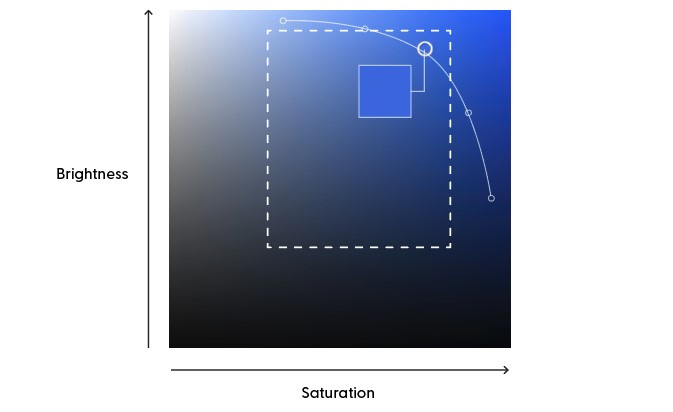
In addition to the color wheel, digital artists and designers may be familiar with this square view. It's a helpful tool when working with a single hue. This square view covers a broad spectrum and is organized logically: left to right for saturation and bottom to top for brightness. Why don’t we start with this nice blue hue with the even nicer number 222°? This square now reflects the complete variety of this single hue.
The next step is to select a “version” of this blue to get started. In general I don't like my colors to be too saturated. It fits some art styles, but I’d recommend picking something from the marked area. The idea is to avoid extremes: not too dark, a moderate level of saturation, just like our friendly blue.
Now, we're ready to build a 5-color monochromatic palette. Instead of randomly selecting colors, we'll follow a simple approach. Think of the first color as the middle point and choose two lighter and two darker versions. As you move towards the darker shades, increase the saturation. And with going lighter, decrease it. Do your picks look like a curve? Then you’re doing it right! Keep in mind that darker but desaturated colors can lose vibrancy and appear muddy.
Here’s our first palette, ready to work with! Remember: monochromatic palettes are all about the variations within a single color. This approach creates a sense of unity and simplicity in your artwork. Monochromatic palettes are excellent for a calm, elegant, and minimalistic feel - and a great point to start coloring an artwork!
Analogous Palettes
But what about combining different colors? Isn’t that the biggest challenge after all? It certainly is, and we’re going to look into it next. With small steps, as the analogous palette is about creating a palette from similar colors. When we say 'similar,' we mean hues that sit together on the color wheel, kind of neighbors!
We’ll stick with our 222° blue, and do the same we did when we created the monochromatic palette. However, instead of picking colors from the same square, we'll gently nudge the hue control in both directions, just a tad. And there, we again select brighter and darker values, expanding our palette. Try keeping that curve from before between the colors you select.
Analogous palettes show a sense of harmony, but don’t look as minimalistic as monochromatic palettes. Here’s something to try out: Create an analogous palette like described above, but move the hue control further away from the original color step by step. See how the palette transforms from harmonious to more expressive, like those two examples above? Find that sweet spot that resonates perfectly with your art.
---
Pro Tip: To check if your digital palette has enough contrast, you can try desaturating your image, turning it into grayscale. Take a look at the palettes below. The first one uses completely different hues, but their gray values are quite similar. The second palette offers much better contrast. Consider this technique to evaluate your colors and fine-tune them for enhanced contrast in your work!
Complementary Contrasts
Now we’re going to take things up a notch - by maximizing the difference between our base color and the additional colors. When we shift the hue to the exact opposite side of the color wheel, we discover a vibrant yellow at 42°. The tension between these two counterparts is called complementary contrast. It serves perfectly to create eye-catching and captivating palettes.
This is an easy way to give your coloring some hierarchy, for example by working with a monochromatic palette that uses a complementary spot. This complementary color immediately directs attention to the object you've colored it with.
Attention for digital artists: depending on the color model you use, there may be a difference in the colors sitting on the opposite sides of the wheel. In the model I am using here, the pair of blue is orange, while in the RGB color mode the complementary pairs are blue/yellow and orange/purple.
---
Pro Tip 2: Avoid using all the colors from your palette in equal amounts. Instead, focus on a primary color (or a limited amount of colors) that establish the mood of your artwork. Then, let the other colors play supporting roles as spot colors. This approach works especially well when you're working with colors from the opposite side of the color wheel, as you would with a complementary palette.
Split-Complementary
Here’s a little altered version of the complementary contrast that I like to use a lot in my colorings. By “splitting up” the hue on one side of the wheel, you receive a little wider range, and more interesting options that are less hard than a full complementary contrast. You can also close the gap between the split, and turn this into a striking analogous-complementary palette.
---
That's part 2 - I'm writing part 3 and 4 right now, these will probably be released here after the Kickstarter is done. As always, I need a bit of deadline pressure to finish things up 😅.
Thanks for reading, have a great weekend!Stefan
Files