Home
Home

 Creators
 Search
 Recent
 Random
 Posts
Posts
 DMs
DMs
 Tags
Tags
 Random
 Importer
 Import
 FAQ
FAQ
 Account
 Register
 Login
Login
 Favorites
 Keys
Keys
 Logout
 Telegram

RetroArch Now (Easily) Available on iOS (Patreon)
Content
UPDATE: After messing around with the built-in iOS Files app I've been able to connect directly to my Windows shares (via "connect to server") and with some long-pressing and some crossed fingers it seems you're able to copy and paste directories full of files from the share into RetroArch's sandboxed directory. It's failed out on me mid-copy a couple of times (and the intermediary app I was using before, FE File Explorer is even worse here) but it definitely seems like a smoother process than using effing iTunes of all things. I tried playing Dig Dug while getting my oil changed earlier today and found that RetroAchievement syncing (pulling down achievement lists and icons on first launch of a game) seems to take a minute or more. No ideal, but kinda neat? That said, the virtual D-pad in RetroArch feels bad and keeps laying down diagonals when I don't intend to use them, so I guess the lesson here is "keep a controller on you." I mean that's just good advice, anyway, right?
ORIGINAL ARTICLE FOLLOWS:
Hey, so now that emulation has been cleared by Apple, we’re starting to see more and more emulators hitting the actual App Store. This is neat! But it probably isn’t quite as neat as the jailbreak/alt store-friendly versions of these emulators and it definitely isn’t as convenient as this stuff can be on most Android devices. Why, you ask? Well, ya know, Apple. It’s always Apple. While they’re now allowing emulators to appear on the store, those applications need to comply with all the official App Store policies. That means that an emulator setup like RetroArch, for example, has to be very particular about how it exposes the underlying filesystem. It also means that you can’t really just replace or update individual RetroArch cores, because those are all baked into the application itself in a part of the filesystem that you don’t really get to mess with.
(Or, at least, if there’s a way to do that, I can’t figure it out)
Restrictions around using JIT (just-in-time compilation) mean that RetroArch can’t effectively offer up its Dreamcast core. It also means that Dolphin, the Wii/GameCube emulator of choice, probably won’t officially appear on iOS at all.
This is all less than ideal, though it’s still neat to have access to, say, Sega CD games on an iPhone. I’ve been messing around with it a bit and have found file management—meaning getting ROMs and BIOS files onto the phone itself—to be an extreme pain in the ass. So I figured I’d write something real quick with my advice. Some of this advice may require you to be at least somewhat knowledgeable about how RetroArch works, but we’ll tackle that in a future installment in the series of emulation videos I’m putting together.
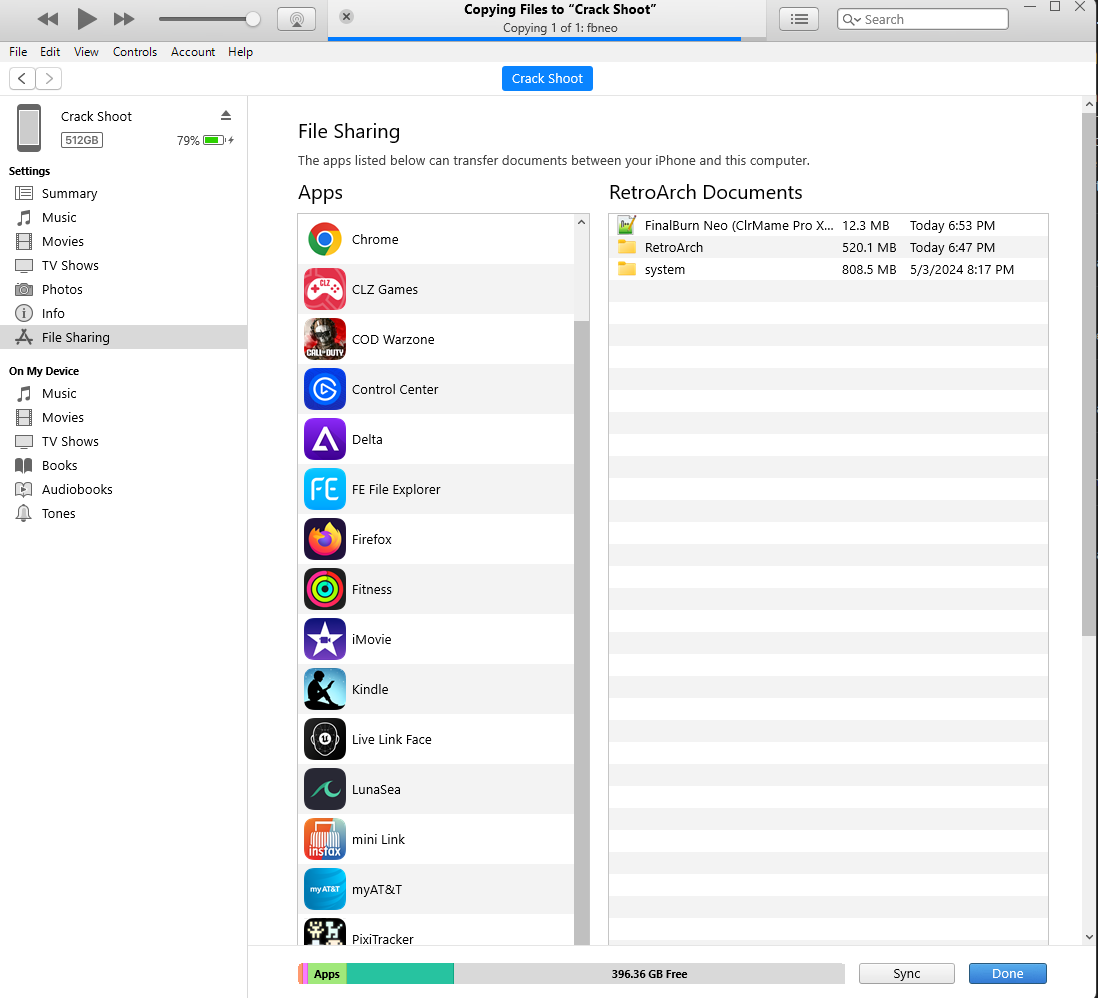
OK, the big bummer: the best way to transfer, like, a lot of files over to your device is to plug your phone into a computer and use iTunes File Transfer. Yeah! iTunes! It still exists! If you only intend to copy a few files over, you can use the Load Content option in RetroArch and then the “Open…” menu to pop open the iOS Files picker. This will let you grab from a variety of sources, like a connected Dropbox or, in my case, the FE File Explorer app, which I have pointed at my Windows file shares. Handy for one or two files, but I’m trying to transfer like 8,000 arcade games to my phone, OK? I don’t have time for this.
So iTunes File Transfer it is. The catch is that iTunes File Transfer won’t let you open directories stored on your phone. So once you push up, say, a directory named “2600” with every Atari 2600 ever made in it, you won’t be able to easily make changes to that directory. So if new 2600 games magically come out, I will probably have to delete and re-upload that entire directory. A hassle! This sucks!
There’s also the matter of the RetroArch “system” directory, which is where it looks for BIOS files, firmware, FBNeo sound samples, and so on. The default location for that stuff is inside a folder named RetroArch, which, as I said, you can’t really edit with the iTunes File Picker. So I’m uploading a new folder (still called system) outside of the RetroArch folder with everything that exists in my PC and Steam Deck RetroArch installs. Inside of RetroArch itself you can set the directories that it uses to look for that stuff, so I’ll open that and point it at the new directory.
Also worth noting is that iTunes File Transfer takes forever. The entire time I’ve been writing this it’s been chewing away at copying 41GB over USB—that’s the size of the entire FBNeo set.
Delta, another emulator on the App Store, is a bit better about individual file copying because it presents the phone’s standard file picker a bit earlier in the process, but as far as I can tell there’s no way there to just dump a full set onto your phone.
Personally, I’m not sure that I’ll keep all this stuff installed, as I have a variety of devices that can do all this stuff and don’t really need my phone to do it. But it’s cool that it finally can, without me having to jailbreak it or move to the EU or something insane like that. Now I can earn RetroAchievements on my phone? I guess?
Are you going to mess with any of this stuff? Sounds like Delta—which still only plays a handful of Nintendo systems—has been burning up the charts, so it sure seems like there’s a lot of user interest there. Maybe we should’ve just bought Android phones and then we would’ve been doing this like a decade ago, right? Naaahhh…
Files