Home
Home

 Creators
 Search
 Recent
 Random
 Posts
Posts
 DMs
DMs
 Tags
Tags
 Random
 Importer
 Import
 FAQ
FAQ
 Account
 Register
 Login
Login
 Favorites
 Keys
Keys
 Logout
 Telegram

Original Xbox Theme Addon | Best of ALL TIME APR-24-24 Update (Patreon)
Downloads
Content
#retrogaming #xbox #emulation #retroFE #coinops #arcadegame
Greetings...
Good day,
First of all, I want to thank you for your continuing support as one of our patreon..
This is the Project Arcade Official Xbox Theme Addon plus the Best of ALL time update April 2024..
Just extract and overwrite. all roms must be placed in the collections/Xbox/roms and Xbox SUB/roms folder.
But if you know what you're doing there will be no problem.
Customized Logos videos cover artworks and system artworks.
If you have other queries or suggestions feel free to message me.
If you need assistance on placing rom files on different partitions or drives, do not hesitate to message me...
+++++++++++++++++++++++++++++++++++++++++++++++++++++++++++++++++++++++++++++++++
I present the Original Xbox Theme Addon Project Arcade
Requirements:
Project Arcade 2.6 plus latest updates.
Xemu Latest
2024 Update
Features:
2 Selectable Modes
Added Hyper List
Added animations.
logo, video, disc art, story, box art and
fanart are scraped from launchbox database.
The hyperlist or meta file was extracted.
from the launchbox database - reconstructed
to work with retrofe.
Configured on an xbox controller (can be tweak)
1920x1080 Fullscreen video gameplay resolution
or 4:3 Video resolution (can be tweak)
Running on Xemu Latest Updates
+++++++++++++++++++++++++++++++++++
NOTE:
Greetings...
Working directory fo Project Arcade should be as follow regardless of what drive letter you will use:
EX:
C:\ProJectArcadeBitsBits
H:\ProJectArcadeBitsBits
D:\ProJectArcadeBitsBits (Recommended)
Emulators:
EX:
CXBX
D:\ProJectArcadeBitsBits\emulators\CxbxReloaded
Xemu
D:\ProJectArcadeBitsBits\emulators\xemu
appdataFiles (Please use default settings included for your drive letter)
EX:
CXBX
C:\Users\nameofuser\AppData\Roaming\Cxbx-Reloaded
Xemu
C:\Users\nameofuser\AppData\Roaming\xemu
Note:
Just copy one of the settings in your appdata folder in your C drive
Default Xemu ROMS DIR
EX:
D:\ProJectArcadeBitsBits\collections\Xbox SUB\roms
Default CXBX ROMS DIR
EX:
D:\ProJectArcadeBitsBits\collections\Xbox\roms
++++++++++++++++++++++++++++++++++++++++++++++++++++++++++++++++++++++++++++++++++++++++++++++++++++++++++++
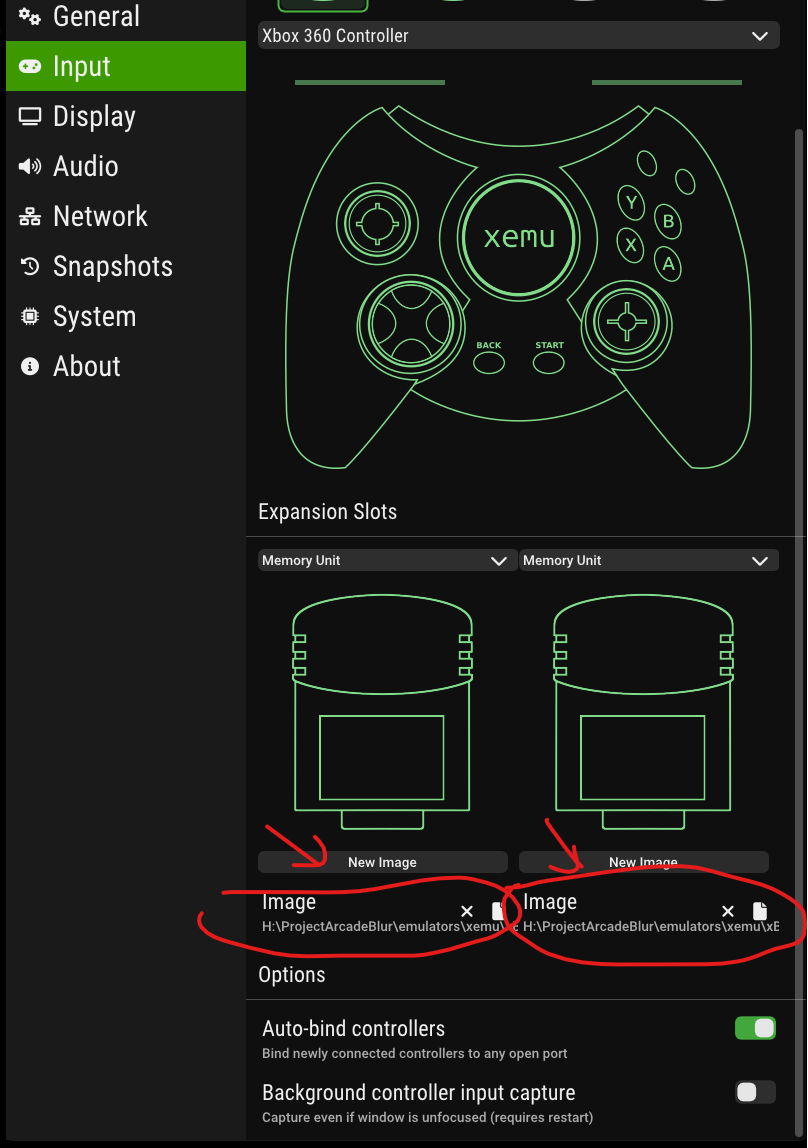
FIX for Bind error on Peripheral Input
open the xemu emulator and go to settings, then input then reset or make a new image for the memory cards...
Files