Home Creators Posts Import Register Favorites Logout

Content

NOTE: If you're one of the few PC users having weird camera behavior, please come to discord.twistedmexi.com so we can troubleshoot.Because script mods aren't supported by Paralives mod tools, they can't be hosted on Steam Workshop. This will go on a new paralives section of TwistedMexi.com soon.

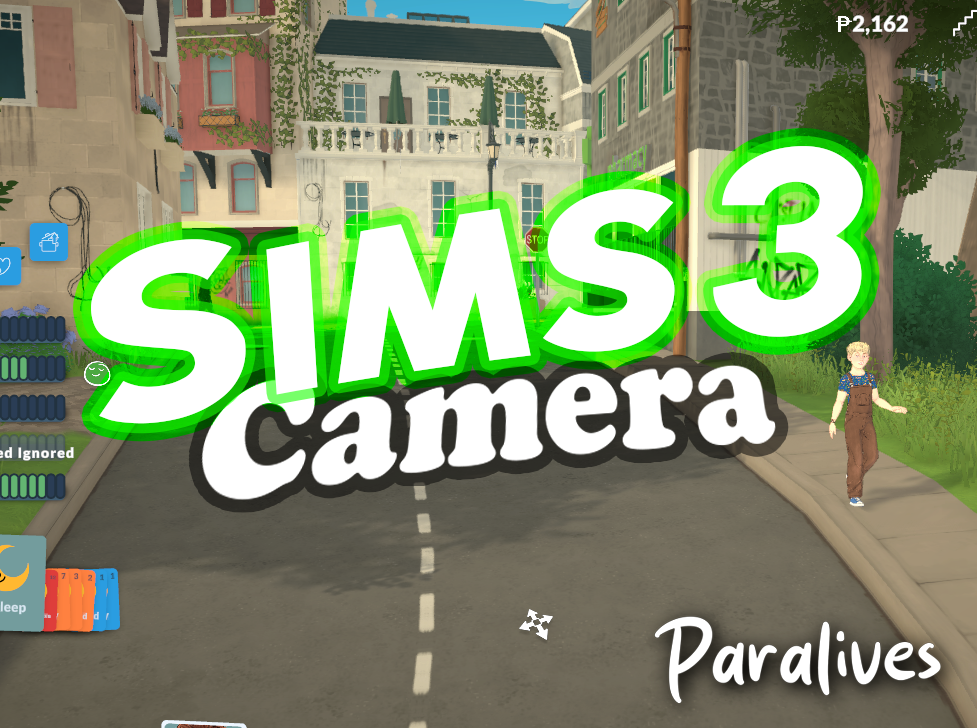
Sims 3 Camera

This mod changes the game camera behavior to match the sims 3 camera controls.Even I couldn't believe how much nicer the game felt with this camera swap, and I made it. I believe most of you will feel the same.

Right-click now pans, varying in speed depending on how far you drag it from the marker.It will keep panning until you release the mouse.

Middle-click now rotates the camera.

< and > rotates the camera left and right

ctrl+up arrow and ctrl+down arrow rotates the camera up and down.

I highly recommend my Sensible Camera Controls mod as a companion to this mod, which removes the auto-tilt the game has when you zoom in or out. (By default, the game tilts your camera down as you zoom out)

Usage

To verify the mod is working, simply hold right click and drag your mouse. You'll see a camera movement icon and the camera will pan just like it does with the Sims 3 camera.

=============================

Paralives Script Mod Initial Setup Tutorial

Script mods have to be installed manually, similarly to how Sims 4 mods are installed, but the steps are different enough that you'll need to pay careful attention.

🚨🚨🚨DO NOT SKIP 🚨🚨🚨

🚨🚨🚨DO NOT SKIP 🚨🚨🚨

Step 1 [PC AND MAC]

Locating Your Script Mods folder

Open Steam

Go to your Library

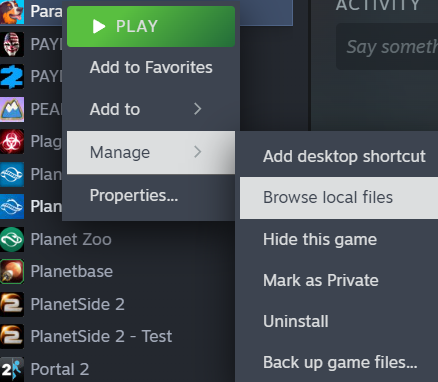
Right-click Paralives

Select Manage → Browse Local Files

Keep this window open until you're completely done.

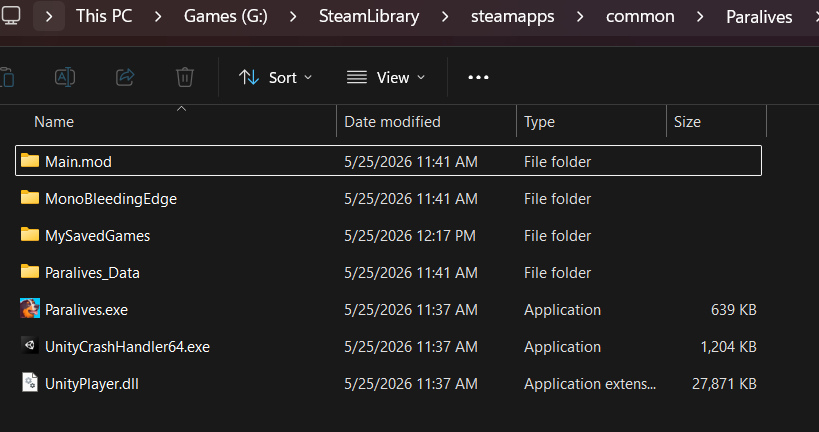
This opens your game installation folder. If you plan to frequently install script mods, I recommend making a shortcut to this folder or pinning it to your quick access sidebar.NOTE: On Mac, the folder that contains Dog Icon Paralives.app is the correct folder. Do not go inside the Paralives.app.

IMPORTANT: Ignore folders with .mod in their name. Those are actual game files, not mods.

STEP 2 [PC USERS]

(Mac users scroll down to the next section)

Download and Install BepInEx

Think of BepInEx like an "XML Injector" mod for Paralives. For Sims 4 mods, many tuning mods require XML Injector in order to function.In this case, every script mod will need BepInEx installed first in order to even load at all.

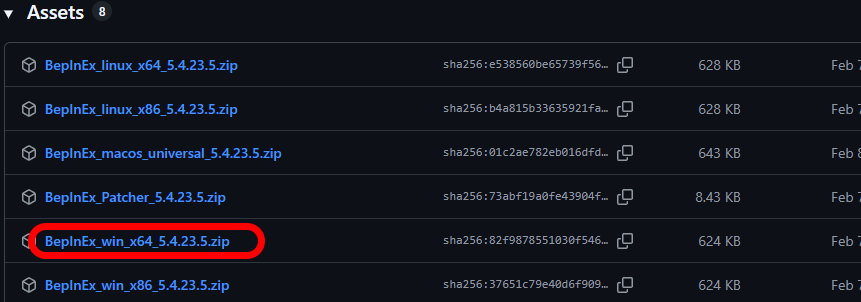
Go to the official BepInEx releases page: BepInEx Releases

If you are on Windows, Download the file that starts with BepInEx_win_x64For example: BepInEx_win_x64_5.x.x.zip⚠️If you are on Mac, Download the file that starts with "BepInEx_macos_universal" instead

That is the only file you need, don't download the source or any other files.

Double-click the BepInEx file you downloaded and it will open the zip.

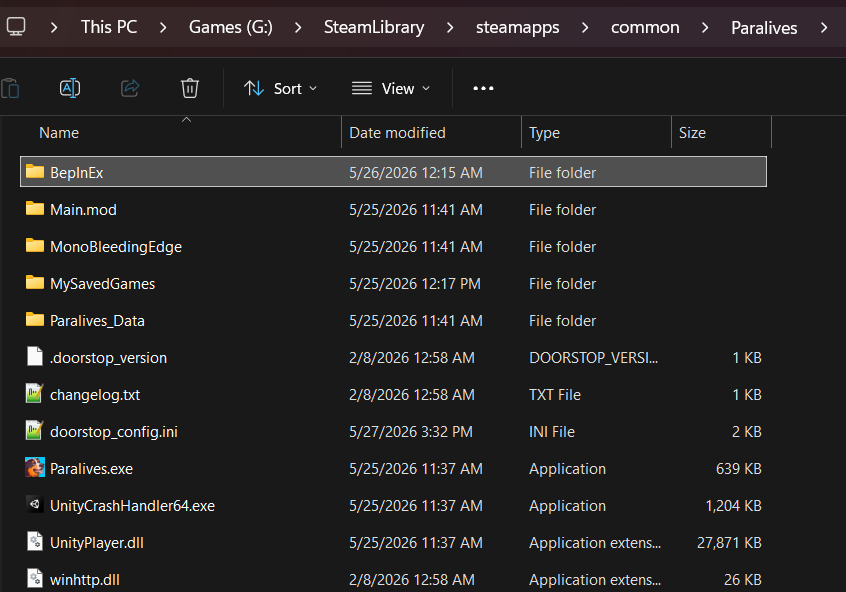
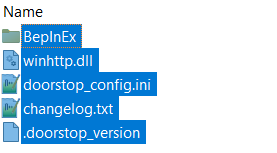
Select ALL files in the zip and drag all of them into that Game Installation folder you just opened.

That's it. Do not modify or move around the files.

You need to start the game once. This will let BepInEx start up and create additional files and folders you'll need. Reaching the main menu is enough.

Step 2 [MAC USERS]

Download and Install BepInEx

Think of BepInEx like an "XML Injector" mod for Paralives. For Sims 4 mods, many tuning mods require XML Injector in order to function.In this case, every script mod will need BepInEx installed first in order to even load at all.

If you tried to install BepInEx previously, make sure you delete all BepInEx related files from your game folder.

Mac M1, M2, M3, etc needs a special BepInEx version. The Valheim game community made one that works. There's also some extra steps you'll have to complete.Mac-Compatible BepInEx

Download the Manual Download

Double-click the BepInEx file you downloaded and it will open the zip.

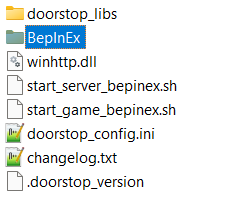
Select ALL files in the zip and drag all of them into that Game Installation folder you just opened.

Do not modify or move around the files. If you ended up with a BepInEx_Valheim folder in your game folder, you did it wrong. The contents of that BepInEx_Valheim folder are what should be put in your game folder.

Open Terminal in the game folder. NOTE: Your Terminal input line should say "Paralives" and not "Paralives.app" if the terminal is opened in the correct location.

Run this command to let your Mac know these files are okay to run:

xattr -dr com.apple.quarantine "$HOME/Library/Application Support/Steam/steamapps/common/Paralives"

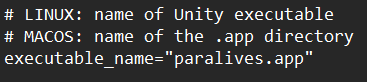
Open start_game_bepinex.sh in a text editor and update this section on Line 13 to say "paralives.app"

so that it looks like this:

Run this command to make the .sh file executable:

chmod +x start_game_bepinex.sh

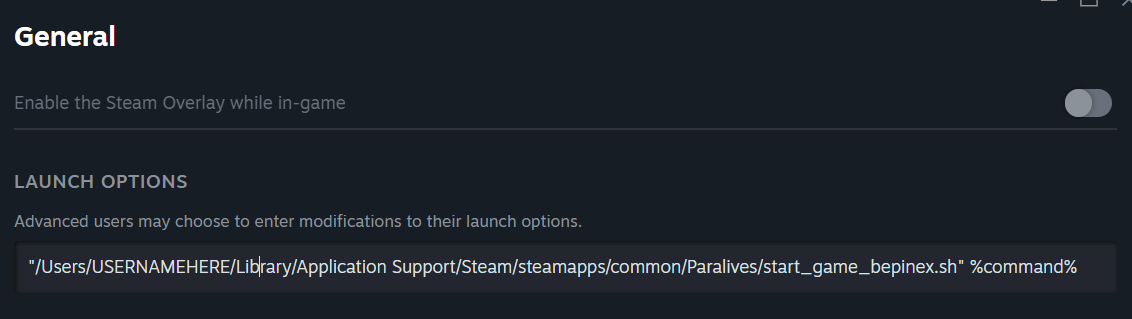
Right-click your game in Steam and select properties. Go to General tab.Enter this command into launch options, but replace USERNAMEHERE with your mac username.

"/Users/USERNAMEHERE/Library/Application Support/Steam/steamapps/common/Paralives/start_game_bepinex.sh" %command%

NOTE: If you get OS Error 260 it means your launch options are not correct. Double check it against my screenshot above, make sure your username is correct, and make sure all quotes are included.

Close it.

You need to start the game once. This will let BepInEx start up and create additional files and folders you'll need. Reaching the main menu is enough.

Step 3. Verify Setup [PC AND MAC]

If you followed the instructions correctly, you should be able to do the following:

Open your Game Installation folder again. If you lost it already, refer back to the Section 1 of this tutorial. (and maybe bookmark it this time)

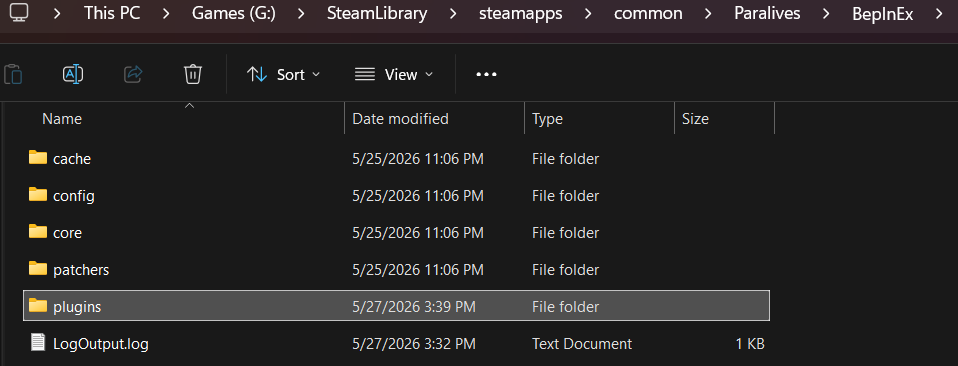
Inside this window you should have a BepInEx folder. Open it.

Inside this window you should have a plugins folder. Open it. If you don't, then you didn't start the game after installing BepInEx. Do so.

Congratulations! The folder you're in right now is where any script mods will go.If you think you might forget this part, let's make a shortcut to this folder as well and call it "Paralives Script Mods".

Initial setup is done. Proceed to this mod's standard install instructions below.

=============================

Mod Installation

⚠ FOLLOW IT WORD FOR WORD. ⚠

Download the "[Paralives] TwistedMexi's Sims 3 Camera v1.0.zip" below.

Delete any existing copies of the mod, if you have any.

DONT use any zip extract options. Instead, OPEN the "[Paralives] TwistedMexi's Sims 3 Camera v1.0" zip by double-clicking it and drag the "Tmex_Sims3Camera" folder inside to your BepInEx "plugins" folder. That's it! Do NOT restructure or modify the files in any way.

Start your game and try the mod's features. There is no in-game mods list for script mods - the Mods menu will not show it.

THIS IS A PARALIVES MOD. DO NOT INSTALL FOR SIMS 4.

Files
Comments

dhahna

You rock as always! Does this also help the issue for us Mac users not able to use the touchpad to pivot/zoom? I installed the sensible camera mod but that didn't help the track pad/right button issue :(

GlazeyLady

20 minutes before I saw this I said "I sure hope Twisted Mexi makes a Sims 3 camera mod for Paralives. Thank you so much - switching between Paralives and Sims 4 (where I use Sims 3 camera) has been so frustrating. You Rock, as always.

Hekarctic w\o Ґ

Thank you so much! But can we to use this mod on MacOS? For example, I downloaded BepInEx for Mac, but new folders and files are not there, the game crashes, when I tried open it with Paralives.app in installed folder, and when I open the game in Steam, it's okay, but without new files and folders. I'm so sorry for my English, I'm trying to write it faster...

Lucas Barbosa

Can I install it if I use cloud gaming? [Boosteroid per se]

andi_paradise

OMG! this mod is absolutely amazing :) thanks a lot!

Jill

Thank you so much for this mod and the very clear instructions!

tipoual

So great ! Now i can play both of game at the same time without getting confused lol! *I play Para during the loading screens ;) Thank you for the great tutorial, and mods !! Edit after install : Working as a charm, just follow the steps !!!

TwistedMexi

This is second-hand info because I've never used it but looking online, it seems like that's not possible. Sorry :(

TwistedMexi

Yes it should work for Mac, but my mac I used for testing broke last year so I have no way to check myself. The steps should be fairly identical aside from using the MacOS BepInEx. I will say that when I first installed BepInEx myself, paralives crashed on the first 2 runs, but never crashed again. it's possible the game itself is bugged while BepInEx is trying to initialize. Maybe give it a few starts if it crashes. The Paralives.app attempt probably isn't actually loading BepInEx at all, hence no new folders.

Laura K.

Hah, I subbed literally to try this out. Stopped playing TS4 ages ago but loved your stuff. Happy to see you mod for Paralives! Hope to see more cool stuff in the future

Alyssa Perrine

I noticed that the most recent x64 file of BepInEx doesn't have the WinHTTP file, and without it, it doesn't work. it's NBD, because version BepInEx_win_x64_5.4.23.5.zip (the last update) still works, i just don't understand why because i know nothing about mods or code

TwistedMexi

Ohh that's interesting. I'll take a look later, that might help some of the people having issues

TwistedMexi

I think you may have accidentally downloaded the macos version, which doesn't include the winhttp.dll file by design.

Mai

hiii Mac user here tysm for this mod! unfortunatley the only thing tht shows up in the beplnex folder after I restarted the game is another folder named "core"

dhahna

I have MiddleTouch from a recommendation you gave before! The problem is holding down the trackpad (force touch instead of right-click) while also rotating your fingers to move the camera. One person put it as trying to push a full shopping cart with a broken wheel. MiddleTouch works great to add items to my favorites in Sims though! :) I can use the keyboard to move the camera in Paralives as well, but equally as annoying, so I've given up until there's a fix. Apparently they are aware of the issue so hopefully one comes soon!

Nicole Harnett

Exactly what I was looking for, you're a legend 🫡

Kayla

This is perfect, thank you!

TwistedMexi

Please come to the discord.twistedmexi.com so we can troubleshoot. I don't have a mac of my own to test right now so we'll have to try a few things together. It's pretty late here so I might not be available until tomorrow

TwistedMexi

Actually I think I know what's happening. I revised the Step 2 section to account for mac installs. make sure you're using the macos file and not the win_x64 version.

Creative Girl of Color

OMG your an absolute superstar, this mod is such a game changer. I cannot believe how well it works and now I actually want to play the game lol.. Thanks so much you did so good. If you have any tips on how I can optimize my game without it taking off into outer space that would be much appreciated?.. Thanks

Clueless Oasis

Thank you so much, EA has conditioned us so much that the sims 3 camera is literally second nature. It isn't patented, It really should be the life sim "default"

TwistedMexi

I see. Aside from just plugging in a normal mouse, I see Mac might support holding the command key and left clicking in order to register a middle click. If that works, that should be a little easier.

TwistedMexi

I agree. Some of the stuff in paralives definitely feels like it's different just for the sake of being different. Perhaps trying to avoid being called a sims clone.

Lissi

Its still happening even with the updated instructions :(

TwistedMexi

Please stop by the discord and @ me. I'll respond tomorrow. discord.twistedmexi.com

ElliAntics

I just wanted to add that I adore the way your humor comes through writing instructions. I now have the giggles (And omg so much better camera -thank you!!) 💙💚💙

Xtiaan

Hello, your mod does not work for me T.T. I have followed the instructions as you indicate for Win64 and I don't know what is happening that I don't notice that it works, if someone can help me...

TwistedMexi

We can definitely help but you'll need to come to the discord so we can troubleshoot properly.

Xtiaan

Thank you very much, I have done it all again and it already worked for me, some file did not drag correctly it seems to be! And thank you for doing this work, congratulations!

Ava Beddow

Same here! Only the core folder appears even after opening the game. I joined the Discord but not sure how to @ you!

petecordwainer

I think there were already a few script mods on Nexusmods but this one definitely is a must have! Personally I haven't played sims in like a decade but I found it frustrating in Paralives that I can't pan with the right mouse button. Thank you for your mod. 🙏

Eva

Hi, I'm a Mac user, and I'm experiencing some issues where the additional folders won't generate. Only the core folder is there and that is it.

Keighley Chicoine

I have the same exact issue! I even started the game to main menu, then started it up the full game in live mode just to make sure. The file still did not appear for me

noa

I have the same issue

Sally

So,... I think you may have saved my sanity... Thank you so very much for that!!

Brandi

Same here.

Amanda

Same

Skyjixies

same here, idk what to do now :/ and i paid specifically for this mod

KyBhabie

It does not have those folders in the actual BepInEx like you show, just a folder labled "core".

Gvbe

Honestly I had to subscribe just for this 😭 Tysm for your work, this is a MUST!!!!!!!! -- Lemme ask though... Would it be possible to make a mod for the Photo Mode camera to be a flycamera (something like the tab camera on Sims 4)? It'd be a game changer for picture-taking!

Johanna

hi, if I want to remove the mod, do i remove the five BepInEx files I added? I'm trying to figure out if a bug I'm getting is realted to a mod or not

TwistedMexi

I wouldn't remove BepInEx if you intend to put other script mods in in the future

JEFFERSON HUYNH

I haven't played The Sims 3 in a while, but how can I tilt the camera?

TwistedMexi

Tilt is done with your middle mouse button clicked in. Drag your mouse and it will rotate

Carly Matthews

Thank you so much! It was driving me crazy having to use the keyboard to pan. Would you consider adding keyboard keys for vertical tilt though? As a disabled player, it is very hard for me to use the middle mouse button. I'd even be happy with remapping the WASD keys to rotate/tilt instead of pan. (I'm aware that Q/E are already available for horizontal rotation, but there is no vertical tilt by keyboard by default - and yeah, this was a pain point for me in The Sims, too.)

Beck M.

This has been such a help, thank you so much for making this! I did want to ask if there would be any way to add the ctrl+up/down keyboard shortcuts to tilt the camera?

TwistedMexi

I'm looking into this currently. As long as there's no major issues with those keys being bound to something else, then it'll be added.

Tomika Blair

Its not working for mac. Is refunding available? Or is there some way to fix it?

Mania Bo

same for me...

TwistedMexi

Hey so a bunch of Mac M1 users and I just figured this out earlier. i'm going to post a mac guide soon, however once they got the mod loaded, there's some issues with the rotation controls on the mac. I'm going to troubleshoot some more tomorrow. If you want a refund that's no problem, but alternatively you can also stick around a few days while I figure it out if you want.

TwistedMexi

Hi, we figured out some stuff over in my discord for Mac users, you can check my latest post for more info but I'll have a new guide and an updated mod for you guys soon.

Nathanial

For those playing on Linux (Fedora), the steps are the exact same as the Windows instructions but WINEDLLOVERRIDES="winhttp=n,b" %command% has to be added to the Steam Launch Options for the BepInEx folder to make the plugins directory. I am using the Flathub/Flatpak version of Steam downloaded from the Software Center. Steam from the package manager or elsewhere *might* be different.

Carly Matthews

This would also work for me! I forgot that's how I used to do it in TS3/TS4. It's been a while since I've played... 😂

Anna G

Seconding this!

Carly Matthews

Or even Ctrl+Right Click for rotate/tilt!

Alexandria

I am having trouble, I followed the instructions and opened the game after installing BepInEx, but the file only shows core it does not show the plugins

TwistedMexi

If youre on a Mac M1, M2 etc I'm working on a guide for you guys

D Jar

Thanks! I was just about to say me too!

Megan Lister

I just dropped a year sub to thank you for making Paralives playable! The only thing I'm finding is that pressing the mouse scroll bar and rotating the camera is the opposite of Sims 3 controls. Is anybody finding that or just me?

Lindsey

I believe I am having the same issue as Mac users. I am forcing Paralives to run on Linux so I know that could just be the issue but if you are able to address the issue for Mac users hopefully it will work.

Alicia Austin

So this is just for Windows not Mac yet?

TwistedMexi

It's for both but Mac users were having issues. We got the setup figured out yesterday and then I fixed an issue with the rotation just now. The fully working mod should be out tomorrow on this post, but if you want to use the testing version for now you can link your patreon to discord and it's in the patreon #support channel where we were troubleshooting.

TwistedMexi

It shouldn't be the opposite but if you want to come to the discord we can troubleshoot. Discord.twistedmexi.com

KDarkling

Omg! Thank you so much! 😭

PandaPop195

I'm not sure what I've done wrong but I only have 'Core' in the BepInEx folder? heellpppppp

TwistedMexi

Are you on apple silicon mac? (M1, M2,etc)

TwistedMexi

Just in case this is it, you won't have the other folders until you've ran the game once.

TwistedMexi

Oh if you turned on the invert controls in gameplay options, make sure to uncheck those.

Juliette DS

it doesn't work... i don't know what to do

lolathelotus

Thank you so much for this. This is AMAZING!!! It makes the controls much more intuitive.

meg

Thank you thank you thank you!!! I'm not much of a mod user and I'm always a bit nervous about installing them but you made this so easy and my game is so much more enjoyable. Ahh! Thank you <3

sophia

I don't know if I'm dumb LOL but this is so complicated for me on Mac. Gonna give It another shot another day because I cannot stand the camera mechanics for Paralives.

TwistedMexi

You can come to the discord tomorrow and we can try to help you through it

Rotherford

Thankyou so much for the Mac support! This is a literal game changer! I love it!

NataSims

Thank you so much. I haven’t tried installing this mod yet, but I’m really keen to give it a go. It’s just that after playing Paralives, when you want to play The Sims 4, your wrist starts to ache because the controls are different. I hope it’ll be easier 💗 Thank you for making such useful mods 🩷🩷🩷

SimScandalous

Thank you so much! I'm on Mac (M5) and when I try to paste the commands into Terminal I get a Malware / safety warning that it could harm my computer. I assume I'm good to ignore this but it's making me hesitant. ;-)

TwistedMexi

Yes that's basically because BepInEx is not officially "signed" by apple, so apple wants you to confirm you want to run it. It's common with open source software. It won't harm anything, the entire valheim modding community uses this project to load their mods.

Tilly

I have an MacBook M2 and it doesn't work. I've tried redoing it 3 times now and read the instructions carefully.. The game won't launch when I'm done, Steam says error 260 when I try to. It does launch when I remove the code in launch options, but of course the ts3 camera isn't working then. Is this a common issue or is it just me? :(

TwistedMexi

Hey 260 means Steam doesn't like the launch command, I just fixed it in the guide based off what others said worked. Try again.

EricaLeshea✨

Hi, on Mac here and keep getting OS Error 260. Any help is appreciated

TwistedMexi

It means your launch command is wrong. Check for missing quotes. Also I just updated the command this morning so double check that

Nikola Ginda

Hej! Zainstalowałam moda poprawnie, ale nie działa tak jak powinien

Creative Girl of Color

Oh ok thanks so much I appreciate you getting back to me. Cause I think they had some other mods that broke with the update.

Caitlin Holm

I am still having issues on my Mac, have followed everything to a tea put am getting a pop up saying that a file does not have permission?

Amanda

What about Mac M4?

TwistedMexi

Should be the same instructions for Mac

Amanda

I'm having the same issue

Amanda

Also in terminal for the chmod it says no such file or directory

TwistedMexi

260 will be an invalid launch command. Discord.twistedmexi.com to troubleshoot

Skyjixies

I got bepinex to work, but the mod is not working properly

Lynn Steele

Hi! I am a Mac user and was trying to install the script mod and I see there is Step 11 but it’s blank. I tried to run the script and it did generate the plugin folder however the command to get Steam to run the game doesn’t connect so for now I removed the path from the Steam command and the game runs. Is Step 11 important?

TwistedMexi

Just a formatting mistake, I removed that empty step. I also clarified a few things in the guide, if you want to retry. If you still need help, come to discord.twistedmexi.com and we'll get it sorted

NataSims

I’ll just add that everything’s fine. No problems at all. Wishing you good health

Simmo

I had claude help me but I found that everything worked when I > Select ALL items in this folder (Cmd+A) Copy them (Cmd+C) Click the back button to go back to the Paralives folder Paste them (Cmd+V) When it asks if you want to replace/merge, select "Keep Both" or "Merge"

TwistedMexi

The zoom shouldn't be affected by the mod at all, only the rotate and pan. Make sure you have RC2, but if it it's still giving you issues please come to discord.twistedmexi.com so we can troubleshoot.

deejuni

Unfortunately even after following your steps in details and going back and forth several times, I'm not able to install it on my Macbook successfully. There are a couple of files missing in the latest Mac BepInEx files compared to your example. And the file names aren't the same too. I did change the file name in your original code to the new file name - but still not working. It's okay though, I'll just wait until hopefully there's a proper mac update for this one. For now, I'll gladly keep supporting for all the amazing work you do :) Thank you!!

Holly

I believe I did everything correctly, but when I go to start up the game after installing everything, it tells me that I don't have permission to open the document. When this happens the start_game_bepinex.sh text file opens and the game itself doesn't open. Did I do something incorrect here?

TwistedMexi

Hi if you stop by discord.twistedmexi.com we can help you troubleshoot

TwistedMexi

The links are in the tutorial. Make sure you do the correct Step 2 depending on whether you're on Mac or PC. If you get stuck on a step, we can help troubleshoot at discord.twistedmexi.com

Alicia Austin

I miss having a Windows. It took me a whole hour to understand Mac settings. Thank god for Google Gemini helping me as well and thank you for giving us this mod! it works!

Anna Banana

I installed this last night bed it worked great all night! I just logged on today and the right click is making the camera scroll across the whole screen!! Anyone else?

TwistedMexi

Someone else had this issue and it was a steam workshop camera mod messing with this one.

Daniel Jossen

i think i managed to install. it seems to work. but i dont get the middle click to rotate. any idea where i am stuck? :) thx for the mod

TwistedMexi

Come to discord.twistedmexi.com and we can troubleshoot

Susan

I just downloaded this becuase I hate having to use the keyboard to move the camera. Followed the instructions exactly as shown, but when I try to use the mod in game it does not work.

TwistedMexi

I'm in bed for the night but if you come to discord.twistedmexi.com we can troubleshoot tomorrow.

BlackCat12

Hi Mexi and first of all thank you for this mod! The original camera control drives me crazy, and having the option to go back to the Sims 3 camera in this new game truly is awesome. Yesterday I got your mod and everything worked like a dream following your step by step instructions. But after going into the game today, it just didn't work anymore. It tried a couple of things (checking in the mod menu, that even the one local mod is activated, resetting everything I changed in the camera and hotkey settings, reinstalling the mod, plenty of restarting the game). There has been a small update today - could this be the cause? Or did I do something wrong? Like I said, yesterday it worked wonderfully, today it just didn't (even before I tried everything else). I didn't install any other mods since yesterday, too. I just have your other camera mod and a couple of plants, rugs, and tattoos (nothing of that new). Your help would be very much appreciated! Edit: I'm on Windows, not Mac.

TwistedMexi

Hi, we've had a few people say this and then it started working again, so please try stopping the game and launching it again. Maybe something about the update causes the first launch not to work as expected. If you still have issues, come to discord.twistedmexi.com and we'll get it sorted 🙂

Susan

I got it to work. I downloaded it late at night and I might have missed a step. So I redid it today and it now works.

Bret Edward

I'm following the steps but getting no such file or directory at step 11 for Mac.

TwistedMexi

That means you didn't open the terminal in the right location or the files aren't in the right location. Terminal should say Paralives, not Paralives.app If you still need help, we can troubleshoot discord.twistedmexi.com

Janey

Hi TwistedMexi! I originally downloaded your mod when you first released the RC1 version and it worked perfectly for me, i play on pc. Anyway I redownloded your mod when I saw you had released the RC2 version but unfortunately that one doesnt work at all for me and makes the camera behave all weird. luckily I still had your RC1 version saved which still works absolutely fine. I dont know if I have missed something here but I installed both exactly as your instructions said and the RC2 just doesnt work for me.

Misbah Razah

Does this work on laptops? I don't have a mouse connected.

TwistedMexi

Please try the 1.0 I just posted, it should resolve the remaining issues.

TwistedMexi

Technically but you may find the rotation controls difficult with trackpad gestures. A mouse is recommended.

Janey

Thank you, I tried it just now and it’s still not working. I have just commented in your discord about it and felt it might be easier to discuss there.

Sunset

Hello, I play with the sims 3 camera on sims 4 however the sims 3 camera on Paralive doesn't work the same. I followed the direction step by step and I have to say. I'm not experiencing sims 3 camera. Not blaming or anything. I just don't know what i did wrong or is my expectation flawed.

TwistedMexi

Some PC users are still having issues, there's a test copy in discord you can try that should resolve it. discord.twistedmexi.com

Amanda

Yesssss thank you for the updated Mac instructions! I have the Apple M4 chip. I finally took the time to figure it out (your "if you see this, you did it wrong" helped so much lol), learned some new tricks on my Mac in the process, and got it installed and working! Thank you :)

vicki

Im on PC and only getting core no plugins

vicki

Me 2

TwistedMexi

Come to discord.twistedmexi.com to troubleshoot