Home Creators Posts Import Register Favorites Logout

Downloads

Content

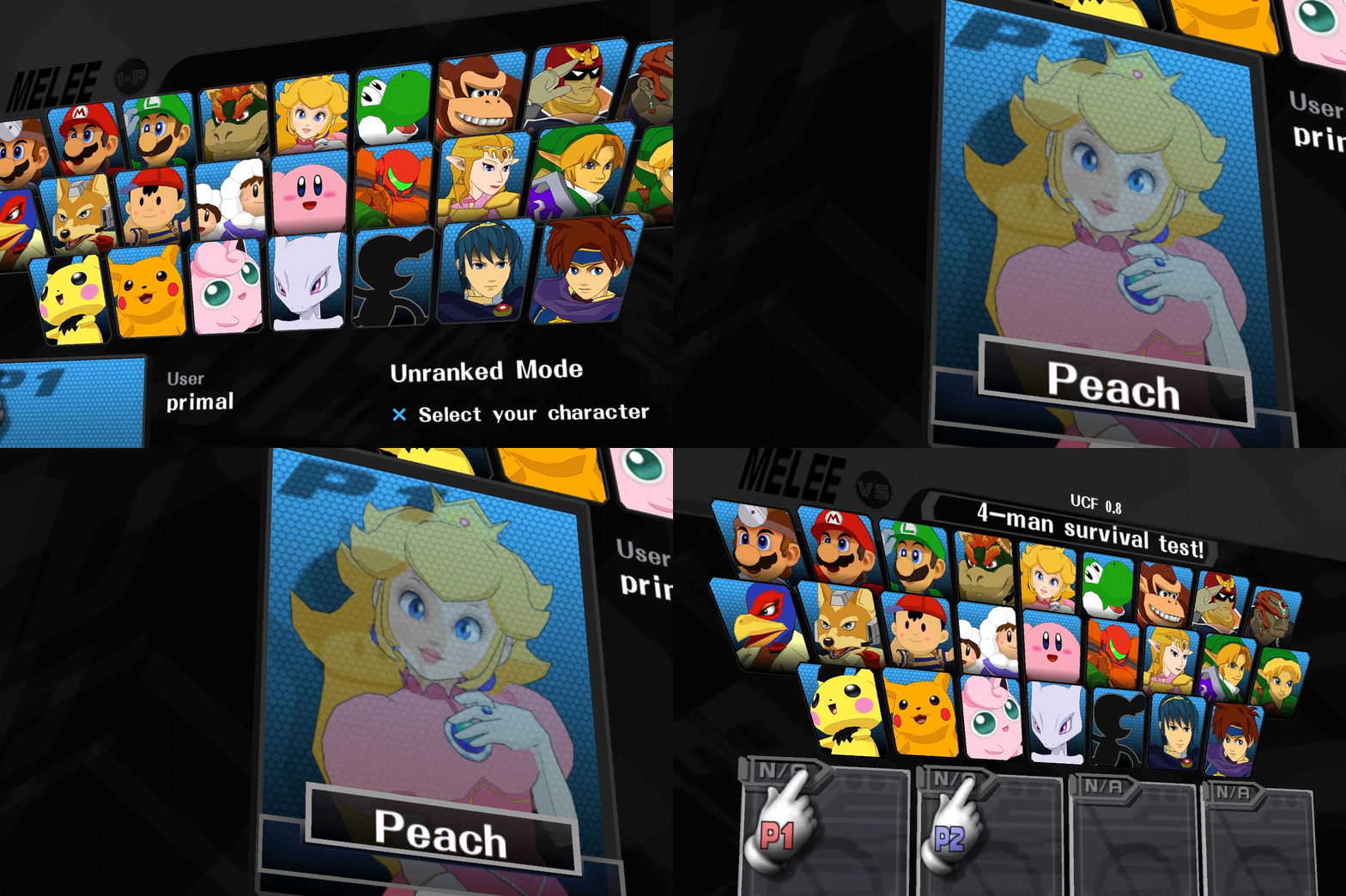
Enjoy this patron-only release of the Animelee CSS!This mod uses both a modded file and HD texture swaps, so I've included some extra instructions on how to set it up.David V. Kimball has come up with a quick video tutorial on how to set this up! https://www.youtube.com/watch?v=v1Rs1lOtOvM---Here are some written instructions on how to do it as well 👇👇👇--- Replacing the Modded File ---When replacing the file with DTW, click on the blue "Menus (CSS/SSS)" at the top of the window to jump to the right area of the ISO.Make sure to replace the .USD file labeled "Character Selection Screen (ENGLISH)"--- Adding the HD Textures ---Dolphin has a built-in HD texture swapping feature. To use it, you'll need to put the HD textures into a special folder inside of DolphinDavid V. Kimball has made a video explaining how to install HD texture packs which you can watch here https://www.youtube.com/watch?v=SYItKN88hzg&t=72s (starts at 1:12)If you're using the newest Slippi Launcher, you can follow this video to find where the texture folder has been moved to https://youtu.be/WmhnNlfy0UkOnce you have the textures in the folder, fire up Dolphin then click on the "Graphics" button, go to the "Advanced" tab, and check both the "Load Custom Textures" and "Prefetch Custom Textures" boxes.---I will be around today to answer questions but will be gone until the end of the month.Enjoy the CSS! We're almost at the full release of Animelee. 

Files
Comments

Primal

Yep just swap the vanilla MnSlChr.usd file with any of the ones here using DTW

David V. Kimball

Let's goooo! Hopefully my video is helpful. If anyone still can't figure it out, feel free to reach out to me.

moy56

is there a way for the HD textures to apply to one ISO but not another? they replaced the CSPs in my regular melee ISO too, which i don't really care for

Kaleb Roberts

Looks great! Is it possible to make a vanilla background version instead of just having it black? I think it would be cool, and have a close vanilla feel to it while still looking sick.

Jova

This is sick! Orange would be sweet too. Tysm

Carlos Lavayen

I followed tutorial but I dont have the CSS Background, only the CSP

Oliver Silfveroxel

this is dope as hell! any chance u could share how you make the CSPs? I'd like to change the ones I have skins on, but still have the same poses

shīkumeister

I’ve been waiting for this since forever. Amazing work. The game actually feels like a complete Animelee now. The portrait shapes are solid. I could never do this level of work, you’re extremely talented. Now that we’re coming closer to the end of base animelee I want to point out a component of your work you may want to consider adjusting. The eyes and ears on some of the characters are too realistic for their cartoon-anime design. Mario is a good example of a character who’s complex ears and eye textures are off-putting in contrast with the rest of his design while Roy is a good example of cartoon-anime eyes correctly matching the rest of the aesthetic. I hope you find the feedback useful!

Mason Hopkins

Is there a method to get the CSP's on console? I'm sure there is but haven't been able to find anything descriptive online

Vapedragon

i have an issue where I'm also using the melee HD texture pack. I'm not sure exactly which files to put into which folder if I just want to replace the character select icons and the CSPs. I tried and it's "working" somewhat, except that there are a lot of characters whose portraits are correct but the voice lines and names are wrong. I only replaced the CSPs and CSS files from the melee HD pack, but still getting some weird desync. Any tips ? Great work btw, this looks incredible

Samuel Gómez

How can i add the .usd file to my Combo Counter + M22 Full Pack iso, dax texture just don't let me change anything in the iso but with vanilla isn't problem at all