Home
Home

 Creators
 Search
 Recent
 Random
 Posts
Posts
 DMs
DMs
 Tags
Tags
 Random
 Importer
 Import
 FAQ
FAQ
 Account
 Register
 Login
Login
 Favorites
 Keys
Keys
 Logout
 Telegram

Knight Rider Mod v6.2.4 - (Early Access WIP Download) (Patreon)
Downloads
Missing 3 full-res photos, 3 files, as this post has not yet been imported.
Content
Here is the list of the current Mod Features (pdf Version attached):
Animations, Sounds- and Display Functions
- All KITT and KARR Versions are available in seperate DLC Packs
- S1KITT
- S2KITT
- S3KITT
- S4KITT
- S1KARR
- S3KARR
- KI3T
- individually animated Voiceboxes for all different versions
- Animated high detail Dashboard for all Knight Rider vehicles (including working Speed-Meter, RPM dial, Temperature display, RPM Bar, Speed Bar, Fuel Display)
- Animated Startup Sequence for all Knight Rider vehicles
- Working Rear View Screen for KITT and KARR Monitors, that can be toggled
- New Animated Scanner for all Knight Rider vehicles
- Turbo Boost ( 5 different Modes with Selection Menu)
- Adjustable Turbo Boost (including Trajectory Guide Animation)
- C-Mode (including Convertable Animation)
- Super Pursuit Mode in Season 4 KITT (including SPM Animation with original Sound, SPM Handling and SPM Engine Sound)
- Emergency Braking System including Animation
- New animated Startup Button Animation for Seasons 1&2 and Seasons 3&4
- Working and animated T-Top Roof
- Working Trip Meter
- Working Fuel Display
- Working Temperature Display
- Working Dashboard Clock, that can display realtime or ingame time
- original KITT introduction including startup sequence when entering KITT
- KITT and KARR Idle Comments including voicebox animation
- KITT and KARR Crash Comments including voicebox animation
- KITT and KARR Comments when reaching 3 wanted stars
- KITT and KARR Comments after injuring several peds
- KITT and KARR Comments after evading police
- KITT Comment when exceeding 180 mph (optional)
- Shutdown sequence sound when leaving KITT
- Tinting Windows with Hotkey
- Tinting Tailight with Hotkey
- Night Vision
- Thermal Vision
- Underglow Lights with 4 different colors, that can be toggled on/off
- Interior Lights, that can be turned on/off
Drive Modes including Dashboard Button Animations
- Pursuit Mode
- Super Pursuit Mode
- Normal Cruise
- City Cruise (slower Handling for driving in the city)
- Auto Cruise (11 different driving styles to select)
- Silent Mode
- Emergency Braking System (including Animation)
- Rocket Booster
- Braking Rockets
- Ski Mode (new improved mode including an option to steer during Ski-Mode)
- Speed Control
Weapons and other Gadgets
- Micro Jam (disables target engine)
- Micro Lock
- Thermo Dynamic Generator (bursts targets tyres)
- Sonic Disabler (Stuns target(s) for a short duration)
- Parachute
- Laser
- Grappling Hook
- Oil Slick
- Smoke Screen
- Tyre Buster
- Front and rear Rockets
- Fire extinguisher
- Flame Thrower
- Water Cannon
- Front Cannon
- Flare
- Firework
- Grenade
- Sticky Bomb
- Gas
- Hacking Police Frequency to get rid of police
Other
- Call KITT Mode
- Follow Mode
- Surveillance Mode
- Parachute
- Random Turbo Boost Sounds
- Option to deactivate the random Crash Comments
- Toggle Function for Idle Sounds
- automatically opening/closing doors when player gets near or walks away
- Light Booster (additional massive Booster to light intensity)
- improved popup lights, that can be manually toggled on/off everytime
- New Displays with red Background like in the series
Knight Rider 2008 Mod
- Attack Mode Transformation WIP
- Mountable Gattling Guns
- Laser
- Turbo Boost
- Ski Mode
- Camouflage
- EMP
Hotkeys:
Spawn Menu:
- Open Spawn Menu: Numpad Add
- select vehicle with arrow keys and confirm with Enter
Functions:
- Follow_Mode = NumPad1
- Autocruise = NumPad1
- Speed_Control = Numpad5
- Pursuit_Mode = Numpad0
- Rocket_Boost = ControlKey
- Transformation = Add
- Turbo_Boost = ShiftKey
- Selection_Key = CapsLock
- Ski-Mode_left = NumPad4
- Ski-Mode_right = NumPad6
- Ejection_seat = E
- Silent_Mode = NumPad2
- Cruising_Mode = Decimal
- Hacking_Police = NumPad7
- Thermo_Dynamic_Generator = Divide
- Microjam = NumPad8
- Microlock = NumPad9
- Sonic_Disabler = NumPad3
- Surveillance_Mode = H
- Windows_Tint = Z
- Taillight_Bar_Tint = X
- Rear_View_Camera = End
- Laser = D1
- Front_Rocket = D2
- Rear_Rocket = D3
- Tank_Cannon = D4
- Firework = D5
- Flame_Thrower = D6
- Fire_Extinguisher = D7
- Flare = D8
- Reset_Tripmeter = Y
- Rear_View_Camera = End
- Cinematic_Camera = Home
- Clock_Change = F12
- Nightvision = Subtract
- Parachute = Multiply
- Toggle_Comments = Q
- Toggle_Random_Turbo_Boost_Sounds = Delete
- ThermalVision = Multiply
- Camouflage = Decimal
- EMP = Numpad 8
- Smokescreen = N
- Oil Slick = K
Other Keybinds (can not be changed):
- Braking Rockets: Brake + Handbrake
- EBS: Brake + Handbrake (in SPM)
- Toggle Scanner On/Off: Control Left + S
- Scanner Speed Increasement: Control Left + Page Up
- Scanner Speed Decreasement: Control Left + Page Down
- Scanner Speed Reset: Control Left + R
- Turbo Boost Height Increasement: Selection_Key + Accelerate
- Turbo Boost Height Decreasement: Selection_Key + Decelerate
- Turbo Boost Afterburner: Hold Shift during Turbo Boost (the longer Shift is pressed, the more powerful the Boost)
- Select next Autocruise Driving Style: Selection Key + Accelerate (while Autocruise is active)
- Select previous Autocruise Driving Style: Selection Key + Decelerate
- Super Pursuit Mode Speed Increasement: Selection Key + right arrow (While SPM is active)
- Super Pursuit mode Speed Decreasement: Selection Key + left arrow (While SPM is active)
- Open Popup-Lights: L + PageUp
- Close Popup-Lights: L + PageDown
- Toggle Light Booster: I + Multiply
- Toggle Interior Lights: L + I
- Open/Close T-Top left: Control + J
- Open/Close T-Toop right: Hold Control + K
- Open Bonnet: G + Page Up
- Close Bonnet: G + Page Down
- Activate Underglow Lights: N + Page Up
- Deactivate Underglow Lights: N + Page Down
- Change Underglow Light Color: N + Arrow right/left/up/down
- Open Gadget Menu for additional Gadgets: Hold Tab Key
- Select desired Gadget with your mouse (then release Tab Key)
- use selected gadget with your ingame vehicle weapon key (check your ingame controls for it)
- Load/Unload Gattling Guns (on KI3T): Control Left + Numpad 2
- Fire Gattling Guns: Your ingame vehicle weapon key
Advanced Camera Controls:
- Toggle Advanced Camera Controls On/Off: Home
- Player_Visibility = I
- Toggle Static Camera On/Off: D8
- Select next Camera Offset: P + Arrow right
- Select previous Camera Offset: P + Arrow left
- Move_Camera_Upward: Page Up
- Move_Camera_Downward: Page Down
- Move_Camera_Forward: NumPad 8
- Move_Camera_Backward: NumPad 2
- Move_Camera_Leftward: NumPad 4
- Move_Camera_Rightward: NumPad 6
- Rotate_Camera_Upward: NumPad 9
- Rotate_Camera_Downward: NumPad 1
- Rotate_Camera_Leftward: NumPad 7
- Rotate_Camera_Rightward: NumPad 3
Notes:
- This mod is designed for keyboard. I don't know and can't test how the functions work with controllers.
- Due to the number of functions, it's highly recommended to use a keyboard with a Numpad
- If Scripthook does not work with the latest GTA Game Update, you might have to downgrade the game until scripthook got updated.
- If the verification does not work, make sure, your game is not minimized while starting/loading
- Be aware, that an active Patreon Membership (Full Mod Access or higher) is required to play the Mod. KITT or KARR will eject you otherwise.
Release Notes:
- New Oil Slick Animation including new Spinning Effect
- added a new option to chose if KITT and KARR shall always be proper or get dirty
- after initial Spawn, KITT or KARR will ignore traffic lights and drive directly to the player
Bugfixes:
- several code improvements and minor bugfixes
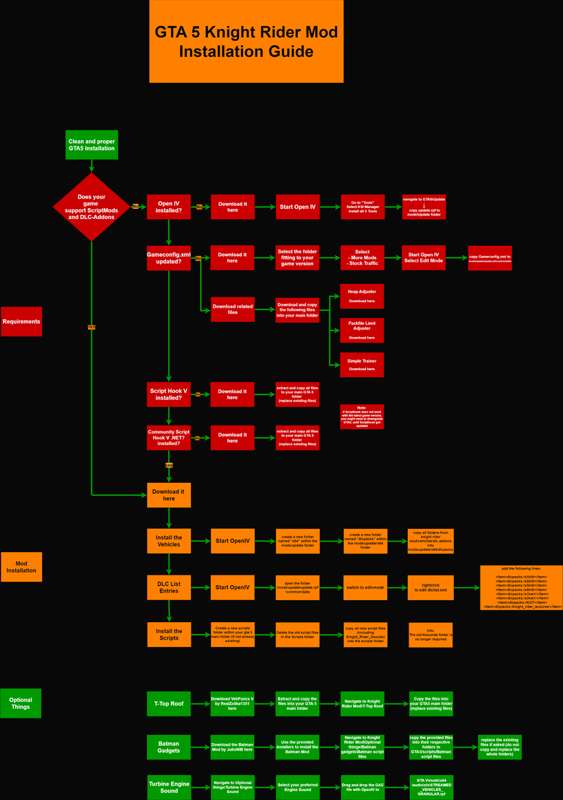
Installation (Download the PDF Version below):
Notes about Installation Support:
I do not support on setting up your GTA 5 or on getting your game working for mods. I also won't copy the files for you.
Everything you need is provided and explained in the Installation Guide and the readme files.
Please read the Installation Guide carefully and follow the steps to make sure, everything is working properly.
After you made sure, you followed all steps carefully and still have any issue, please make screenshots of your folders and ingame screenshots to explain and show your issue (including a detailed list of the steps you did so far) in my discord: discord.gg/TFbRXMmv.
if you just write, that something is not working, we can not help ;)
Big Thanks to all my patreons for their awesome support, that helps me developing and financing my mods
Special Thanks to:
- dicky_the_ducky for his continuing help with the Code
- S4MuEL and CEM for their help with the Knight Rider Models
- Sairus for his new KI3T model
- 3id for his original Knight Rider script and his help at setting up a new script
- thedoctor100th for his Engine Sound files
- Sersorroza, Knight Racer, & Teoadrianoj for the original models
Files
Previews only