Home Creators Posts Import Register Favorites Logout

Content

Hello everyone,I would like to share my FINAL set of Optimized Settings for all LG OLEDs from 2017 to 2026+ Series for both SDR / HDR / DOLBY VISION Movies & TV Shows + Xbox One/Series X|S+ , PC, PS4/PS5+ and Switch 1/2 gaming with the best PQ and lowest Input-Lag results possible (from 4ms to 21ms based on model).These settings are the results of 9+ years of gathering professional calibration results (using external equipment and software), valuable online knowledge from the most reliable sources and direct testing & analysis.Yeah, I know, "settings cannot be copy/pasted from TV to TV as they're all different" , but tested LG OLED variance between models is much lower then average, and even within a 3% variance you will still experience a much more accurate image compared to default presets, plus CMS and WB advanced options weren't touched in order to avoid variance error as much as possible.

There are 6 Profiles to independently 1-time-Setup for each source/content combination, and then forget about it.In order to do it, just change the video source to the one you want to calibrate (for example: webOS Netflix app, or to HDMI1 connected to Xbox Series X / PS5) and then load up the type of video content you want to calibrate (for example: launch an SDR Game, or an HDR Game, or a Dolby Vision movie).

Once you're ready, apply the Optimized Settings specifically for your LG OLED Series (see the sections below to identify your TV settings).

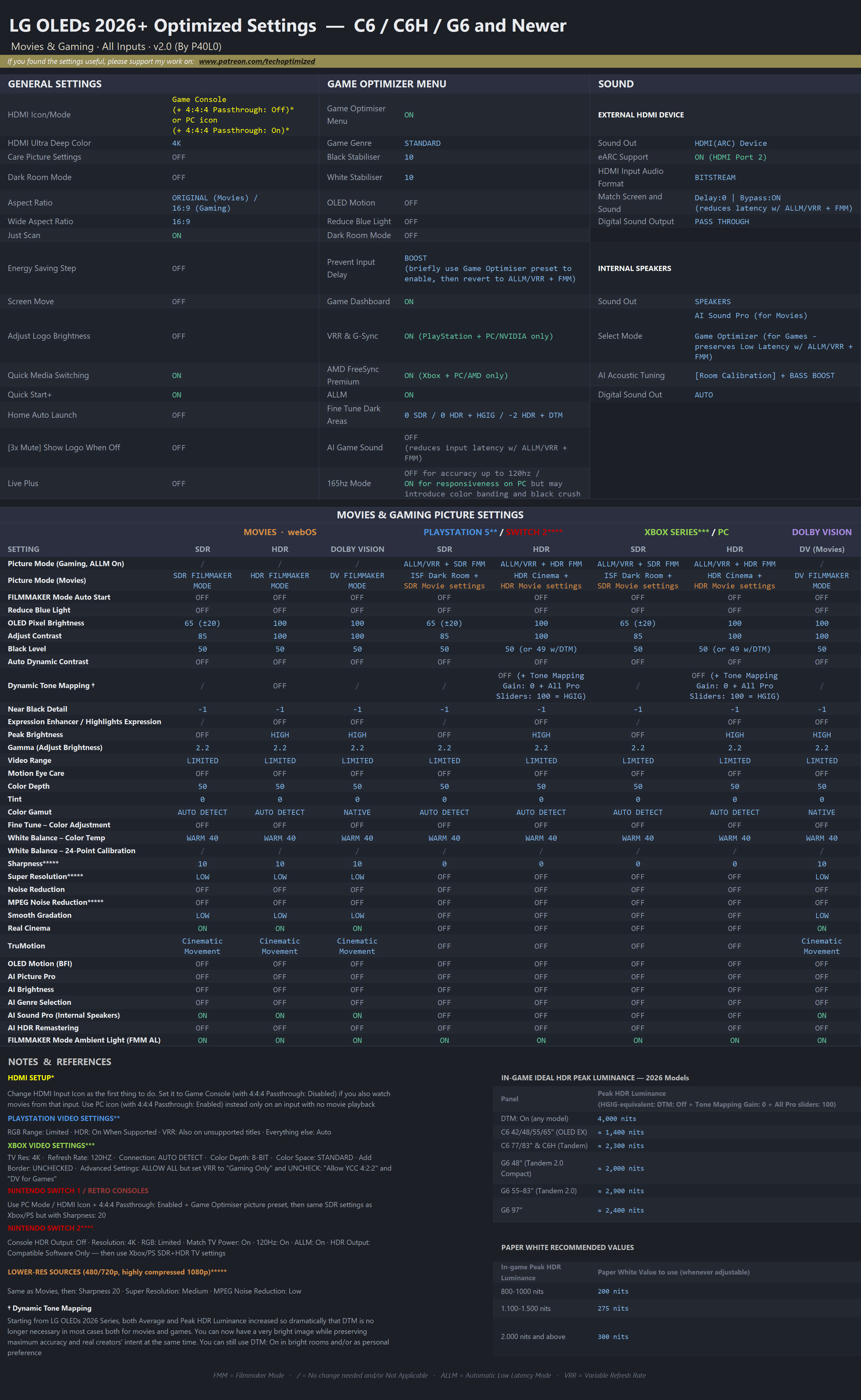
Optimized Settings for LG 2026+ OLED Series:

Click for Full Screen.

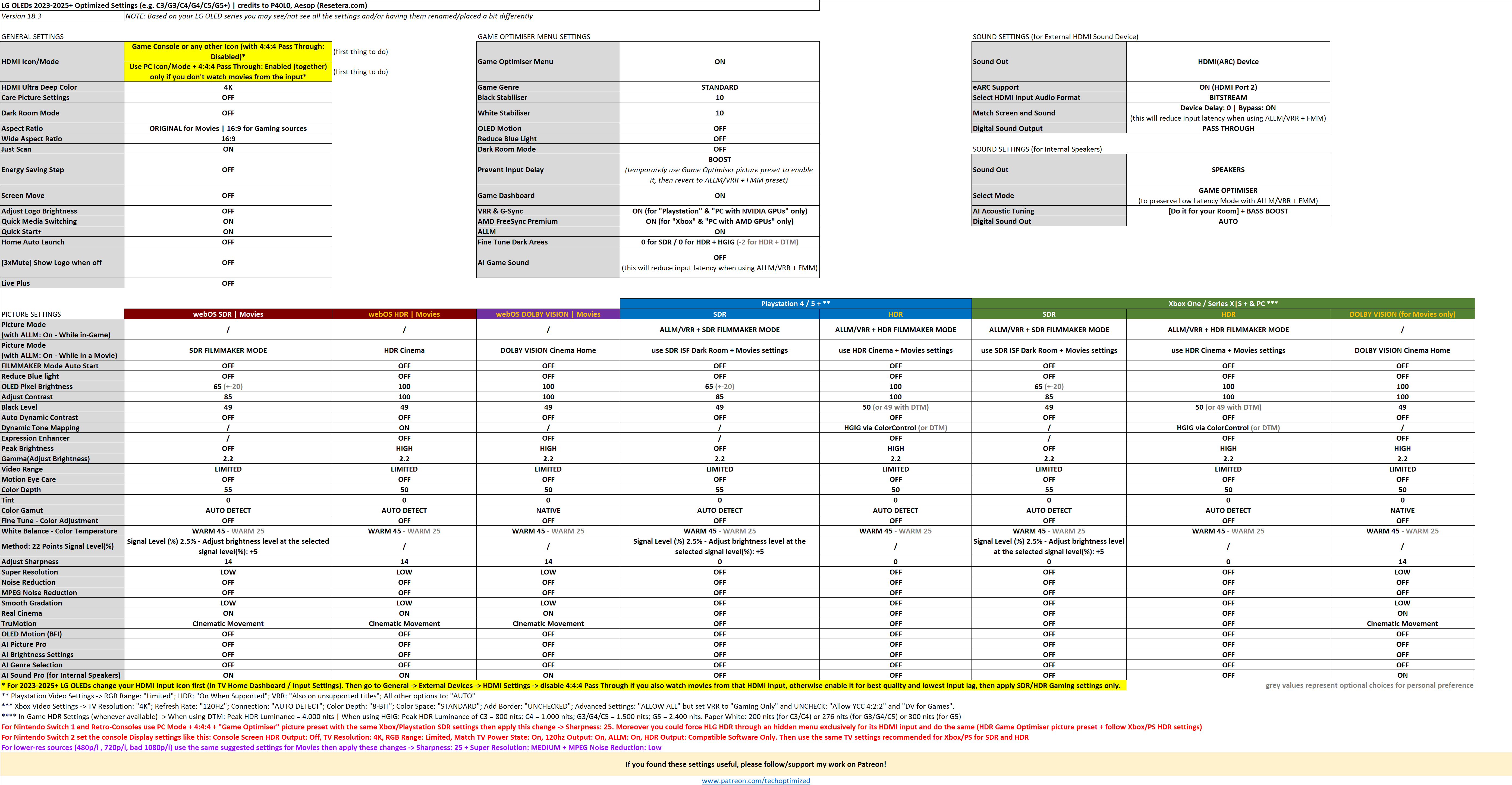
Optimized Settings for LG 2023-2025 OLED Series:

Click to open the video.(Use the video as a walk through menus/settings but apply the latest settings you can find below)

Click for Full Screen.More information and reasoning about the settings here.

You can also unlock ALL settings and apply further tweaks by using the ColorControl app (on Windows). Read more

For LG C5/G5+ Only: you don't need to use ColorControl to force HGIG in HDR FMM preset (for gaming) anymore.When using ALLM/VRR + HDR FMM preset, just set DTM: Off and then set all the new "Professional sliders" to 100 to have the same HGIG accuracy but at the real max luminance of the panel.​

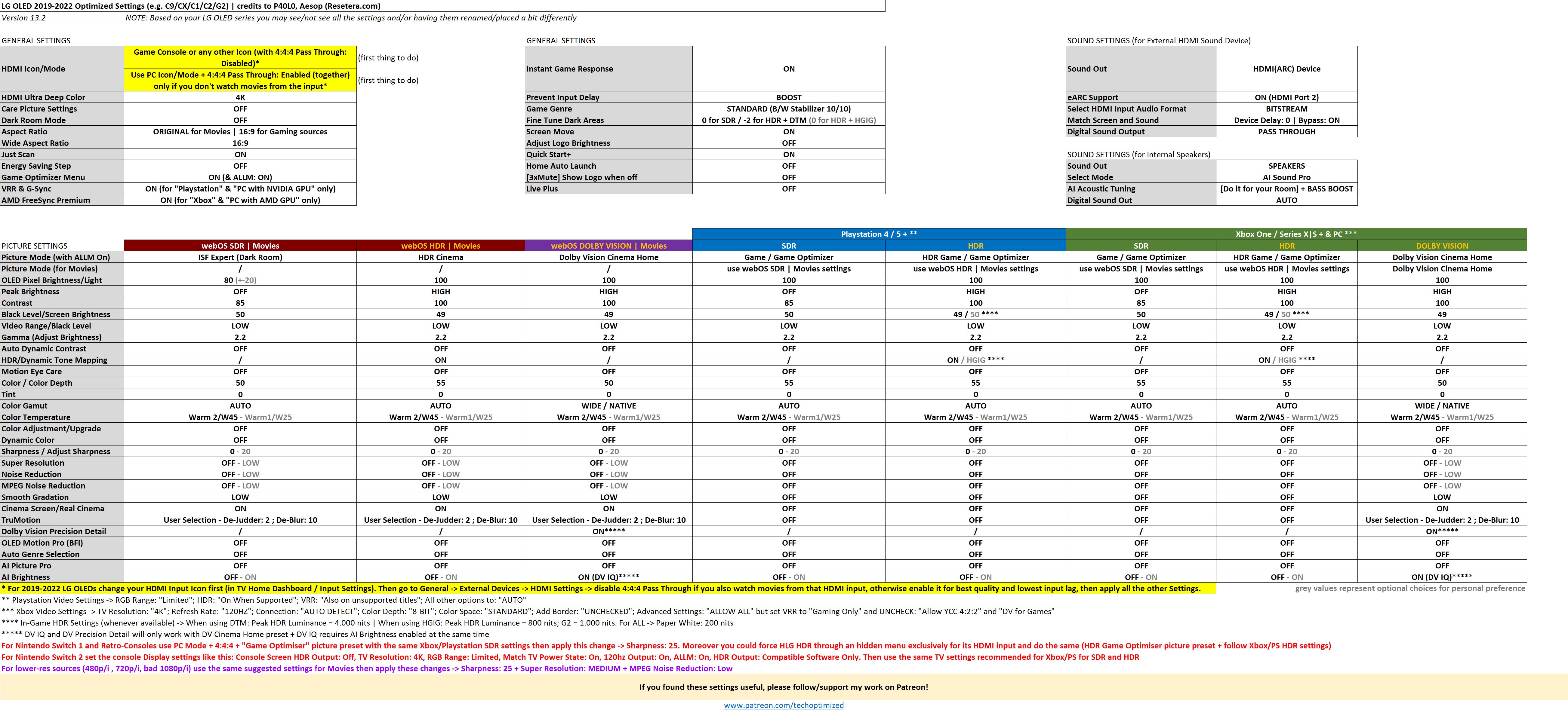
Optimized Settings for LG 2019 up to 2022 OLED Series:

If you have a 2019-2022 LG OLED apply the following changes first, then proceed with the updated Overall Settings Chart below:

Use "Game Console" Icon for game consoles and mixed usage scenario (Games + Movies & Media);

You can change the HDMI icon going into "TV Home Dashboard" and then "All Inputs" section;

Use "Original" aspect ratio for all sources except for gaming ones: for those use the "16:9" aspect ratio in order to fix potential input lag bugs.

Click for Full Screen.You can also unlock ALL settings and apply further tweaks by using the ColorControl app (on Windows). Read more

Optimized Settings for LG 2018 OLED Series only:

Use the same settings of 2017 series below, then apply the following changes:

SDR Game and SDR ISF Dark presets: bring back Tint to 0;

Disable Dynamic Contrast everywhere;

HDR Cinema Home: be sure Dynamic Contrast is OFF; set Dynamic Tone Mapping: ON;

HDR Game: set Color value back from 65 to 55; be sure Dynamic Contrast is OFF; set Dynamic Tone Mapping: ON;

Dolby Vision: change OLED Light value from 50 to 100.

Optimized Settings for LG 2017 OLED Series only:

Click to open the video.

Unlock ALL settings by using the ColorControl app (on Windows). Read more

____

PC Gaming: Optimized - The Ultimate Guide (including NVIDIA/AMD CP + G-Sync/Freesync + HDR Best Settings)

Xbox HDR Calibration Guide

Playstation HDR Calibration Guide

Nintendo Switch 2 HDR Calibration Guide

____

NOTE: Don't forget to adjust HDR "Sliders" also in game settings if available. Usually, for these TVs, you need to "increase" the level of Max HDR Brightness "Slider" to make the game logo/icon totally disappear in a white background, or set it to a numerical number around 4.000 nits (for Dynamic Contrast or Dynamic Tone Mapping: On) or 800 nits for HGIG (1.000 nits for LG G2/C4; 1.500 nits for LG G3/G4/C5; 2.400 nits for LG G5; 2.900 nits for LG G6)Dolby Vision gaming is not recommended. Click here to know more.Paper White could be set around 200 nits in most cases (276 nits for LG G3/G4/C5 only; 300 nits for G5/G6 only)This is the reason why, even with both the console and the TVs properly calibrated, some games may look "dark" or "washed out" if these settings are left to default.

FAQ & Useful Insights:

The new NVIDIA RTX HDR and NVIDIA App: a literal Game Changer for HDR on PC

HDR Games in 2023 - A complete analysis

Dynamic Tone Mapping (DTM) vs HGIG - There's actually no "versus"

Dolby Vision for Games - Sky high expectations, Mediocre results

How to dramatically improve "SDR-only" HDMI devices (like Nintendo Switch) thanks to forced HLG

Unlock ALL your LG TV settings with ColorControl app + New Tweaks (Windows)

How to unlock your LG OLED true potential using the hidden Service Menu [Easy Way]

How to STOP your LG OLED bombarding Ads & Notifications on you

Miscellaneous Gaming Suggestions for Best Visuals & Clarity

OPTIMIZED IN-GAME HDR SETTINGS:You can also find the latest, personally curated Optimized Settings for 300+ HDR games by following/supporting me on my Patreon, including:

007 First Light

Agents of Mayhem

Alan Wake 2

Alan Wake Remastered

Alone in the Dark (2024)

A Plague Tale: Innocence

A Plague Tale: Requiem (Public)

Ark: Survival Evolved

Armored Core 6

As Dusk Falls

Assassin's Creed: Black Flag Resynced

Assassin's Creed: Mirage

Assassin's Creed: Odyssey

Assassin's Creed: Origins

Assassin's Creed Shadows

Assassin's Creed: Valhalla

Astro Bot

Astro's Playroom

Atomfall

Avatar: Frontiers of Pandora

Avowed

Back 4 Blood

Baldur's Gate 3

Battlefield 1

Battlefield V

Battlefield 2042

Battlefield 6

Biomutant

Black Desert

Black Myth: Wukong

Bloodstained: Ritual of the Night

Borderlands 3

Borderlands 4

Callisto Protocol (Public)

Call of Duty: Black Ops 6

Call of Duty: Black Ops 7

Call of Duty: Black Ops Cold War

Call of Duty: Modern Warfare (2019) & Warzone (Public)

Call of Duty: Modern Warfare 2 (2022) (Public)

Call of Duty: Modern Warfare 3 (2023) (Public)

Call of Duty: Vanguard

Call of Duty: WWII

Chernobylite

Clair Obscur: Expedition 33

Control - Ultimate Edition (PC Native HDR Mod)

Crackdown 3

Crash Bandicoot N. Sane Trilogy

Crimson Desert

Cronos: The New Dawn

Crysis Remastered Trilogy

Cyberpunk 2077 (Public)

Days Gone

Dead Island 2

Dead Rising Deluxe Remaster

Dead Space (Remake)

Deathloop

Death Stranding

Death Stranding 2

Demon's Souls Remake

Destiny 2

Destruction AllStars

Detroit: Become Human

Deus Ex: Mankind Divided

Devil May Cry 5

Diablo IV

Directive 8020

Dirt 5

Doom Eternal

Doom: The Dark Ages

Donkey Kong Bananza

Dragon Age: The Veilguard

Dragon Ball: Sparking! Zero

Dragon's Dogma 2

Dying Light: The Beast

Elden Ring

Everybody's Golf

F1 22

F1 23

Fallout 76

Far Cry 5

Far Cry 6

Farming Simulator 22

FC 24

Flight Simulator 2020

Flight Simulator 2024

FIFA 22

FIFA 23

Final Fantasy VII Rebirth

Final Fantasy VII Remake

Final Fantasy XV

Final Fantasy XVI

Forspoken

Forza Horizon 3

Forza Horizon 4

Forza Horizon 5

Forza Horizon 6

Forza Motorsport

Forza Motorsport 7

Gears of War: Reloaded

Gears of War 4

Gears 5

Genshin Impact

Ghost of Tsushima

Ghost of Yōtei

Ghostrunner

Ghostrunner 2

Ghostwire: Tokyo

Godfall: Ultimate Edition

God of War

God of War: Ragnarok (Public)

Gotham Knights

Grand Theft Auto 5: Remastered (Public)

Gran Turismo 7

Gran Turismo Sport

GreedFall

GRID Legends

Grounded (Public)

Halo: Campaign Evolved

Halo Infinite (Public)

Halo: The Master Chief Collection

Hellblade: Senua's Sacrifice

Hellblade 2: Senua's Saga

Helldivers 2

Hell is Us

Hitman Trilogy

Hogwarts Legacy

Homefront: The Revolution

Horizon Forbidden West (Public)

Horizon Zero Dawn Remastered

Hot Wheels Unleashed

Hunt: Showdown

Immortals Fenyx Rising

Immortals of Aveum

Indiana Jones and the Great Circle

Infamous: First Light

Infamous: Second Son

Injustice 2

Jurassic World Evolution 2

Jusant

Just Cause 4

Keeper

Kena: Bridge of Spirits

Kiln

Knack 2

Layers of Fear

LEGO Horizon Adventures

LEGO Star Wars: The Skywalker Saga

Lies of P

Life Is Strange: True Colors

Like a Dragon Gaiden: The Man Who Erased His Name

Like a Dragon: Infinite Wealth

Lords of the Fallen

Madden NFL 23

Mafia: Definitive Edition

Mafia III: Definitive Edition

Mafia: The Old Country

Maneater

Marathon

Marvel's Avengers

Marvel's Guardians of the Galaxy

Marvel's Midnight Suns

Marvel's Spider-Man 2

Marvel's Spider-Man: Miles Morales

Mass Effect Legendary Edition

Mass Effect: Andromeda

Matterfall

Metal Gear Solid Delta: Snake Eater

Metro Exodus

Middle-Earth: Shadow of War

MLB The Show 22

Monster Energy Supercross 5

Monster Hunter Rise

Monster Hunter Wilds

Monster Hunter World

Mortal Kombat 1

Mortal Kombat 11

MotoGP 22

MXGP 2021

NBA 2K22

Need for Speed Heat

Need for Speed Unbound

New World: Aeternum

Nex Machina

NHL 23

Ninja Gaiden 2 Black

NINJA GAIDEN 4

Ni no Kuni II: Revenant Kingdom

Nioh 2 Remastered

No Man's Sky

No Rest for the Wicked

Observer: System Redux

Onrush

Ori and the Will of the Wisps

Outriders

Overwatch 2

Path of Exile 2

Plants vs Zombies: Battle for Neighborville

PGA Tour 2K23

Pragmata

Psychonauts 2

PUBG: Battlegrounds

Ratchet and Clank: Rift Apart

ReCore: Definitive Edition

Red Dead Redemption

Red Dead Redemption 2

Redfall

Resident Evil 2/3: Remake

Resident Evil 4: Remake

Resident Evil 7

Resident Evil Requiem

Resident Evil: Village

Resogun

Returnal

Ride 4

Ride 6

Rise of the Ronin

Rise of the Tomb Raider

Rocket League

Saints Row (2022) (Public)

Saints Row: The Third Remastered

Saros

Sea of Thieves

Sekiro: Shadows Die Twice

Shadow of the Colossus Remake

Shadow of the Tomb Raider

Silent Hill 2 Remake

Silent Hill f

Skull and Bones

Sniper Elite 5

South of Midnight

Split Fiction

S.T.A.L.K.E.R. 2: Heart of Chernobyl

Starfield (Public)

Star Wars Battlefront 2

Star Wars Jedi: Fallen Order

Star Wars Jedi: Survivor

Star Wars Outlaws

State of Decay 2

Steelrising

Steep

Stellar Blade

Still Wakes the Deep

Stranger of Paradise: Final Fantasy Origin

Suicide Squad

Tekken 8

Tetris Effect: Connected

The Crew Motorfest

The Dark Pictures Anthology: House of Ashes

The Dark Pictures Anthology: Little Hope

The Dark Pictures Anthology: Man of Medan

The Dark Pictures Anthology: The Devil in Me

The Elder Scrolls IV: Oblivion Remastered

The Elder Scrolls Online

The First Descendant

The Last Guardian

The Last of Us Part I (Remake) (Public)

The Last of Us Part II

The Last of Us Part II Remastered

The Last of Us Remastered

The Medium

The Outer Worlds 2

The Quarry (Public)

The Surge

The Surge 2

The Talos Principle 2

The Witcher 3: Wild Hunt

The Witness

Tiny Tina's Wonderlands

Tom Clancy's Ghost Recon: Breakpoint

Tom Clancy's Ghost Recon: Wildlands

Tom Clancy's Rainbow Six: Extraction

Tom Clancy's The Division 2

Tony Hawk's Pro Skater 1+2

Uncharted 4: A Thief's End

Uncharted: The Lost Legacy

Until Dawn (2024)

Watch Dogs: Legion

We Happy Few

Wild Hearts

Wo Long: Fallen Dynasty

World of Tanks

Wreckfest

WUCHANG: Fallen Feathers

XDefiant

Zombie Army 4

Zoo Tycoon: Ultimate Animal Collection

______________________________

Let me know what you think.Hope you enjoy it :)Cheers,-P

Files

Comments

P40L0 | Technology: Optimized

2023-2024+ chart updated to v15.6 (10/06/2024) with the following changes: - Changed "Prevent Input Delay" suggestion to BOOST: which you can still enable when using ALLM + FMM by temporarily switching to Game Optimizer picture preset, switching from Standard to Boost and then reverting to Filmmaker Mode picture preset. Boost will further lower input lag by 2-3ms for 60hz only sources (like Nintendo Switch) - Playstation Video Settings note below the chart updated recommending to enable VRR "Also for unsupported games" - Nintendo Switch red note below the chart updated recommending using "Game Optimizer" preset for low input lag (as ALLM and VRR are not supported) there - FTDA suggestion' wording made more concise/clear ___________________________________________ 2019-2022 chart updated to v12 (10/06/2024) with the following changes: - General Settings' suggestions expanded including more options (following 2023-2024 chart structure) - Fine Tune Dark Areas' settings changed to 0 for SDR, -2 for HDR + DTM and 0 for HDR + HGIG as LG backported their 2024 fix for it also to previous models! Recommended Color Temperature is now W45: as it's the most accurate on previous sets - Playstation Video Settings note below the chart updated recommending to enable VRR "Also for unsupported games" - Nintendo Switch red note below the chart updated

David Soto

Should I leave my Series X on 120hz if I am playing a game at 30fps?

Riccardo Pietro Ranieri

Sono allibito... Ho acquistato un G3 65" a fine gennaio. L'ho calibrato seguendo le tue impostazioni e fin qui tutto bene. Adesso mi ritrovo con un bel burn-in di una scritta di un videogioco che gioco tutto i giorni per forse mezz'ora. Eseguo un pixel refresh ogni tanto a supporto di quello che fa già il TV. La luminosità sui lati è visibilmente più elevata... Nemmeno il mio vecchio C7 ha avuto questi problemi nei primi anni di utilizzo... Qualche consiglio in merito? Grazie mille e perdona il disturbo

Riccardo Pietro Ranieri

Tanto per la cronaca ho un C3 48 che i miei figli utilizzano per giocare molto più di me essendo in due a fornire ed è perfetto... Non ho parole...

Riccardo Pietro Ranieri

Mi sono accorto che non è stato pubblicato il mio precedente messaggio in cui dicevo in sintesi che il mio G3 65" acquistato a fine gennaio presenta già un burn-in in basso a destra di un videogioco che uso per una mezz'ora al giorno. Eseguo il pixel refresh ogni tanto come complemento a quello automatico del TV. La luminosità ai bordi è molto pronunciata. Nemmeno il vecchio C7 aveva presentato questi problemi nei primi anni di vita. Qualche considerazione o consiglio. Ho impostato i settaggi da te raccomandati. Grazie mille

Riccardo Pietro Ranieri

Ciao Paolo, mi servirebbe una mano per svelare un mistero; ho preso da qualche giorno un G4 65" ed ha un comportamento diverso dal G3. In pratica se sul G3 abilito il passtrough 444 il livello dei neri aumenta, mentre sul G4 ha l'effetto contrario e migliora l'immagine. Secondo te come mai? Preciso anche che sul G4 c'è un ps5 pro mentre sul G3 una ps5 slim. Grazie mille!

Rene Kollmann

I'm a bit confused about if I should use HGIG or DTM with my C2. On PC there are so many games in which you have to use DTM but for me HGIG looks better and is not so extremely bright. Especially when browsing and on the desktop. Is there any compromise/solution or do you have to switch the picture settings everytime when you switch between HGIG and DTM? Right now I'm just using DTM because of the switching issue and setting up everything again. Still not sure about the RTX HDR settings though...

John Morris

I find the internal apps sometimes don't handle DV content well (mostly Max on my CX). I'm using all your settings recommendations. The brightness will fluctuate mid-scene, seems to be an issue with the DV IQ as it doesn't happen in Cinema mode but I find Cinema too dim. My "fix" was to use a streaming stick for Max and force it to just display HDR instead of DV. Within these settings on the Chromecast, it asks for color format "4:2:0 10-bit", "4:2:0 12-bit", "4:2:2 12 bit". From what I've seen and read it doesn't seem to practically matter much, but curious if you have any thoughts on what I should choose?

Prodan Statev

Thanks for your work! For the 2019-2022, why set the PS5's RGB range to Limited?? I thought games running at 60fps natively output in full RGB range. Also, Vincent Teoh says Limited causes uneven increments in RGB code values during HDR adjustment, while Full range maintains clean 10-point increments (https://www.youtube.com/watch?v=S0G8sHcFQq8) Plus, 120fps games at UHD must output as YCbCr 4:2 which is always Limited range.

7weir

You've mentioned in the video that "TPC" and "GSR" do a good enough job so that we can safely disable Screen Move and Adjust Logo Brightness without worrying about damage. I've been using these features for my LG CX, but it seems like you're saying it's not necessary for the LG G4. Can you give a brief elaboration of why we no longer have to worry about using these options for burn in protection? What exactly did LG fix that no longer warrants turning them on?

David Soto

If I'm using my PS5 to watch a blu-ray, do i have to change the aspect ratio to original or is 16:9 okay?

Emil Mathisen

Any changes needed for the g2/c2 ? Also is it enough to change to 4:4:4 in external devices or do i also need to change the icon?

Emil Mathisen

Hi pablo ive got the 55 g2 atm do you think it would be worth and upgrade it to a g4?

Emil Mathisen

P40L0 is there a reason why you dont use fmm on g2? Oh and what have you noticed to be normaly better hgig or dtm?

Emil Mathisen

Confused about the rgb range on tv and ps5 using limited/limited i can see the sun at 15 click on the ps5 hdr calibration but when i use auto/auto i cant see it on the calibration screen at 15 clicks

Emil Mathisen

Should black level still be 49 if using hgig?

P40L0 | Technology: Optimized

UPDATE (04/12/2025): LG 2023-2025+ OLEDs Settings updated with the following changes: - Added LG 2025 OLEDs settings - Further reduced input latency when using ALLM/VRR + Filmmaker Mode for gaming (which is now virtually identical to Game Optimiser latency) thanks to the following changes compared to previous settings: AI Game Sound: OFF AI Sound Pro: OFF A/V Sync: BYPASS - Added Switch 2 recommendations (based on what we know and have seen about it so far) - Restructured the chart with new, more complete settings (especially for Game Optimiser Menu) + better labels and notes for more clarity/readability during first setup

Laurens

Paolo if I use only the tv speakers should I disable Dolby Atmos on the tv and just use linear pcm on ps5 ?

Laurens

Paolo I just bought the ps5 pro and there is a settings called enhanced visual for ps4 games should I turn this on its off by default maybe because it has input lag what do you say ?

faisal manzoor

Hey I have a question so you talk about hgig but that only works on game optimized mode and not any other modes like filmmaker or anything

Mark Faherty

Just wondering why you use black level video range low on the series x

Mark Faherty

And should the series X be on standard

P40L0 | Technology: Optimized

UPDATE 2025/05/22 For 2023-2025+ LG OLEDs: Changed recommended Color Temp from W50 to W45: to remove a slight yellow tint on whites (probably introduced after last few FW updates) while still remaining color accurate and within the D65 standard (used by all movies and games as well) For people preferring a colder temp (for example if they watch TV in a bright room most of the time) I added W25 as a personal preference option. I don't recommend ever going colder than that or you will drift away too much from color accuracy and things will just become too bluish

P40L0 | Technology: Optimized

UPDATE 2025/06/05 - Added final Switch 2 recommended settings for both 2019-2022 and 2023-2025+ LG OLEDs - Added Switch 2 system-level HDR Calibration app recommended settings

P40L0 | Technology: Optimized

2023-2025+ LG OLEDs Settings Chart v18.3 Changelog (07/15/2025): - TruMotion: Cinematic Movement is now recommended again for Movies on 2023+ LG OLEDs: after latest July 2025 firmware, LG finally fixed it. No more noticeable Soap Opera effect, no visible artifacts and it's better at removing judders than my previous Custom preset. It also works good on both 24p, 30p and 60p video contents - LG G5 HDR FMM + HGIG Peak Luminance is now suggested at 2.400 nits (to be more accurate) - HDR Optimized Settings' list updated

John Morris

Do you still recommend sharpness 0 (optional up to 20) for the CX, or would you now recommend 14 like you do for the newer TVs?

Vincenzo

Paolo buonasera, che settaggi consiglieresti per l'utilizzo dell'app GeForce Now sulla serie OLED? Ho visto che, ovviamente, non si può applicare la Gaming Mode perché non è un output esterno.. Suggerisci di usare sempre la FMM coi relativi settaggi? Posseggo sia C2 55 Pollici e C5 48 Pollici. Grazie mille come sempre in anticipo! 🙏🏻

Joel Todd

Could us UK people get a mirror to the recommended settings table image, as Imgur has been blocked in the UK? Cheers!

P40L0 | Technology: Optimized

UPDATE 2025/11/03: For LG C5/G5+ Only: You don't need to use ColorControl to force HGIG in HDR FMM preset (for gaming) anymore. When using ALLM/VRR + HDR FMM preset, just set DTM: Off and then set all the new "Professional sliders" to 100 to have the same HGIG accuracy but at the real max luminance of the panel.​

Steve Singer

Why do you recommend DTM on over HGIG now?

Glenn

if i understand correctly, do i need to switch icon for xbox to pc and why is that? last time it was console icon. I have an LG C1.

Glenn

Hi P40L0, when using tv speakers. do i need to use PCM or bitstream? My tv is now on PCM for xbox. and in the audio settings for xbox. things like passthrough are unchecked. Is that okay as well?

Holious

Really nice work! Really appreciate your effort! Just one quick question. I assume I should set my C2 video range to limited right? As it's equvalent to black level low? Cause on C2, there is video range instead of black level.

Gary Turner

Hi P40L0, i'm unable to view the LG settings as its says the content is unavailable in my region (UK). Is there anyway I can get a latest copy of the page for the G5? Also, what picture settings would you use for a different connected device such as an Apple TV. Would you use the WEB OS settings or XBOX/PS settings? Sorry if this sounds like a daft question. On my old LG (G3) I used the XBOX settings for the Apple TV and SKY, just questioned it when setting up my new TV. Thanks in advance and thank you for the great work!

Laurens

P4OLO is it still up to date to use limited on tv and console because I often read auto is the better option ?

Laurens

And why dou recommend screen shift on older lg like C1 but on newer 2023 models you say off ?

Laurens

Paolo one question if my game does not soppurt HGIG like Zelda would you recommend DTM or ?

Rene Kollmann

Is there a difference in the nits setting when using a 42“ c oled because it’s dimmer than the bigger versions? Also would you still recommend HGiG only for PC?

Daniel Twinn

Hi, the image embedded into the page is very blurry on both phone and laptop. When I click full screen it take me to imgur (which is blocked in uk) any other ideas on how I can view this properly?

Victoria Redmond

Is there a reason you disable OLED Motion Pro (BFI)? I figured Black Frame Insertion would be nice for gaming, especially older retro titles.

Fizz

Hey, everything okay? I have a question. Would you recommend the G5 in 48? From what I've heard, it has fewer nits (probably about the same as the G3 55). Would you say that's sufficient for a dark room, or is the G5 55 significantly better?

Vincenzo

Buon pomeriggio Paolo, ho collegato la PlayStation 4 Pro (HDMI porta 3) alla LG C5 con gli stessi identici settaggi alla tv che uso con la PlayStation 5 Pro (HDMI porta 1) ma è presente un input lag clamoroso. Da cosa può essere dovuto? Consigli di utilizzare la classica Game Optimiser Mode invece che la combo Filmaker Mode+ALLM?

Rene Kollmann

Hey P40L0, sorry for being annoying for asking the almost same question twice now but I'm considering upgrading my C2 to a C5/C6 ( all 42 inch) and the peak brightness is still around 800 nits on all of them if I'm correctly informed. In your recommended settings it's stated to use 1500 nits for the C5. The 42 inch only has 800 nits. Should you still set up Windows for 1500 nits? (and 276 nits Paper White of course)

Daniel Fernandes

Does the LG C5 (48 inch) have any input lag when using FMM + ALLM compared to Game Optimizer? If I use Game Optimizer mode, do you recommend using HGiG or DTM?

Lewis King

Hi, been subbed on and off for a good few years now. I've just got a ps5 pro and I honestly can't remember if during initial hdr set up should you calibrate in HGIG and then switch to DTM or calibrate in DTM from the start? Seeing conflicting sources online.

David Gonzalez

Can I use the G5 settings if I have a 77" G6?

Casper

Thank you for this. I subscribed! I’m trying to understand the correct HDR setup for the LG G6 on PC I really hope you can help me specially with my 48 inch. I have both the 48” and 55” G6 and their HGiG behavior is clearly different. On the 48” G6, I can clearly see HGiG working and changing the highlights compared to DTM Off. However, HGiG clips at around 1490 nits in Windows HDR Calibration, even though the panel itself is capable of higher peak brightness. (No information on this how much it is exactly) I’ve read in your page it’s 2000? On the 55” G6, HGiG and DTM Off look virtually identical in actual gameplay, which wasn’t the case on my 48”. So my main questions are: If I want to get the maximum HDR/highlight performance out of the 48” G6 and 55 should I forget about HGiG and instead use Filmmaker Mode + DTM Off + the Professional Tone Mapping sliders? If I do that, what should I use in Windows HDR Calibration? FMM + DTM Off/Professional Tone Mapping seems to keep the calibration pattern visible until close to the 4000-nit range. (I think not to sure about this) Should I actually calibrate Windows to ~4000 nits, or should I ignore that clipping point and enter the panel’s measured peak brightness instead? And then, most importantly, what should I set the HDR Peak Brightness slider to inside games? Should it match the ~4000-nit clipping/tone-mapping range, the Windows calibration value, or the actual measured peak brightness of the panel? The same question applies when using DTM On. I currently use DTM On with a 4000-nit target because the TV is tone-mapping that 4000-nit input to its actual capabilities. Is 4000 nits therefore also what I should use in games, or should in-game peak brightness still be set to the panel’s physical peak? One last thing: the guide recommends Video Range LIMITED for PC. Why Limited? Almost every PC recommendation I’ve seen says to use RGB Full + Full. Is there a specific advantage or fix on the 2026 C6/G6 when using NVIDIA RGB Limited + LG Video Range Limited, particularly regarding HDR/HGiG/tone mapping? Thank you !

Antonio Ferrari Cazarín

Just a few questions, what input icon do I use with switch 2 and do I use passtrough 4:4:4 enabled (pc icon with or without 4:4:4 or game console with or without 4:4:4) Switch 2 just used for gaming on an LG C2. thanks in advance

P40L0 | Technology: Optimized

UPDATE - 18/08/2026 Overall Settings Chart for LG OLEDs 2026+ updated with slight adjustments after latest firmware updates: - SDR OLED Light slightly lowered to recommended value 60 (then you can lower/increase it to your personal preference/light condition)​ - 165hz Mode is recommended ON on PC for lowest input lag and best responsiveness but with slight additional color banding and black crush as a cost (but it's still worth it)​ - LG G6 Peak HDR Luminance is now around 3.100 nits! (and I also adjusted other 2026 model peaks but may still vary a bit in real world due to panel lottery)​ - FMM Ambient Light is now recommended to OFF for gaming inputs in order to keep input latency lowest when using ALLM + FMM for gaming​ Enjoy ;) Click -> https://raw.githubusercontent.com/P40L0X/P40L0-Image-Archive/main/Patreon/LG_OLEDs_2026+_Chart_Modern_P40L0_v2.png