Home
Home

 Creators
 Search
 Recent
 Random
 Posts
Posts
 DMs
DMs
 Tags
Tags
 Random
 Importer
 Import
 FAQ
FAQ
 Account
 Register
 Login
Login
 Favorites
 Keys
Keys
 Logout
 Telegram

Mass Effect Andromeda - HDR Optimized Settings (Patreon)
Content
The game is NOT using/applying Xbox/Playstation HDR Calibration app settings.
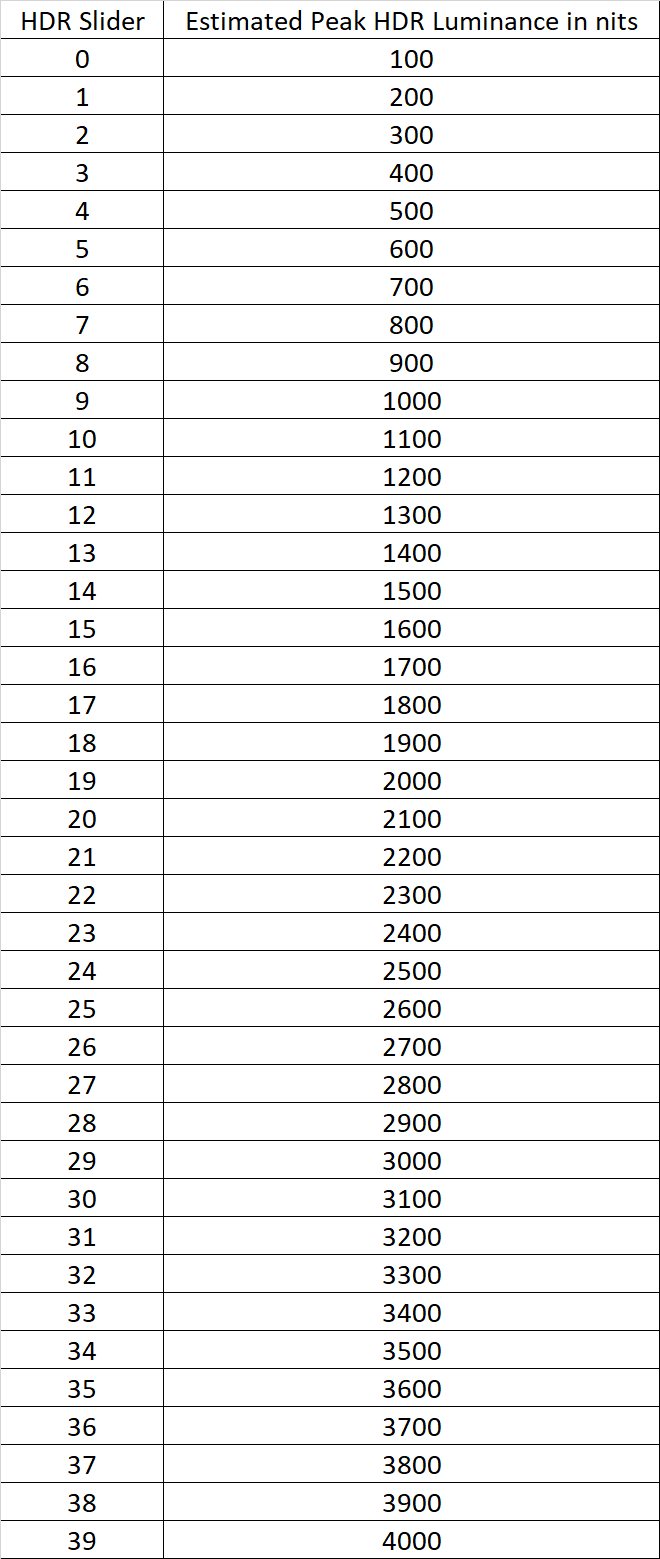
The game has a good HDR implementation offering an "HDR Brightness" slider, even if not measured in "nits" (it will range from 100 to 4.000 nits).
If you have an LG OLED and:
> you're using Dynamic Tone Mapping or Dynamic Contrast:
Set HDR Brightness slider to: +39 clicks (starting from 0; which is around 4.000 nits);
> you're using HGIG:
Set HDR Brightness slider to: +7 clicks (starting from 0; which is around 800 nits) or +9 clicks (for G2) or +14 clicks (for G3).
If you don't have an LG OLED and:
> you don't have an HGIG option:
Set HDR Brightness slider to: +9 clicks (starting from 0; which is around 1.000 nits);
> you're using HGIG:
Set HDR Brightness slider to the corresponding real Peak HDR Luminance of your TV in "nits". See the table below for reference
Files