Home

 Creators
 Search
 Recent
 Missing
 Random
 Posts
 DMs
 Tags
 Random
 Importer
 Import
 FAQ
 Account
 Register
 Login
 Favorites
 Keys
 Logout
 Telegram

LG 2023-2025+ OLEDs - Final Optimized Settings (Patreon)
Content
After years of incremental upgrades, LG 2023+ OLED Series dramatically improved upon previous years' models, especially since G3 and its brand new MLA panel.Luminance is much higher, ABL is much more relaxed, TPC & GSR got fixed, all presets and processing got revamped, accuracy OOTB has never been so good so all my previous Optimized Settings needed to be renewed (especially for gaming)It's almost like buying an OLED for the first time…again. :)
Like promised, here's my Full Setup - 1 Hour Video Guide along with my Ultimate Settings for it (use the video as a walk through menus/settings but apply the latest settings you can find below)
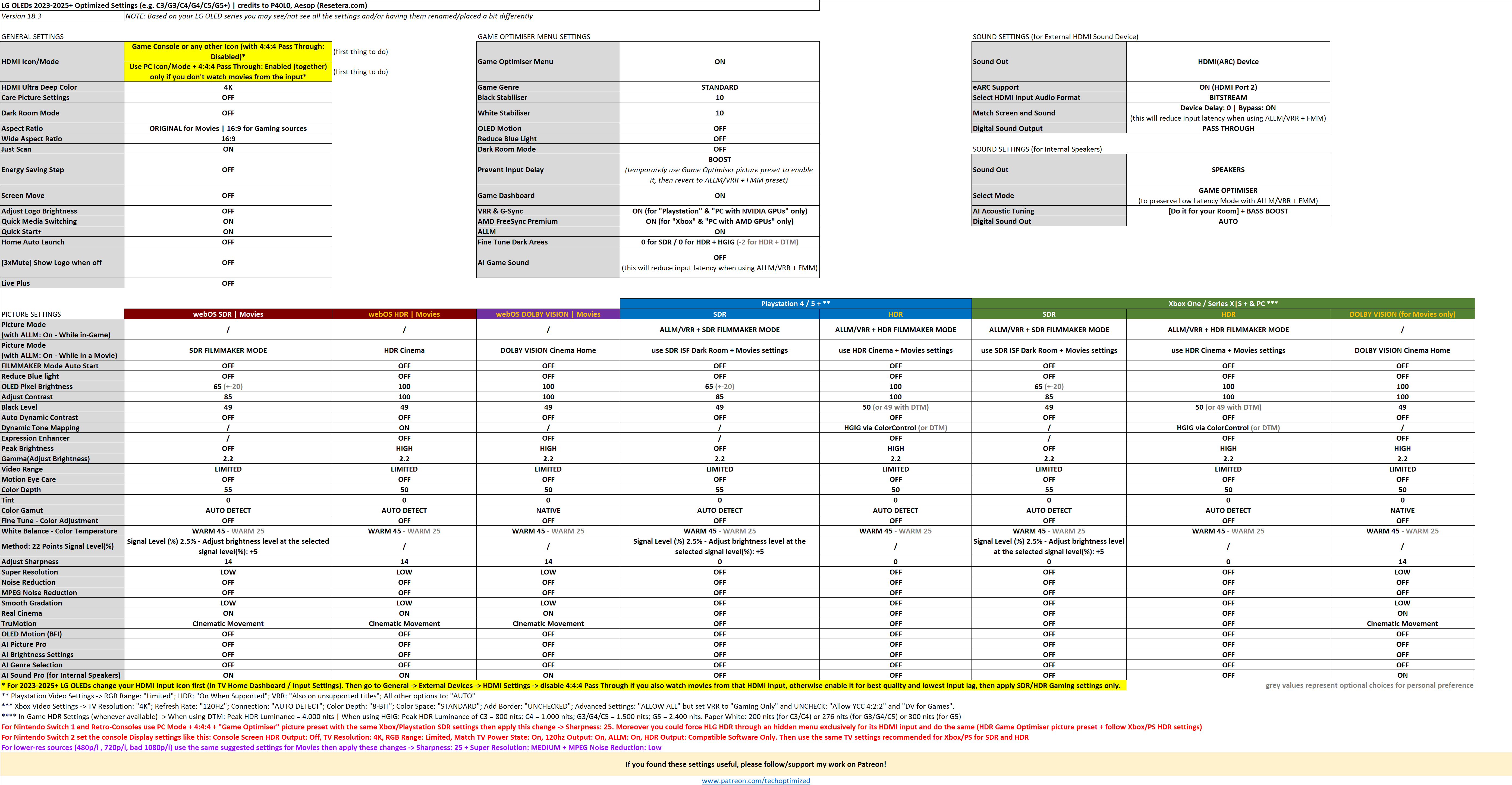
Optimized Settings for LG 2023-2025+ OLED Series:
Click for Full Screen
You can also unlock ALL settings and apply further tweaks by using the ColorControl app (on Windows). Read more
For LG C5/G5+ Only: you don't need to use ColorControl to force HGIG in HDR FMM preset (for gaming) anymore.When using ALLM/VRR + HDR FMM preset, just set DTM: Off and then set all the new "Professional sliders" to 100 to have the same HGIG accuracy but at the real max luminance of the panel.
I'll try to explain the most noticeable changes below.
v18.3 Changelog (07/15/2025):
TruMotion: Cinematic Movement is now recommended again for Movies on 2023+ LG OLEDs: after latest July 2025 firmware, LG finally fixed it. No more noticeable Soap Opera effect, no visible artifacts and it's better at removing judders than my previous Custom preset. It also works good on both 24p, 30p and 60p video contents
LG G5 HDR FMM + HGIG Peak Luminance is now suggested at 2.400 nits (to be more accurate)
v18.2 Changelog (06/05/2025):
Added final Switch 2 Recommended settings: both for the console Display settings and TV settings. See the new red note
v18.1 Changelog (05/22/2025):
Changed recommended Color Temp from W50 to W45: to remove a slight yellow tint on whites (probably introduced after last few FW updates) while still remaining color accurate and within the D65 standard (used by all movies and games as well) For people preferring a colder temp (for example if they watch TV in a bright room most of the time) I added W25 as a personal preference option. I don't recommend ever going colder than that or you will drift away too much from color accuracy and things will just become too bluish
v18 Changelog (04/12/2025):
Added LG 2025 OLEDs settings
Further reduced input latency when using ALLM/VRR + Filmmaker Mode for gaming (which is now virtually identical to Game Optimiser latency) thanks to the following changes compared to previous settings:
AI Game Sound: OFF
AI Sound Pro: OFF
A/V Sync: BYPASS
Added Switch 2 recommendations (based on what we know and have seen about it so far)
Restructured the chart with new, more complete settings (especially for Game Optimiser Menu) + better labels and notes for more clarity/readability during first setup
v17 Changelog (01/05/2025):
HGIG in FMM (enabled via ColorControl) is now preferred over DTM: this because1) PC/Windows HDR Calibration cannot reach 4.000 nits (needed for DTM)2) Most recent games are now providing in-game Peak HDR Luminance controls which can be set accurately for HGIG (or are directly supporting system level HDR calibration) and will look better than DTM when this is the case3) HGIG enabled in FMM via ColorControl coupled with ALLM and/or PC Mode + 4:4:4 + VRR will further lower input latency compared to DTM4) Some users are reporting occasional "auto-dimming" with ALLM + FMM + DTM. This isn't happening with forced HGIG in FMMDTM remains suggested as an optional preference tho.
TruMotion is now suggested to Custom: De-Judder 2, De-Blur 10: this is almost an exact match of the old (and sadly gone) "webOS 23 Cinematic Movement" (which I always thought was the best but now was replaced with the new and worse "webOS 24 Cinematic Movement" which unfortunately introduces noticeable Soap Opera effect). I've tried these new Custom values on regular TV, 24p Movies, 60p videos and other formats and it always looked good/smooth/natural but never once entering into noticeable SoE instead. Before making the change I also gathered some extra user feedback and it was very positive as well :)
Re-worded some suggestions to make it more clear/complete
v16.1 Changelog (11/05/2024):
Dialed down "Adjust Sharpness" value for Movies from 20 to 14: in order to eliminate all visible sharpening and flickering artifacts, even if very minor (especially in DV).On LG OLEDs the Sharpness value up to 10 is not adding any sharpening yet, but it will just enable the LG upscaling algorithm (which will benefit sub-4K upscale by removing its aliasing while will usually ignore native 4K contents). In doing so, the image gets a bit blurrier so adding another +4 on top of it will restore its reference sharpness without visible artifacts.For Gaming Sharpness is still recommended to 0 as both consoles and PC have their own upscale + sharpening algorithms (like FSR/PSSR/DLSS) and with 0 you will also ensure the lowest input lag possible.
v16 Changelog (10/22/2024):
Changed TruMotion suggested setting to User Selection - De-Judder: 2 ; De-Blur: 2 as the previous "Cinematic Movement" introduced noticeable Soap Opera Effect and motion artifacts after latest updates of webOS 24. Those custom values will still remove judders but without those artifacts
v15.6 Changelog (10/06/2024):
Changed "Prevent Input Delay" suggestion to BOOST: which you can still enable when using ALLM + FMM by temporarily switching to Game Optimizer picture preset, switching from Standard to Boost and then reverting to Filmmaker Mode picture preset. Boost will further lower input lag by 2-3ms for 60hz only sources (like Nintendo Switch)
Playstation Video Settings note below the chart updated recommending to enable VRR "Also for unsupported games"
Nintendo Switch red note below the chart updated recommending using "Game Optimizer" preset for low input lag (as ALLM and VRR are not supported) there
FTDA suggestion' wording made more concise/clear
v15.5 Changelog (08/26/2024):
After firmware 03.31.82 (for B3/C3/G3) and latest one for 2024 series, LG finally fixed the raised black levels when using VRR. Now black level is perfect with Fine Tune Dark Area left to 0 when using SDR and HDR + HGIG (I've tested it with 6 different Black Level patterns to be sure!)For HDR + DTM, FTDA was changed from -4 to -2 (to still compensate for a slight gamma raise inherent in the use of DTM)
v15.4 Changelog (07/10/2024):
I've found that enabling PC Icon/Mode coupled with 4:4:4 Pass Through: Enabled at the same time will provide a better image (more accurate and with less color banding) with even less input lag in all presets outside Game Optimizer (so including ALLM + VRR + FMM), even better if on real PC usage when you select YCbCr444 instead of RGB (like in NVIDIA Control Panel)
I've updated my PC Gaming Optimization Guide accordingly
I've explained a bit better in the chart (and in the relative note) that you should use PC Mode and/or 4:4:4 Pass Through only if you don't watch movies from that HDMI input, otherwise you should use any other HDMI Icon and disable 4:4:4 Pass Through (in order to restore all important Clarity options for movies as Smooth Gradation, Real Cinema, TruMotion, Super Resolution and more)v15.3 Changelog (05/28/2024):
Added PC Icon/Mode recommendation only for inputs where movies are not being watched: as most useful Clarity options (as Super Resolution, Smooth Gradation, TruMotion) will be locked out and cannot be enabled even when using ColorControl. If you don't watch movies, PC Mode will enable 4:4:4 and provide slightly better color banding while also lowering input lag in all presets
Added HGIG (forced via ColorControl) to ALLM + HDR FMM as a personal preference alternative to DTM: this will provide the absolute best and most accurate results for all those games which let you control Peak HDR Luminance while also further lowering input lag a bit compared to DTM. For games without Peak HDR Luminance control it may look a bit off (sometimes a little too dim or too bright with clipped highlights) but as my personal preference I still prefer it to DTM on LG G3 in most games I've played so far. That said I only game in a dark room and considering it will require fiddling with ColorControl app via PC and a wireless connection: ALLM + HDR FMM + (new) DTM remains the universally recommended setting for most on 2023+ series. If you also choose HGIG in the end, set back Black Level to 50 and re-calibrate system-level calibrations and games to your actual max nits (e.g. 800 nits or 1.000 nits for G2/C4 or 1.500 nits for G3/G4)
Fine Tune Dark Areas setting recommended to -2 when using HGIG (forced via ColorControl): for the most accurate black levels compared to VRR: Off
Noise Reduction and MPEG Noise Reduction are now recommended to OFF: I'm not sure if this started with most recent firmwares, but now with those enabled motion clarity took an hit with noticeable ghosting/smearing (especially on Apple TV) so universally it's better to always have those OFF right now. If you watch movies from very low res sources (analog/SD devices, low bitrate YouTube videos) you can try to turn them back to Low or at least MPEG Noise Reduction: Low for digital sources
For Nintendo Switch and Retro-Consoles (at low res) Super Resolution is now recommended to MEDIUM: still coupled to Sharpness 25. SR to HIGH was adding too much noise to the image
v15.2 Changelog (04/10/2024):
Added support for 2024 Series which basically shares the same suggestions except C4 HGIG Peak HDR Luminance to 1.000 nits (G4 is still 1.500 nits)
Paper White is now recommended at 276 nits for both G3 and G4
You can leave FMM DTM: On when using forced HLG HDR instead of SDR for Nintendo Switch
v15.1 Changelog (10/30/2023):
SDR, HDR and DV Black Level is now recommended from 50 to 49: this because:-SDR Black Level at 49: will be slightly closer to BT.1886 gamma but with the benefit of not crushing details-HDR Black Level at 49: will slightly improve DTM gamma accuracy for movies without crushing details and also making it closer to calibrated HGIG for gaming-DV Black Level at 49: will slightly improve DV Cinema Home gamma accuracy for movies without crushing details
Xbox Refresh Rate is suggested back at 120hz: after latest console + games update, the few cases of severe flickering and stuttering (e.g. Halo Infinite) were fixed. If you are still experiencing them with some games, you can set 60hz only for them (just remember to go back to 120hz for all the others)
v15 Changelog (10/11/2023):
TruMotion is recommended to "Cinematic Movement" (again): after latest firmware updates, "Cinematic Movement" is back to my top TruMotion recommendation for Movies as it provides the smoothest and clearest motion without introducing noticeable SoE (Soap Opera Effect);
Sharpness is now recommended to 20 for Movies and 0 for Games: unless you mainly watch uncompressed 4K/HDR Blu-Ray Movies (where I still recommend Sharpness 0 for neutral value), Sharpness 20 will help in both upscaling and sharpening all other compressed/streaming contents without introducing haloing or shimmering. For Gaming, set it to 0 to further slightly improve input lag and avoid redundant overprocessing (as both Consoles and PC will already do the upscale + games already provide their native sharpening techniques);
Super Resolution and Noise Reductions are now recommended to Low for Movies: as those provide tangible signal/picture improvement without any noticeable downside. Super Resolution is tied to the Sharpness value, so in the case of Sharpness 20 + Super Resolution: Low its effect is very minimal, but is nice to have for compressed/streaming contents. Turn it Off for Gaming in order to keep input lag low;
Warm 50 is now the only recommended color temp: as starting from 2023 Series, LG really nailed the pre-calibrated temp out of the box and there's no need to use anything else;
Xbox Refresh Rate is now recommended to 120hz for whom mostly play at 120fps and/or 40fps, while to 60hz for whom mostly play at 60fps and/or 30fps (both cases with VRR active): this mainly because@ 120hz + 60fps + VRR: many games have stuttering and/or flickering issues with VRR (Halo Infinite, Ghostwire Tokyo, Lies of P and many more). These are gone at 60hz + 60fps + VRR@ 120hz + 60fps + VRR: you would have more color banding in gradients. Those will be better at 60hz + 60fps + VRR@ 60hz + 60fps + VRR you would have very similar if not identical input lag compared to 120hz + 60fps + VRRObviously, if you need/want to play at 120fps and/or using 40fps modes, you need to set the console to 120hzThis doesn't affect PC, as for example G-Sync is always working better when Windows + NVCP are set to 120hz, along with all other PC Suggested Settings
v14 Changelog (08/30/2023):
SDR OLED Light is now recommended at 65: with a +-20 points adjustment depending on preference. The previous value of 80 was VERY bright, especially in a dark room (and especially on G3) so this may be a better starting value for most;
SDR Gamma reverted from BT.1886 to 2.2: this because after latest firmware updates for G3/C3, the entire black level floor was changed/fixed by LG around 2.2 both for SDR and HDR, along with the other changes below;
HDR Filmmaker, HDR Cinema and DV Cinema Home Black Level values reverted from 48 to 50: as, like mentioned in the point above, LG fixed all black level issues for the stock value of 50, making 48 a bit too crushed now. Setting it back to 50 will also make all those presets "future proof" for additional LG fine tuning, so without the need to manually changing them again;
When using the Forced HLG method for SDR-only sources (like Nintendo Switch), DTM is no more recommended: to avoid HUD elements to bee too bright, increasing the risk of image retention. I added this to the relative note below the chart;
SDR ISF Expert (Dark Room) is now recommended with ALLM: Off (with same settings for SDR Movies): while SDR FILMMAKER MODE remains suggested with ALLM: On. This way you will automatically have Super Resolution enabled for movies and disabled for games ;)
v13.5 Changelog (05/10/2023):
Just changed HDR Filmmaker Mode to HDR Cinema preset for Movies: as DTM is working differently between the two. HDR Cinema will have the "old" DTM which is better for Movies (which would be too dim/dark without it) while HDR Filmmaker Mode has the "new" DTM which is better for Games, being closer to properly setup HGIG results in highlights when games are set to 4.000 nits.
v13.4 Changelog (05/05/2023):
TPC & GSR got finally fixed by LG. No more need to access the Service Menu to Disable them: also avoiding risking your 5-years warranty. Finally, movies will not auto-dim anymore while the slight games' remaining auto-dimming when leaving them fixed on the same scene for over 5-8 minutes won't be noticeable during normal gameplay;
For these reasons, you can safely disable the "Screen Move" feature: as this always had a very small effect in preventing burn in, so with TPC & GSR properly working you can disable it to regain a bit more sharpness and you won't notice the entire screen moving around from time to time;
PC Mode & 4:4:4 are still Not Recommended: even if color banding and texts are very slightly improved when using PC Mode/Input Icon (or enabling the new separate "4:4:4 Pass Through" toggle), the EOTF and colors are getting raised, noticeably drifting from accuracy when using it. PC Mode is also no more necessary to reduce input lag outside of Game Optimizer preset as ALLM: On is sufficient in doing so. I also found that Xbox Series X (with YCC 4:2:2 disabled on the console) will still be able to output a 4:4:4/RGB signal in both SDR 8-bit and HDR @ 10-bit even when using the "Game Console" icon, then it's the TV doing the subsampling, further minimizing the few remaining PC Mode advantages;
Quick Media Switching is Recommended: if you have a capable/certified HDMI 2.1a cable, this will reduce the "black transition" you usually see when handshaking between different signals;
"GAME OPTIMIZER" Sound Mode is Recommended (for Internal Speakers): to unlock Game Optimizer gaming "profiles" (when using the Game Optimizer preset) but also to preserve the Game Optimizer Menu and options (including ALLM, VRR and Fine Tune Dark Areas) also when using "non-Game" presets for gaming. You can then perform an "AI Acoustic Tuning" and Enable "BASS BOOST" to improve the internal speakers' performance for your room, but it's highly recommended to just use an external soundbar or speakers for an actually better quality;
Using the Game Optimizer Menu (with ALLM: On) + SDR/HDR Filmmaker presets is a better alternative to SDR/HDR Game Mode + HGIG: with the same identical low input lag as Game Modes. This because it was measured that Game Modes are not only around 100 nits dimmer, but also have the new 2023 background "Dynamic Color Boosting" technology forcefully disabled resulting in 50% less luminous colors on the higher spectrum. LG has received the user feedback for also enabling it in Game Modes but, apparently, they're not going to do anything about it for now. "Dynamic Color Boosting" was the key new feature which was able to make LG G3 not only comparable to Samsung S95C QD-OLED's color luminance, but even surpass it most of the time in SDR/HDR Filmmaker for movies, so using Game Optimizer (with ALLM: On) and SDR/HDR Filmmaker will preserve "Dynamic Color Boosting" also for gaming while keeping the lowest input lag possible. The only thing to remember using HDR Filmmaker for gaming is to set both the system-level HDR Calibration and HDR games' Peak HDR Luminance to 4.000 nits whenever possible, while Paper White or equivalent should be set around 200 nits. Will it still be accurate without HGIG? Yes;
DTM is much improved, especially when coupled with HDR Filmmaker Mode: DTM now analyzes 20.000 different zones for each frame (!) instead of 5.000 and finally won't excessively overbright night/dark scenes anymore (I've already tested this with dozens of games and movies in different scenes and Peak HDR Luminance). What it does now is similar to what HGIG does: making specular highlights "punchier" and more pronounced (by always leveraging the actual Peak HDR Luminance of the TV, which is insanely high now around 1.500 nits on G3) without screwing up everything else. The only side effect is a slight elevation of black level which can be offset/fixed by just lowering the HDR Black Level setting from default 50 to 48 when using it. DTM is especially useful for completely replacing HDR Game Optimizer Preset + HGIG with HDR FMM, even in the long term (just remember to set games to 4.000 nits instead of 1.500 for G3 or 800 nits for C3 whenever possible, but if you can't: DTM will also better accommodate any other "fixed" HDR game as well) while it will have a very minor (but pleasant) difference in Movies (which do have metadata) between DTM: On and Off;
Prevent Input Delay: STANDARD is Recommended for always 120hz signals (as Xbox) while BOOST for 60hz signals: this because BOOST has no input lag effect with 120hz signals but could still raise gamma a bit. Better use it only for 60hz only signals (as Nintendo Switch or 60hz gaming on PS5). If you use a receiver with multiple consoles attached, leave it on BOOST. Gaming with ALLM: On + SDR/HDR Filmmaker Modes will force it to STANDARD;
SDR FILMMAKER MODE (with Color 55) and HDR FILMMAKER MODE (with DTM: On + Black Level: 48), DV Cinema Home (with Black Level: 48) are now Recommended for Movies: SDR/HDR FMM are the most accurate presets OOTB and the closest match to a Sony HX310 (30k$ Hollywood Reference Monitor 👀) using a G3, which basically means they're pre-calibrated from the factory and you don't even actually need an in-place calibration as you wouldn't notice any difference by naked eye after (crazy stuff!) and DTM: On on top of this is not making a big difference for Movies. For Dolby Vision the "DV Cinema" preset, instead, even if it's the most accurate on paper, presents visible black crush OOTB and a much more "muted" presentation over HDR FMM with similar "real-world" contents outside of patterns and benchmarks (even with DTM: Off), therefore DV Cinema Home is more universally recommendable as it's actually closer to HDR FMM with DTM: On (great) rendition: just decrease HDR Black Level value from 50 to 48 also for it;
SDR Recommended Gamma is back to BT.1886 both for Movies and Games: with just a minor Method: 22 Point Signal Level(%) luminance adjustment to improve dark detail;
Smooth Gradation: LOW is now Recommended for Movies: as this is very effective in removing basically all color banding and macroblocking artefacts without losing fine details. Unfortunately, it can't be enabled for gaming when ALLM is On so you may notice additional color banding in 4K/120hz/HDR10 games and the only solutions for this are waiting for LG to enable it also for gaming or just to improve color banding in games over time via firmware updates;
Noise Reduction and MPEG Noise Reduction to LOW are good now (for Streaming & TV): as those will preserve original film grain in movies while visibly removing macroblocking or other compression artifacts without ruining fine details. Those are Recommended for streaming services (with compresses their video sources by definition) and regular TV, but you may turn them off for 4K/HDR Blu-Rays;
Sharpness slider is much better than previous years: as even cranking it up to 50 will not introduce that bad haloing or over sharpening artifacts as before. You can literally increase it up to 20 to make regular TV & Streaming picture clearer, sharper and apparently higher resolution without any visible downsides. It's better to keep it at 0 or 10 for 4K/HDR Blu-Rays;
Super Resolution: Low does a good job coupled with Sharpness 20: as it will slightly improve texts and textures' definition without screwing up anything else or creating visible over sharpening artefacts. With Sharpness 25 its effect will noticeably increase and could only be useful for very low res contents (480p/i, 720p/i or bad 1080p/i), especially with Super Resolution: HIGH. Also notice this will increase input lag a small bit, so it's better to turn it completely off for XSX and PS5;
TruMotion: Cinematic Movement is good…but can be better: as for previous models, the new TruMotion: Cinematic Movement setting really helped in removing the inherent stutters of 24p contents but still didn't completely remove the noticeable Soap Opera effect in many scenes. On G3 I found that TruMotion set to "User Selection" with De-Judder: 2 and De-Blur: 2 provided the smoothest 24p movement without noticeable SoE. This has become even more needed with G3 as MLA and the increased brightness exacerbated the inherent 24p stutters on OLED panels (even with Real Cinema enabled). A correctly setup Motion Interpolation (with a 120hz panel) will solve that;
AI Brightness and all other AI Picture settings are now Recommended to Off in all modes: as those may have the opposite effects than wanted, for example further dimming the screen in already accurate modes (for a dark room) when small light sources are detected in the room or messing around with Color Temperature (which is great as is at Warm 50) or with skin tones and contrasts. You don't want that;
DV for Gaming was Not Recommended before and it's even Less Recommended now: Disable "DV for Games" on Xbox advanced video settings and stick with Game Optimizer Menu (with ALLM: On) + HDR Filmmaker (with DTM: On + Black Level: 48) + Console & Games set to 4.000 nits Peak HDR Luminance for the absolute best results for gaming. You can keep regular "Dolby Vision" for Movies enabled;
Fine Tune Dark Areas setting was changed to -4: to better reflect the black levels rendition between VRR: Off and On. Just remember that each preset and input (SDR/HDR/DV) has an independent FTDA setting to setup through the Game Optimizer menu;
2023+ Overall Settings Chart overhaul: all settings got renamed and reordered in a more coherent way to reflect the new TVs, many new settings were added and a lot of values got re-tweaked after new analysis and direct testing. So please, ignore any previous chart a re-start from here if you have a 2023 LG OLED or newer;
ALL my personally curated in-game Optimized Settings for 200+ HDR Games got updated and aligned for G3 and latest 2023 series' settings as well. You can find them by kindly following/supporting my work here.
Enjoy the next generation of LG OLEDs: Optimized! 😉-P
Files