Home Creators Posts Import Register Favorites Logout

Content

The game DOES USE/APPLY Playstation HDR Calibration app settings.

The game has a fairly good HDR implementation by actually applying the system level HDR Calibration app values...but not exactly.

In fact, its Max HDR Luminance will generally be noticeably higher in an unpredictable way compared to anything you've setup there.

For this reason, Dynamic Tone Mapping is suggested.

Moreover the game seems to slightly increase the black levels in HDR, but this can be fixed with the following in-game settings:

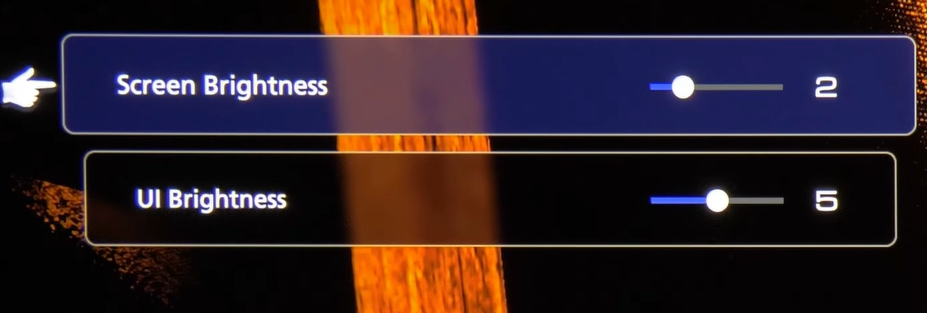
Set "Screen Brightness" slider to 2 (for fixing the black levels in HDR with DTM: On)

Leave UI Brightness to 5 (or decrease it if you think UI elements are too bright for you)

BONUS:

Do not use Performance Mode on PS5: as currently it will provide very unstable 60fps (with drops down to 30fps) resulting in very bad stuttering while playing. Even VRR won't fix this on PS5 as the console does not support LFC and will begin to stutter even with VRR when framerate goes below 48fps (which happens often). Also in Performance Mode resolution and textures take a big hit.

Use Quality Mode: as, even if 30fps should be avoided on OLEDs, it will still look and play smoother than the unstable and visually downgraded Performance Mode;

Reduce Motion Blur from Default 5 to 2: in order to get rid of trailing/ghosting artefacts while still improving motion, especially at 30fps.

Files
Comments

Michael

ciao paolo, con il mio lg c1 e solo con ps5, quando avvio un gioco che ha hdr o vrr o tutti e due, lo schermo diventa nero per due o tre secondi e poi ritorna con l'input giusto.. è normale?

Weston Wright

Do we leave default is we don’t have auto tone mapping?

Stanley C

Hmm, If i wanted to use HGIG for accuracy, could I just set the PS5 to 11 clicks ? Supposably that keeps it at ~800 nits. I feel like the game is suppose to have a somewhat subdued look, and DTM might be going against that too much.

Jason Fortuno

I'm confused because if you're using DTM you usually set PS5 HDR Calibration to 25clicks but now I'm hearing it's 11clicks for DTM with FF16... Is this right?

Matticus

This game looks and feels awful on my oled, had to change to fps mode just to make it playable as 30fps + awful motion blur looks disgusting.

jv

I am on a b7a, with settings tweaked as per your recs. Screen brightness at 2 is very very dark — am I missing something? Thanks for your time

Mark

Has this changed at all with the DLC release?

Riccardo Pietro Ranieri

Ciao Paolo, su G3 che impostazioni consigli? Filmaker + DTM e luminosità a 2?oppure game mode in DTM? Grazie

Riccardo Pietro Ranieri

Ciao Paolo, su G3 che impostazioni consigli allo stato attuale. Ho provato filmaker + hgig e game mode + DTM e luminosità a 2, ma il primo è più contrastato, ma i neri schiacciati, l' altro troppo buio. Non trovo una buona impostazione. Grazie

Riccardo Pietro Ranieri

Anche io godo con FMM e Hgig, ma questo gioco purtroppo lavora male sui neri. O sono belli profondi ed è tutto troppo scuro, oppure il contrasto ne risente troppo per i miei occhi. Lasci comunque 11 11 per final fantasy xvi sulle impostazioni della play o ritoccandole potrebbe migliorare? Grazie mille

Riccardo Pietro Ranieri

Hai ragione ed a volte è un vero peccato. Giochi spettacolari che peccano si queste inezie. Graziw

Moxify

I use all of your TV, ps5 settings and DTM on. My brightness is set to default (5) by now but I feel it could be a little too dark sometimes in very dark areas? You suggest 2? Wouldnt that make it even darker? Like it would be impossible to see something? I use your HDR filmakermode, DTM on and video range set to limited.

Felipe

how is the Ps5 Pro configuration? (specifically graphic mode and motion blur)