Home Creators Posts Import Register Favorites Logout

Downloads

Content

Translator++ Latest Release, Password and downloadable package...

This section is available to any patrons ($1 and greater) and will be updated once a month by the end of every month.

This is patron only build. Please do not share this build anywhere on Internet!! You could potentially be banned from the service and lose all your rights to the future updates and addons. You don't have to worry about sharing the app for free. Translator++ will be shared for free eventually. Free user will have their build every April.

If you haven't installed Translator++ yet, you can start by installing the following full package first, after that you can update your Translator++ via auto-update.

Translator++ Latest full package : Ver 8.8.9

Download the 64bit standard version if you're not sure which one is right for you. (you can change the version latter)

Download here: https://github.com/dreamsavior/TranslatorPlusPlus/releases/download/8.8.9/Translator+8.8.9x64_.51895b12.7z

👇You can also download from attachment at the bottom of this post. 👇

Password

Password :Dreamsavior

Before you update

Please backup your project into .tpp format.

Auto Update

Translator++ has auto-update feature.

Here is a guide on how to initiate update through auto-update.

Or, if you have problem updating via auto-update, you can alternatively update via update package.

👇Download the latest update package from attachment at the bottom of this post. 👇

Mirror

https://dreamsavior.net/translator-plusplus/translator-update-package/

How to update with update package

1. Download the tpch update package file from this post or from dreamsavior.net

3. Make sure that your Translator++ is already connected to your patreon account.

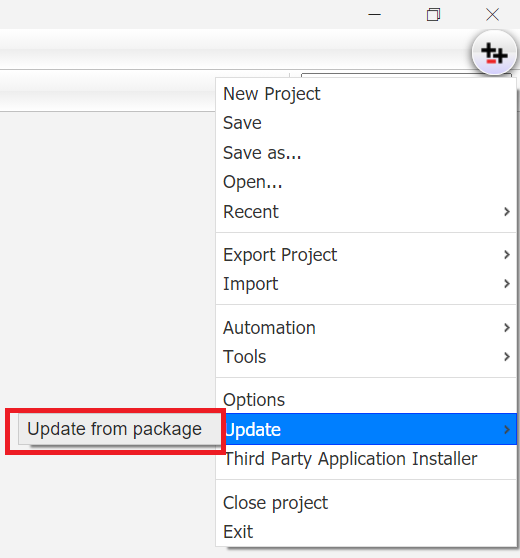
4. From Translator++ main menu, select update → Update from package

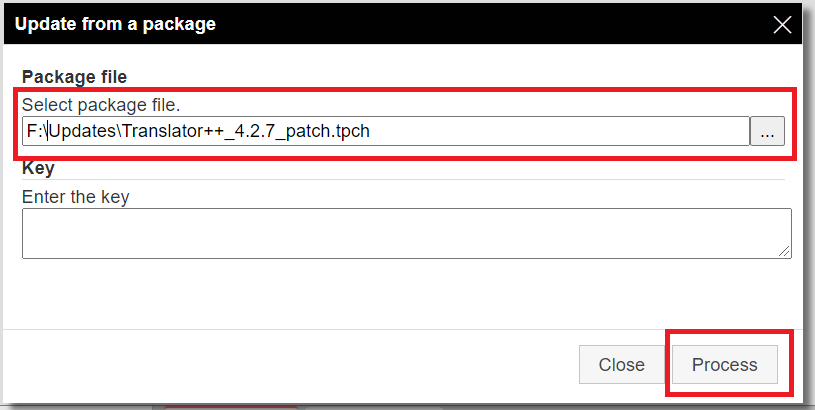
5. Select your package file on Update from a package dialog. After that hit Process button.

6. Wait until the process is completed.

7. Allow approximately 30 seconds for the background update process to complete before updating your Translator++.

I cannot update after I subscribed or changed my pledge!

The back-end of Translator++ requires around 30 minutes to synchronize with Patreon. That means, any change to your pledge may not immediately reflects on Translator++. So, please wait for 30 minutes before attempting to update again.

I'm happy to help you. But please read this before you ask me a question.

I want to make Translator++ the best game translator platform. So if you have suggestions, positive feedback or questions, don't hesitate to contact me via direct message.

I am also happy to help if you are having difficulties. However, before you contact me, please consider this:

Look at the documentation at dreamsavior.net/docs, maybe your problem has already been answered there. Trust me, doing this will save your time.

I will not violate any copyrights or EULA. So, I'm really… really sorry I can't help you if I find out that you don't have the rights to translate the non open source commercial game you mentioned. So, please do not mention any non open source commercial game titles or url anywhere on this patreon page ... including in the Direct Message or at Dreamsavior.net, unless I explicitly ask (which I never did). Any post mentioning the url or the title of commercial games will be ignored and removed.

I'm not supporting porn industries in any kind. So, please do not post or mention any of those games nor url related to pornographic material regardless its distribution format  whether it is open source or not anywhere in this site, I will ignore your questions and remove your post if you do so.There is many reason why I take this matter seriously. One of the reason is because porn are illegal in my home country.  Please pay attention to this matter if you want to support me to continue developing Translator++.

Where to contact Dreamsavior

Please contact me through Translator++'s discord channel.You can open a VIP ticket or ask the community by creating a new post in the respective channel. Please note that you may experience a delayed response if you DM me through Discord, as I receive a high volume of DMs and it's not easy to distinguish which ones are from patrons. Therefore, posting your questions or comments as posts is preferred than sending me a direct message, as our moderators and experienced users may be able to respond to you more quickly when I'm busy.

You should connect your discord account on your Patreons profile to receive discord benefits.

You can see the complete update log at dreamsavior.net

Microsoft Visual C++ Redistributable 2010 & 2015, Install both 32 bit and 64 bit (download here  and here)

Windows 10 or later

2 GB ram

1 Gb disk space (varies with the game you are working on)

Files

Comments

Anonymous

I upgraded to the $11 tier and didnt get my points. I went from $5 to 11 so I could get deepl Pro and yet It didnt give me points. Edit: I redownloaded translator+++ and now it is removing my addons when I try to update them. It says I am ineligible for addon despite me having it and being in right tier with newest version.

Anonymous

I cannot use all the apis except Google, I don't know why.

Anonymous

Where can I set the API? And I cannot use the chatgpt in the latest versiong as well, do I need to change some settings?

Anonymous

I have already installed the add-on, but I cannot connect with it. And also other APIs have the same problems, I can see them in the list.

Dreamsavior

Are you sure the service is available in your country? Some translator may not works in some country. You may need some VPN to be able to make it work.

Anonymous

Ehm im new and i dont know the password where can i find it ,because i dont find it anywhere for extracting

Anonymous

I have installed the add-on "Chatgpt for Translator++", but it doesnt work at all.My application version is 5.3.15, every time I translate my game with "chatgpt for translator++", the progress stays at 0%. Whats wrong with it?

Anonymous

Yes, but I cant find the entrance of the setting page.I have the GPT API yet,but I dont know where I can enter the key.Please teach me about that,thanks~

Dreamsavior

Open Options window. Expand Translator & Language, click ChatGPT for Translator++. Scroll & find Max Request Length

Anonymous

I can't update to the latest version (Ver. 5.3.31). I have tred to re-downloaed Latest full package Ver 4.8.31 and the updater has updated up to the version 5.2.28 not the Ver 5.3.31. I have tried all possible ways to update the program. > From "Option" > "About" > "Version Info" > "Check now" there is no update. > From the splash screen, at the start of the program, an alert popup say: "Can not update, reason: No eligible update found! You may need to reconect Translation++ with your Patreon account (logout and login again)." > Downloading the tpch file "Translator++_5.3.31_patch.tpch" and using "Update from package" the result is: "Log started! You can view the more detailed information on console log (F12) Update failed noUpdate No eligible update found! Done! Log ended!" If it helps I tried debugging the updater process. When the program retrive the info form the server about the "version info" inside the oject "this.lastVersionInfo" i have a json like this: { "user": {...}, "permitted": null, "latest": { "version": "5.3.25", "date": "2023-03-25 00:00:00", "changelog": [...], "level": "5", "min_ver": "0" } } So for some reasion the permitted version is null and the lastest version is only 5.3.25. Can you please fix it? Furthermore I ask sorry to all for my very long post, but I hope to have provided as much information as possible for helping in the fix of this bug.

Rizen

I also have the same problem. Stuck at version 5.3.25

Rizen

I can't update to the latest version (Ver. 5.3.31). I have tred to re-downloaed Latest full package Ver 4.8.31 and the updater has updated up to the version 5.3.25 not the Ver 5.3.31. Downloading the tpch file "Translator++_5.3.31_patch.tpch" and using "Update from package" the result is: "Log started! You can view the more detailed information on console log (F12) Update failed noUpdate No eligible update found!

Anonymous

I have the same problem

Dreamsavior

Hi @Territory91 thank you for your detailed report. This problem has been fixed yesterday. Please try it. And please inform me if you have any further issues.

Anonymous

How to keep the GPT translation content consistent,Does the software have translation memory function? Can GPT train itself? I want it to translate more accurately

Anonymous

When I use ChatGPT for translation, the progress shows 100%, but no translated text is provided. I have confirmed that I entered the correct API key, but I don't know what else could be causing this issue.

Anonymous

hello,i want to ask that why can't i install the chatgpt for translator++?my version is 5.3.31,and the point is enough.

Anonymous

Hello, I do not accept the password

Infinity Realms Hunt

instead of asking by game executable, ask for this .js to translate?

Anonymous

t++ cant seem to recognize newer wolfrpg executable? gamepro.exe 3.182/3.184

Anonymous

Hello, the GPT ver.0.3 doesn't work. I got an error like this: Can not fetch translation with error {} Invalid number of translation returned. Expected 1, 0 is generated!

ShadowTheParrot

I get the same thing 1,0 is generated. Meaning no translation was generated.

Sugata Tomo

Wolf RPG translation injection gives a data folder, not a wolf.data file? Thanks

Anonymous

I can't inject a translation into an rpg maker vxace game, why could it be?

Anonymous

I think that the RPG Maker translation program does not read all the text files and when it injects the translation it does not do it completely To be exact, there are still files that have not been completely extracted or so it seems to me

Anonymous

The problem occurred when I was translating the Livemaker game.Certainly, here is the translation: Specifically, when translating the completed CSV file and injecting it into the game, the system prompts the following error: livemaker.lsb.lmscript:replace_text_blocks:594 - Failed to translate text block ' ' is not a valid CP932 character. Can you help resolve this issue?

Anonymous

what tier use gpt

Dreamsavior

Please read the guide above. And, please let me know if after following the guide you still have problem.

Becks

Thank you for this great work. I've a question, It worked and it auto translated almost every map to 100% but after that, whenever I tried it again it says an "error occured!". Does that mean I'm banned from google? I couldn't find the error log files.

Dreamsavior

Yes, there is a high chance that you are temporarily banned by google. This usually will be fixed by it self after a day or two. I'm currently working on improving information on auto translation log.

Gerald Gantos

Great piece of tooling! BUT, I'm not getting an atlas column is there anything I need to do to use atlas, or is there somewhere I can see an error log?

Dreamsavior

Thank you Geral Gantos, Atlas translator is currently not available on batch translator & on main page. I will add that later.

Julius Costa Peters

hello i was translating a game and now even if i am connected I am receiving this Click connect button, to connect translator with Translator++ table

Anonymous

Hi there! do you know if there is a way to get around the 5000 character limit google translate error 503?? during batch translation

Dreamsavior

5000 character per batch is set in stone! You can't go beyond that at least on google free service.

Anonymous

нашла решение просто надо поменять vpn компьютера

Vercalos

So, I've just tried this tool for the first time, but cannot get it to work for any game. I keep getting "The system cannot find the path specified." and other errors when attempting to create a new project...

NuclearGandhi

The application was unable to start correctly(0xc000007b). I'm getting this error while trying to load any rpgmakervx game, tried with 2 different games. Any help would be appreciated.

Shoe_seat

Hey I'm trying to use the google cloud API and it keeps saying "API key is not valid please pass a valid API key" I added the json file to my environment variables and put the text of the key in your application. Can you let me know exactly what value I need to paste there from the google cloud setup please?

Anonymous

>nvm i figured it out! Please post the fix then for others who have the same issue.

Egor Eshcherkin

Hello, so, whenever I try to load an exe of the game I want to translate I get this: Fatal error: Uncaught com_exception: Source: Unknown Description: Unknown in C:\Users\Егор\Downloads\Translator++\www\php\plugins\rpgmakertrans\extractor.php:87 Stack trace: #0 C:\Users\Егор\Downloads\Translator++\www\php\plugins\rpgmakertrans\extractor.php(87): com->Run('"C:\\Users\\\xD0\x95\xD0\xB3\xD0...', 1, true) #1 C:\Users\Егор\Downloads\Translator++\www\php\plugins\rpgmakertrans\extractor.php(399): extractData('C:\\Users\\\xD0\x95\xD0\xB3\xD0\xBE...', 'C:\\Users\\\xD0\x95\xD0\xB3\xD0\xBE...') #2 C:\Users\Егор\Downloads\Translator++\www\php\loadGameInfo.php(99): extractor('C:\\Users\\\xD0\x95\xD0\xB3\xD0\xBE...') #3 {main} thrown in C:\Users\Егор\Downloads\Translator++\www\php\plugins\rpgmakertrans\extractor.php on line 87

Egor Eshcherkin

I googled it, but I couldn't find any solution to this

chalbodao chaves

There is no version 1.6.30 for download, only 17.

Dreamsavior

I've never seen that kind of error before. What game engine you are working on? And, when this error is occurred?

yiggityyo

Iv'e just downloaded the latest version and am trying to translate a wolf rpg game, I keep getting this when i click new project and then my game.exe RUNNING extractData function Array ( [dirname] => C:\Users\me\Desktop\translator ++ new\Translator++\www\php\cache [basename] => 26ebea590c876378896ad8d6b155d7e5 [filename] => 26ebea590c876378896ad8d6b155d7e5 ) Tmp path : C:\Users\me\AppData\Local\Temp\26ebea590c876378896ad8d6b155d7e5 Copy all *.wolf to temp folder CopyTree by. Dreamsavior Source : C:\Users\me\Desktop\The Good ones\BEST\pixel town\Pixel_Town2\Pixel Town2 Target : C:\Users\me\AppData\Local\Temp\26ebea590c876378896ad8d6b155d7e5 Array ( [files] => Array ( ) [dirs] => Array ( ) ) GENERATING PATCH "C:\Users\me\Desktop\translator ++ new\Translator++\ruby\bin\ruby.exe" "C:\Users\me\Desktop\translator ++ new\Translator++\3rdParty\wolftrans-0.2.1\bin\wolftrans" "C:\Users\me\AppData\Local\Temp\26ebea590c876378896ad8d6b155d7e5" "C:\Users\me\AppData\Local\Temp\26ebea590c876378896ad8d6b155d7e5_patch" "C:\Users\me\AppData\Local\Temp\26ebea590c876378896ad8d6b155d7e5_translated" C:/Users/me/Desktop/translator ++ new/Translator++/3rdParty/wolftrans-0.2.1/lib/wolftrans/patch_data.rb:19:in `load_data': could not find Data folder in 'C:/Users/me/AppData/Local/Temp/26ebea590c876378896ad8d6b155d7e5' (RuntimeError) from C:/Users/me/Desktop/translator ++ new/Translator++/3rdParty/wolftrans-0.2.1/lib/wolftrans.rb:12:in `initialize' from C:/Users/me/Desktop/translator ++ new/Translator++/3rdParty/wolftrans-0.2.1/bin/wolftrans:12:in `new' from C:/Users/me/Desktop/translator ++ new/Translator++/3rdParty/wolftrans-0.2.1/bin/wolftrans:12:in ` ' Moving files to stage CopyTree by. Dreamsavior Source : C:\Users\me\AppData\Local\Temp\26ebea590c876378896ad8d6b155d7e5_patch\Patch\dump Target : C:\Users\me\Desktop\translator ++ new\Translator++\www\php\cache\26ebea590c876378896ad8d6b155d7e5\dump 'C:\Users\me\AppData\Local\Temp\26ebea590c876378896ad8d6b155d7e5_patch\Patch\dump' is not a directory or unaccessible! Moving raw data to stage's data CopyTree by. Dreamsavior Source : C:\Users\me\AppData\Local\Temp\26ebea590c876378896ad8d6b155d7e5\Data\BasicData Target : C:\Users\me\Desktop\translator ++ new\Translator++\www\php\cache\26ebea590c876378896ad8d6b155d7e5\Data\BasicData 'C:\Users\me\AppData\Local\Temp\26ebea590c876378896ad8d6b155d7e5\Data\BasicData' is not a directory or unaccessible! CopyTree by. Dreamsavior Source : C:\Users\me\AppData\Local\Temp\26ebea590c876378896ad8d6b155d7e5\Data\MapData Target : C:\Users\me\Desktop\translator ++ new\Translator++\www\php\cache\26ebea590c876378896ad8d6b155d7e5\Data\MapData 'C:\Users\me\AppData\Local\Temp\26ebea590c876378896ad8d6b155d7e5\Data\MapData' is not a directory or unaccessible! CopyTree by. Dreamsavior Source : C:\Users\me\AppData\Local\Temp\26ebea590c876378896ad8d6b155d7e5\Data\Common Target : C:\Users\me\Desktop\translator ++ new\Translator++\www\php\cache\26ebea590c876378896ad8d6b155d7e5\Data\Common 'C:\Users\Wme\AppData\Local\Temp\26ebea590c876378896ad8d6b155d7e5\Data\Common' is not a directory or unaccessible! TMP Path is : C:\Users\me\AppData\Local\Temp\26ebea590c876378896ad8d6b155d7e5 FETCH GAME TITLE Fetch game data from C:\Users\me\Desktop\translator ++ new\Translator++\www\php\cache\26ebea590c876378896ad8d6b155d7e5\dump\GameDat.txt Initial data : C:\Users\me\Desktop\translator ++ new\Translator++\www\php\cache\26ebea590c876378896ad8d6b155d7e5\initial.json DONE! I also tried translating with an old version before i located your patreon, when it created the temp folder there was a data folder and data.wolf file, i see neither of these in the temp folder created with the new version and same game . I was and still am very excited to use this program, i hope there is a fix for this :)

Jim

Hi, is there any way to export my files into a wolf file for wolf rpg? Sorry for the trouble.

Anonymous

Hello, It seems like the translator dos not hook the text that is stored inside the database For example: > CONTEXT: Map002/events/1/pages/0/228/ChoiceHelp -> Will not get extracted with the translator++ but with another tool called "Gaijinizer" At the other hand, this gets extracted with both translation tool > CONTEXT: Map002/events/1/pages/0/72/Choice The one that can be extracted with Translator++ can only hook the main menu but not the related description. Engine: RPGVXAce Translation++ version: 1.8.1

Anonymous

Are there any updated guides? Because I just can't seem to translate most games at all.

Anonymous

How do i got about patching the translation into a game thats packaged just as an exe with a www folder for save files? It's able to import them and translate them just fine.

Anonymous

Can you make your program more WolfRPG friendly, so we could change fonts and text size without any problems? There are too many great games using this engine to be left out.

Mochi

i get an error upon opening the exe file for a game. im not sure what version of rpg maker this one was made in, but it uses .lmu files for the map ones Error: Unsupported format / engine! Project folder : D:\funstuff\games\Pokemon Nightfall v1.12 [GER] Incoming data : { "gameFolder": "D:\\funstuff\\games\\Pokemon Nightfall v1.12 [GER]", "selectedFile": "D:\\funstuff\\games\\Pokemon Nightfall v1.12 [GER]\\RPG_RT.exe", "gameEngine": "default", "gameTitle": "", "projectId": "", "skipElement": [ "note", "Comment", "Script" ], "indexOriginal": 0, "indexTranslation": 1, "force": "", "rpgTransFormat": true } Error opening file : undefined TypeError [ERR_INVALID_ARG_TYPE]: The "path" argument must be one of type string, Buffer, or URL. Received type undefined

Mochi

had a feeling it was something like that. a shame, but perhaps a tad unreasonable to ask it to be added over newer ones.

onomaximum

I did a machine translation for a WolfRPG game with an older version of the Translator (and translated into the machine translation column). I exported it just fine at the time and the entire game is machine translated, but after editing the text manually and trying to export again (using a newer version of the Translator) it prompts me with the tagging options (I have none so I pick 'ignore') and upon clicking Export Now, it instantly finishes and nothing is generated in the folder I pick. Is this because I'm using a different version of Translator or is it because the text is not in the Initial column...?

Anonymous

Can't load TES files ------------------------------------------------------------------------------- ROBOCOPY :: Robust File Copy for Windows ------------------------------------------------------------------------------- Started : 2019년 10월 31일 목요일 오후 10:39:29 Source : C:\Users\Themyst.Argion\AppData\Local\Temp\c8a191a0383d15bf9ffc49a1dc3ce0e3\extract_main\ Dest : C:\Users\Themyst.Argion\Downloads\Translator++\www\php\cache\c8a191a0383d15bf9ffc49a1dc3ce0e3\data-tes\extract_main\ Files : *.* Options : *.* /S /DCOPY:DA /COPY:DAT /R:1000000 /W:30 ------------------------------------------------------------------------------ 2019/10/31 22:39:29 ERROR 2 (0x00000002) Accessing Source Directory C:\Users\Themyst.Argion\AppData\Local\Temp\c8a191a0383d15bf9ffc49a1dc3ce0e3\extract_main\ The system cannot find the file specified. RMDIR "C:\Users\Themyst.Argion\AppData\Local\Temp\c8a191a0383d15bf9ffc49a1dc3ce0e3\extract_main" /S /Q Moving TES encrypted file to : data-ignored

TheUnsaid

Which older version did you use? WolfRPG doesn't work for me at all, and I'd really appreciate knowing which older version actually worked.

Anonymous

can someone help me please i keep getting this error: RPGMaker Trans v4.5 Legacy Input path: [XP] C:\Users\chest\AppData\Local\Temp\d4a4b8ce42cdfddcd28eff505e039a9e\project Patch path: [v3][update] C:\Users\chest\AppData\Local\Temp\d4a4b8ce42cdfddcd28eff505e039a9e\project_patch Output path: [XP][update] C:\Users\chest\AppData\Local\Temp\d4a4b8ce42cdfddcd28eff505e039a9e\project_translated Patching game [### ] 4 % Could not parse the following script translation: "…あれ? せーさんドコ…?"->"... Huh? Patching game [############## ] 15 % Error parsing inline script: String out of bounds: RubyParserState(string=..'\n'.., index=96, ruleStack=['Base', 'DoubleQuote']) # 4:66; script not translated. Script ks = $game_variables[241].to_s $game_variables[100] += ふたりは もどってこなかった… いまも あのやかたに いるのか… それとも…"

ant

Hello, once the text has been translated, its frame is in play and part of the text becomes illegible, how to solve the problem please

Shirotaiku Komota

THANK YOU SO MUCH FOR THIS SOFTWARE. YOU ARE MY HERO ;)

Anonymous

assalamualakum, greetings of virtue There is 1 feature I want to ask for !! because every so often, the word exceeds the talbor in the Game. so it can't be read because it's too long. I want you to make a reference, long said how many words per bar. in MV.vx ace or wolf there are limits for game developers. to determine the length of a sentence or conversation. every time he wants to write a story or make a game. nahhhh .... I also hope that translator ++ that feature also exists. for we see that the word suapaya doesn't come out on the bar. and makes it easier when editing manually. no need to be automatic, tks for you good luck continues

Anonymous

Hello, I met a problem when translating rmmv game. Translator + + translated the Japanese language in the plug-in instructions. Unfortunately, there are a lot of plug-in instructions in the game, which makes translation very difficult. Can you try to add new functions? Causes text in plug-in instructions to be skipped during translation.

Anonymous

Thanks and Good Work bruh.

Anonymous

Unable to process unextracted KAG at this version. Please extract all the xp3 archives first before working with Translator++. Help

The Butler

@darker, You need to unpack .xp3 file first. -- @dreamsavior. Links are still pointing towards 2.6.20b -FIXED

Anonymous

I can't inject/apply Ren'py game, after pressing inject/apply the processing window pops up and the program closes. When I looked at the all file, there were 0 bytes

Lightgot

So I tried translating a wolf game but it just says "Creating a new project" at the end and doesn't progress

Hakkira

Hi there. First of all thanks for the great tool :) Secondly I was wondering whether there was a way to add deepl as a translation option as nowadays it seems to do a better job at translating Japanese to English. Is there a way to add it myself or is it a planned addon in the future?

Anonymous

I hope... there is the Unity translate engine

Anonymous

Hi, some Ren'py game opened with translator++, then cannot open original game and inject/export game, show the "Parsing the script failed." e.g. "After Class" and "Tavern of Spear" *NSFW

Anonymous

Hello, when I completed the translation and exported it, the files do not have content.

Hakkira

Any ETA on adding DeepL as a translation option?

Anonymous

It takes a long time for kag to convert files, and it has been converting all the time

Anonymous

Is it possible to include RPG Maker MZ support? It gets stuck on loading if I try to open it.

Osford

I have a problem when exporting. the program simply starts the process but after a few moments everything closes and does not create any file

Cheeky Cheeky

I cant seem to click to click the "Create project" in the latest version (Ver. 3.1.30). Seems to be only rmxace projects tho

Dreamsavior

Hold a sec, I can confirm there is a bug on the RM VX Ace's project creation. Thank you for your report. I'll fix this soon.

xxlbbwcurious

It seems there's a bug with the translator++ and WOLF games, when you translate and inject them the data.wolf file will be instead transformed into a data folder which won't work with the game launcher in rpg wolf maker.

Dreamsavior

Data folder is extraction of the data.wolf and is perfectly playable with wolf interpreter. Your error must be caused by other things.

xxlbbwcurious

I have decrypted the data.wolf into a data folder and added the translation manually into them in 2 instances of games and they were able to run the translation that way. Kind of sure the injection of the translation has to be messing with this.

Karl P.

Renpy Games Export Error: [0210/143357.512:ERROR:http_transport_win.cc(178)] WinHttpCrackUrl: Der Vorgang wurde erfolgreich beendet. (0x0)

Anonymous

my translator++ keep saying 3.2.21 is out but I only see version 3.1.31 on the download

Иван Ташкевич

Здравствуйте. Если я не ошибаюсь, но у вас ссылки перепутаны. в место ссылок версии для разработчика ссылка на стандартную, а вместо стандартной для разработчиков. Проверти.

Anonymous

my translator keeps giving me this error Warning: Unknown: failed to open stream: No such file or directory in Unknown on line 0 Fatal error: Unknown: Failed opening required 'autoInit.php' (include_path='.;./php/includes') in Unknown on line 0 Error opening file : undefined TypeError [ERR_INVALID_ARG_TYPE]: The "path" argument must be of type string or an instance of Buffer or URL. Received undefined

Sean Shanley

I keep getting the doesn't have TES Data error. what is causing this? Because of said error when i click create patch, the patch folder always comes up empty with nothing copied.

Anonymous

I couldn't export translations containing too many .rpy files (Summertime saga 20.8 parsing renpy games from C:\Users\Desktop\....... (24 hours waiting) and still waiting pls help. Finish and all file is 0 KB . /((((((

Anonymous

I can't autoupdate from Ver 3.3.30 to 3.4.5, it gives me the message: "No eligible update found!"

Anonymous

The options menu won't open correctly to sync to patreon. The options window opens but it is grayed out and it just says "working" in the center of the page and doesn't do anything else.

Anonymous

With 3.2.23 auto-update wasn't working because it kept trying to open up a browser window for some odd reason. Manually downloaded 3.3.30 and would just see a greyed out options screen with a spinning load bar. Extracted 3.2.23 back into the folder and this time was able to login properly with out a browser opening. Weird.

Anonymous

using the newest update and cant translate rmmz. it keeps telling me ''no handler for engine: rmmz"

アンディ

there is a bug in Ver 3.6.28 . When loaded a project, the translator auto taged lines can't be blacklist when injected. But when i tag the line manually then inject it blacklist fine.

Anonymous

ok this is poggers

Anonymous

Hello man, can i please ask? Yandex API not working It costs money now., i live ukraine and i cant paid for this u have any idea how bypass this or its fixed new beta version?

EmmyG

I've tried downloading this version, the Dev version, and even the latest public version but no matter what I do I can not launch the program. I meet all the requirements and even tried restarting but it never comes up. It shows up in the task manager but the window never comes up.

Dreamsavior

Hi eg, Please remove the Translator++ application data folder at %LOCALAPPDATA%: The location should be at: C:\Users\[Your user name]\AppData\Local\translator++

Anonymous

Hi, I'm sorry if I didn't understand something. But the banner states that the text file translation module will be created when the number of cartridges reaches 550. Now there are 894 of them. Is it worth waiting for this feature and when?

Anonymous

I can't autoupdate from Ver 3.10.3 to 3.10.7, it gives me the message:“Reason:Download failed! The download will be resumed by next update attempt."

Anonymous

I can't autoupdate from Ver 3.9.30 to 3.10.12 ;(

Anonymous

I can't autoupdate from Ver 3.9.30 to 3.10 - Help Please!

Dreamsavior

This is update for $5 patrons. At your current tier, you will receive update by the end of the month.

Anonymous

thank you for telling us about this fact. ps. Previously, it was believed that the latest version is premium. But here in the program there is a message about 4 missed updates. That is why he was indignant. Since the program was downloading the patch update, it asked to restart the application and nothing changed.

Anonymous

The archive of the Developer Version x64 it's of 39.6 MB compared to the others and 7zip say: "Can not open files '...\Translator++_3.10.30_x64-dev_[2fbd0806].7z' as archive".

Anonymous

Does the software support Chinese? How to set Chinese

Anonymous

Can TRANSLATING++ translate the task name, task content, task objective and task reward in the task menu?

Albert Collins

how do i get it all work please help becouse i got the upgrade but dont nhow what to go

Anonymous

So I am trying to create a project so that I can translate a pokemon game. The program goes through all of the maps converting the .rxdata files to .yaml files. However, it gets stuck on processing the PkmnAnimations.rxdata file conversion. Is this normally supposed to take hours?

Anonymous

please add deepl

Anonymous

I'm sorry, but errors were detected in your script. Please correct the errors listed below, and try again. File "renpy/common/00iconbutton.rpy", line 42: u'icon' is not a keyword argument or valid child for the button statement. icon icon style "iconbutton_icon" properties icon_properties ^ Ren'Py Version: Ren'Py 7.5.2.22081402 Sat Aug 20 17:17:42 2022

Anonymous

Dear developers, I have installed your program only so that I can use DEEPL. Unfortunately this option is hidden even with 9 doller and there is no way to buy points. I am extremely annoyed with this strange system you are using.

Dreamsavior

Hi Nova, I'm sorry for the inconvenience. You can read more about level and points here : dreamsavior.net/docs/translator/faq/what-is-points-and-level You can access that guide from Translator++. If you read there, it is actually beneficial for you to have a point system. Because you don’t have to be an active patron to be able to install or update the add-on. You just need enough points … which are your lifetime pledge for Translator++ in USD cent (1$ = 100pts).... And you’re good to go. Please follow the step here to install your add-on : dreamsavior.net/docs/translator/addons/how-to-install-addons Please feel free to contact me if the problem still persist.

Anonymous

Is it possible to not turning text into unicode? For example, "今日、6年目に突入している。" turns into "\u4eca\u65e5\u30016\u5e74\u76ee\u306b\u7a81\u5165\u3057\u3066\u3044\u308b\u3002" instead of the english translation.

Anonymous

When I add too many expressions in Custom escaper, the software gets stuck and I can only change the configuration in the "config" file, why?

Caberg2000

thx for the update, im using v 4.11.5 but stuck at processing here's the log Log started! Creating project Target directory : E:\games\haha mistake 3 - [RJ351743]\New Folder TPM file : E:\games\haha mistake 3 - [RJ351743]\new parser model.tpm Applying file pattern : *.txt 1 file(s) found! Parsing file : E:\games\haha mistake 3 - [RJ351743]\New Folder\s011.txt Generating staging directory New staging directory with id RC7MaNQSZW has been created! Copying E:\games\haha mistake 3 - [RJ351743]\New Folder\s011.txt to www\php\cache\RC7MaNQSZW\data\s011.txt Log ended! Elapsed time : 378ms im just testing wit only 1 file, but it stuck at processing. any help will be appreciated. thx updated regex: /(?=:\D\D\d+(.+))|(?=.+:.+[\r\n](.+[\r\n].+))|(?=.+:.+[\r\n](.+))|(.+[\r\n].+\u3002$)|(.+\u3001[\r\n].+\u3001$)|(.+\u3001[\r\n].+\u3002$)|(.+\u3002$)/gm

Dreamsavior

I’m assuming that you weren’t just complaining, but asking for help for your problem. If so, please put more effort to describe better your problem. Like for example what you did, what have you tried, how you translate, were you using MTL etc.