Home Creators Posts Import Register Favorites Logout

Downloads

Content

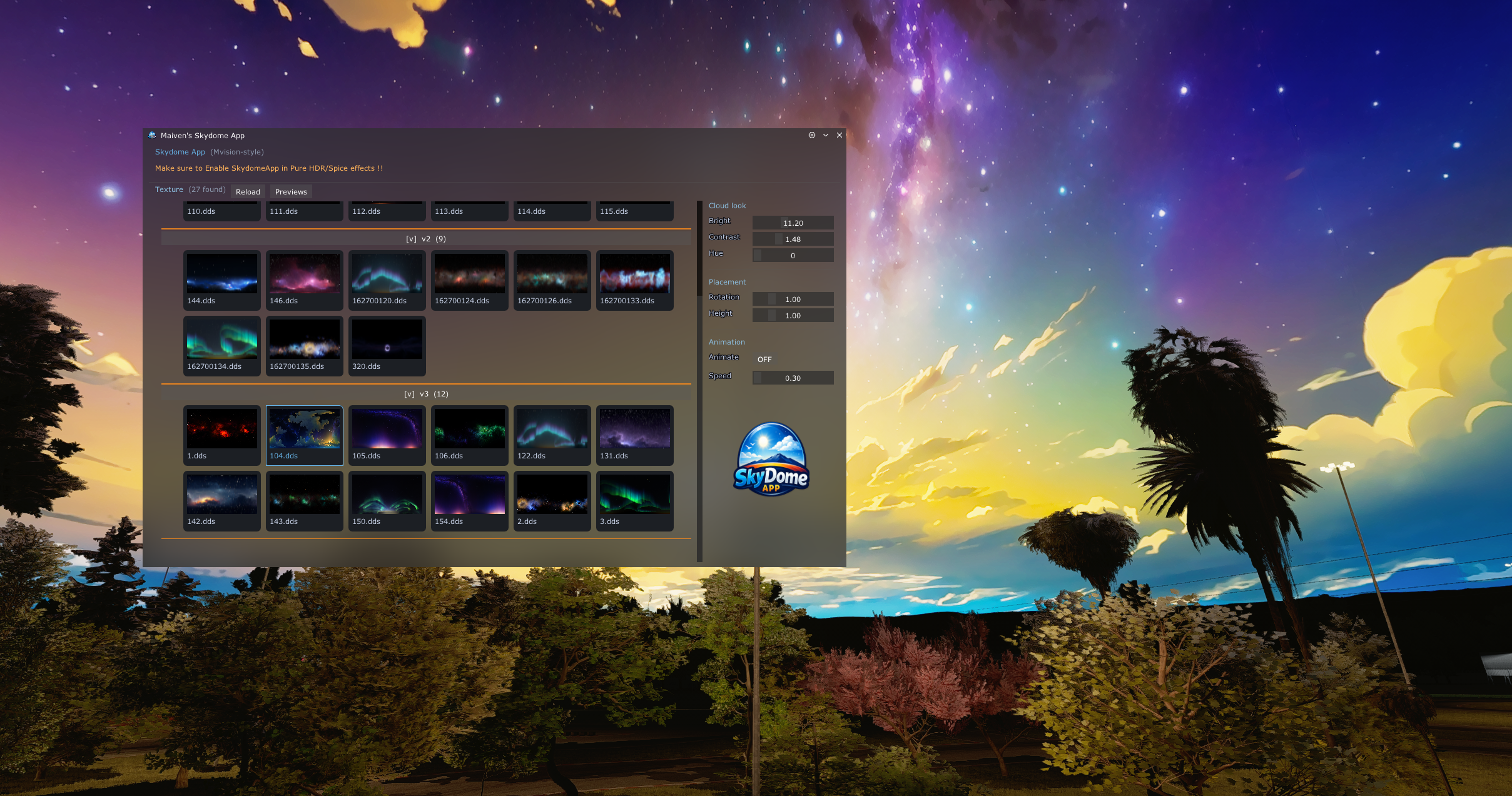
🚀 Introducing the New Skydome App (Mvision Style) 🌌

After a lot of work behind the scenes, I’m finally releasing the Skydome App — a complete replacement for the old skydome implementation.

Previously, skydomes relied on Pure configs and manual setup, which made things a bit messy and harder to manage. With this new app, everything is now simpler, cleaner, and way more intuitive.

✨ What’s new?

Easy-to-use in-app skydome selector

Live previews of all available skies

Adjustable parameters (brightness, contrast, hue, rotation, etc.)

No more manual file juggling — everything is handled directly in the app

⚠️ Current limitations

The app is currently optimized for night-time use only

Daytime compatibility works only if you’re using Mvision PP filters

This is just the beginning — I’ll be expanding features and improving compatibility over time.

If you’ve been using the old method, this should make your workflow much smoother.

Let me know what you think and what you’d like to see next .Your feedback helps shape future updates.this release has all the v1 and v2 and v3 skydomes , will release more since the app now supports the foldersalternative Download LINK : SkydomeApp

🌠 Enjoy the skies and thank you for your support <3

Files
Comments

t0rz1

🔥🔥🔥Thank you for your work!

Hezied X

how to download same as others?

Maiven Graphics

there is a link and attachement , u no longer need older skydomes

logan

best skydomes in the game

db.nov.blue

The app says something about enabling it in Pure HDR/Spice? Where is that? I don't see it in Pure Config or in Pure apps.

Maiven Graphics

There is in the files u download it should tell you how to install read the readme file

Juan Martinez

how do i use skydomes in game? silly question ik but ive never used these before, thanks.

Freeze

me too lol

Matthew Khym

I got the skydomes but they dont work during the day. I use your Mvision 3.0 pp filter

E90_rah

For some reason the app doesn’t populate Anything for is just a gray background as if the app is broken

w

same lol wondering if you found a fix - when i installed i dragged and dropped the win rar folder into content manager because i was confused as to what folders i was supposed to put apps and extension into

w

Okay I figured it out i was pasting into the wrong folder. Go to steam right click assetto corsa, properties - installed files, and then click browse and that's where you paste the two downloaded folders into. after that you have to enable the skydome app in the pure post processing app under spice. then it will work after you adjust time to night.

Maiven Graphics

U need to install the app nanually not throught content manager but doing jt by. Dragging apps and extension folders into assetto corsa root folder

E90_rah

I got it to work, but now I have another issue which I’m not sure if it’s related to your Skydomes the graphics I’m using or pure LCS. I tried using Microsoft copilot to help me figure it out, but it’s not going so well so I reached out to Peter to see if he may know how to fix it.

Maiven Graphics

open the skydome app and click on preview to see all the skydomes and select what u want

kage

wow so sigma and rizzie cool

Fisher Neese

I cant get the skydome to work during the day or sunset even though I am using your pp filter pls help

Maiven Graphics

If u are using the pp filter u dont need the app open pure pp find the skydome tab and use it toggle first daytime skydomes