Home Creators Posts Import Register Favorites Logout

Downloads

Content

Howdy Patrons!

Last month we released our first beta for AltStore Classic with on-device sideloading, which included a list of steps you needed to take to get it working yourself. If you found those steps to be a little tedious, we have some amazing news to share – we’ve automated a ton of this process to make setup even easier!

Today we’re releasing AltStore Classic 2.3 beta 2 with two key features that greatly improve the setup for on-device sideloading:

🌐 Automatic anisette server selection

📁 Built-in pairing file generation

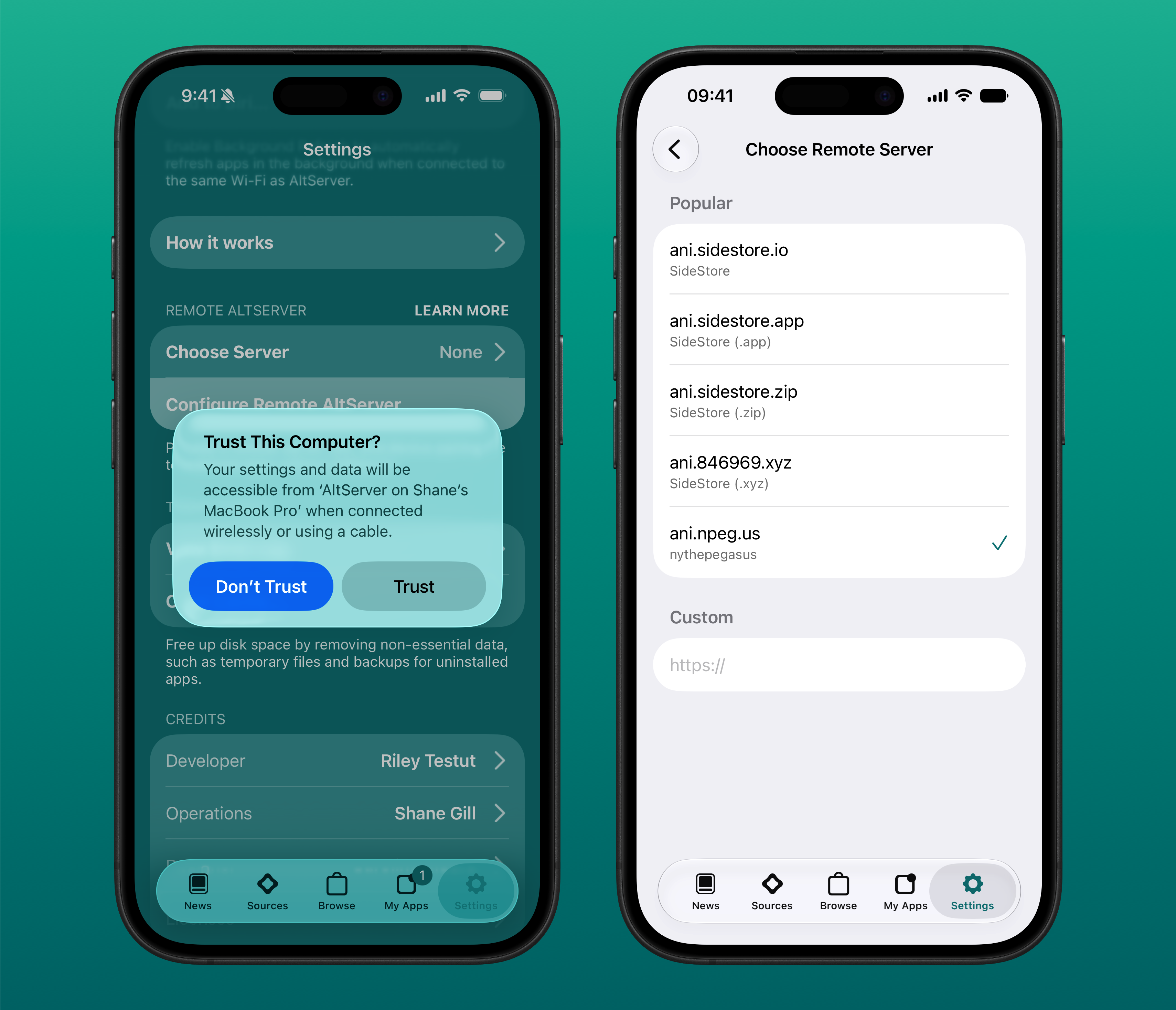
Now in AltStore’s settings, you will see a Remote AltServer section that shows you information on these two features.

First, there’s now a pre-set list of anisette servers run by the community you can choose from! You no longer need to go looking for servers yourself – you can select from the list of popular servers or let AltStore choose one automatically. Huge shout out again to the SideStore team for letting us use their servers!! We’ll also be looking to add even more servers in future updates, so stay tuned on that.

And next, AltServer can now automatically generate a pairing file for your device – no idevice_pair needed! You no longer need to bother creating a pairing file on your computer and then sharing it to your phone or iPad – simply let AltStore handle this from settings by tapping “Configure Remote AltServer.” Another thanks is in order here for jkcoxson for his incredible work on idevice, which has made this all possible.

To use this version, we have new betas of AltServer Mac & AltServer Windows, which you will need to install first. Please see our Install Instructions below for complete details.

To reflect these changes, we’ve also updated our FAQ with new instructions that are much shorter than before 🙂 

We have a few more touches before we’ll be ready with a final release for everyone, but please feel free to provide feedback in the comments!

Best,

Riley + Shane

Release Notes

NEW

Simplified setup process for on-device sideloading

Added built-in selection of popular remote servers to settings

Automated pairing file generation in settings

Install Instructions

To use this version, you will first need to uninstall whichever AltServer you currently have installed and install the version (1.8) attached to this post.

If you're already using the AltStore Classic beta, it will appear as a regular update in the My Apps tab. If you have never previously installed an AltStore Classic beta, it will appear as its own app in the Browse tab of AltStore Classic or AltStore PAL just like the beta versions of Delta and Clip. Make sure to first connect your Patreon account in AltStore's settings and you can download it as you would any other app.

Alternatively, you can install the AltStore Classic beta directly to your device from AltServer 1.8!

Files
Comments

Ed

Works, thanks guys

Sabacito

I am on iOS 18.5 or some shit, never really wanted to update because I was scared it’ll break something. Is it safe to update to iOS 26.5.2 now?

MCChristor

I’ve get Failed to transfer app to device. Socket(Os { code: 54, kind: ConnectionReset, message: "Connection reset by peer" }) errors.

Erick Muñoz

I downloaded the new altserver and the update for altstore classic but now when I attempt to refresh apps it says "Altstore couldnt connect to local VPN". That's if my phone is plugged into my PC or not.

Jumpman

Same here, I get the “Altstore couldnt connect to local VPN” message. And yet, the VPN is active and I’m using a Wi-Fi connection.

Matt G

working great, thanks!

Mike Bentzen

AltServe macOS installed but AltStore shows still on 2.3b1. Refreshed app and so on.

Luis Almonte

I keep getting a 2 step verification alert but the code never comes through on the latest update.

Waym

ios27 and macos27 machineID error

Felix

The automated pairing file generation doesn’t work for me using the PAL version of AltStore Classic and AltServer 1.8. Could you return the option to add the pairing file manually as well?

Alejandro Castaño Medina

If I have SideStore installed but want to switch to this version of AltStore, do I need to delete iloader and SideStore? What do I need to change?

Teo

I used the vpn and tried to sideload a file but is says ”could not find altserver” I tried the other remote server but not one worked

Zachary Escandon

i get the code 54 error, even with developer mode on (it has been on for awhile) and connected to localdev vpn, any help?

Jeffrey Smith

I’m so glad the option for a custom anisette/omnisette server still exists! Thanks guys!

Filip Šaško

hey guys i have problem when i want to connect apple id. i got message unable to register udid the device is registered with this team

Josh

Why is the VPN no longer working?

Ed

Not working anymore for me. Same as what happened with 2.3b1. Works well for a couple days and then it doesn't recognize LocalDeviceVPN anymore, so can't refresh apps.

Spitfire_x86

The Altstore Classic beta installed via PAL does not work with the new pairing file process. Getting a "could not determine UDID" error no matter what i do (iOS 26.5 and Windows 10). But, works fine when Altstore is installed via Altserver

Joey G

i get a error altstore couldnt connect to llocal VPN do i need to download a VPN?

MyBroski

Amazing. Thanks for this! I'm in the UK but did a workaround of creating a 2nd Apple account with the region set as Ireland for the English language to install Alstore PAL. This method works on iOS18 (both my iPhone and iPad) but unfortunately not on iOS 26 (tried VPN and simulating location via StikDebug app but still didn't work which makes me think Apple may have patched this loophole in the latest iOS versions). After years of sideloading via Altstore & SideStore, I've been waiting for this Alstore Classic beta to come to Altstore PAL because FINALLY, this means PERMANENT On-device sideloading & refreshing has come to iOS. E.g. Now if sideloaded apps (via Alstore classic) expire after 7 days, you no longer have to connect to a computer but can simply open the Alstore Classic app (which never expires as it's installed from Alstore PAL), turn on LocalDevVPN and tap 'refresh' to reset the 7 day count. To the dev team, I saw your post back in December 2025 about releasing Alstore PAL to UK officially later on this year. Any ETA on this? 👀

Pete Luna

Requested refund. This is useless with iOS 27

Pete Luna

This does not work with OS 27. You have a lot of nerve charging for this. Clowns

AramCZ

If you are connected to LocalDevVPN and you get an error of VPN not being found here is what to do: First download an IKEv2 VPN the best one I found is VPN Super. Then just restart your device by quickly clicking volume up then volume down and holding the power button for 10-30 seconds after your device has booted up connect to LocalDevVPN and VPN Super and then try refreshing your apps now

CediSaurier

i bought the membership to link in app but cant because it wont load the google login :p

Louis Moulin

Any fix for EU where anisette server return wrong format data ? kCFPropertyListOldStyleParsingError Error Domain=NSCocoaErrorDomain Code=3840 "Malformed data byte group at line 1; invalid hex" UserInfo={NSDebugDescription=Malformed data byte group at line 1; invalid hex}

Felipe Nunes

Do I need a PC to install this version?

Goncalves Daniel

iOS 27 here, need to restart the iPhone every time I want to refresh the apps. If I don't restart I get the could not connect to local VPN error.

Ryan Gettinger

Hello I have recently upgraded to Server 1.8 and AltStore 2.3b2. When I attempt to refresh apps, I am getting "AltStore couldn't connect to local VPN". LocalDev VPN is running on my device and is connected. I have tried Reset Remote AltServer... as well as different servers, power cycling, turning vpn off and on. I have also tried totally uninstalling AltStore and LocalDev VPN and reinstalling AltStore via AltServer. Nothing has helped. Do you have any ideas? Same Error when attempting to "Sign In with Apple ID"

Gabriel Freitas

I want to install an ipa without the need for a computer, I made the donation for this but to do this I need a computer, it doesn’t make any sense, I already downloaded the VPN and tried to install an application but it gives error altserver not found, they talk about no computer but you need one for configuration? or is the error only because I’m on ios27? doesn’t make any sense

Kevin Kienlen

So, I just paid for a sideloader « without computer » that actually needs a computer. Great.

Rolo Gajo

Hello, I'm having an issue. If I'm connected to my Wi-Fi and I'm not using a VPN, I get the following error: NSCocoaErrorDomain 3840: "The data couldn’t be read because it isn’t in the correct format." Also, if I use DeLocalVPN, I get the same error. Do you have any idea what could be causing this or how to fix it?

Mr001Ali

I got an error message saying that the Altserver couldn’t be found when i’m trying to install an app

K I R I T O

I need help, it keeps giving me device udid not found and i cant sideload anything

Kristijan Vojsković

Failed to transfer app to device. Socket(Os { code: 54, kind: ConnectionReset, message: "Connection reset by peer" }) same error

Sundar Tamang

I get the error where it says Unable to Configure Remote Altserver Alt server could not determine this device's UDID

Michał Opalach

Got a solution for anyone having error with ''Socket(Os { code: 54, kind: ConnectionReset, message: "Connection reset by peer" })''. Just go to settings and Reset Remote AltServer, then restart your AltStore and everything works as it should be

À Issa Najjari

Hi Riley & Shane, Would it be possible to release an official LiveContainer + AltStore combined version (similar to the existing LiveContainer + SideStore IPA)? Having LiveContainer built-in would be extremely convenient, especially now that AltStore Classic has on-device sideloading. It would save a free developer slot and make the experience much smoother for users who prefer AltStore. Thanks a lot for all the hard work!

SaiMonicL

Hi, im getting an error on my iPhone 11 iOS 18.6.2 where it says this: Unable to Configure Remote AltServer. AltStore could not determine this device's UDID. I installed AltStore Classic with AltStore PAL, I don't know if thats the problem, but could you help?

ZeroDividesByYOU

I am having some trouble with the patreon linking of the AltStore app on iOS. It is struggling to log in with google and pulling up a blank page even after attempting to link using the default browser. It does send me a verification code using safari rather than the in-app browser but it goes right back to the in-app browser and fails to load anything

K I R I T O

Can someone help me figure out why i cant setup a remote altserver?

shane

I got it to work on iOS 27 beta 6 through the help of Claude. If anyone is interested I can make a fork with instructions. SponsorBlock is nice having again!

Import_cam

server returned invalid response [appleapi+authentication.cpp:1059]

Cameron Keller

Server Returned Invalid Response, [AppleAPI+Authentication.cpp:1059]

Jeff Cash

Anyone else seeing "Server returned invalid response: [AppleAPI+Authentication.cpp:1059]"? The release version also has a similar error, but the error message is less verbose.

Quintanilha

Any insight into the recent issue that prevents the refresh (NSCocoaErrorDomain 3840)?

isaac pichardo

Hello, I cannot install store into my phone, I keep getting an error. Is anyone else experiencing the same issues?

Justin Park

😔 NSCocoaErrorDomain 3840 The data couldn’t be read because it isn’t in the correct format.

Firefighter401

I am encountering an issue trying to install AltStore using a paid Apple Developer Account.AltServer (macOS): Crashes during installation with an HTML parsing error: Encountered unknown tag html on line 1 / Error Domain=NSCocoaErrorDomain Code=3840. It seems to be getting a block page instead of the expected plist data.SideStore (iOS): When downloading the GTA .ipa files on my phone, it errors out saying the files cannot be downloaded because they are not in the correct format.Could you please advise on how to fix this formatting loop or bypass the authentication block?

jamesnightblade

I keep getting a “server returned invalid response” when reinstalling alt store on my phone

TF

Hello. First of all, I want to thank you for your hard and complex work in the field of sidelod. I’m also using version 2.3b2. I’m following the instructions exactly, but when I try to sideload, I keep getting the message “The data couldn’t be read because it isn’t in the correct format”. I’ve tried using either USB or Wi-Fi, restarting my PC and tablet, elevating permissions, reinstalling, and downloading IPA files for various apps, but I’m still seeing the same behaviour. Similarly, I can’t reset the Remote AltStore Server. I’ve noticed that this behaviour isn’t an isolated incident and that some users are experiencing the same problem. If this is a bug, please fix it. I’m using an 8th-generation iPad running iPadOS 18.3.2. When using the latest release of AltStore Classic, I don’t encounter any issues with sideloading. Thank you for any advice or information you can provide.

Komino

Ever since today I’m sadly getting “The data couldn’t be read because it isn’t in the correct format.” 3840 for installs or refreshes.

Sky

Why no Linux AltServer build?

Almasoudi

I have error “ Server returned invalid response “ ( windows 11 )

Ghostlybass

How do you all deal with altserver asking to update iCloud? Can’t seem to make it happy, since the download link for the most recent iCloud doesn’t exist