Home
Home

 Creators
 Search
 Recent
 Random
 Posts
Posts
 DMs
DMs
 Tags
Tags
 Random
 Importer
 Import
 FAQ
FAQ
 Account
 Register
 Login
Login
 Favorites
 Keys
Keys
 Logout
 Telegram

(CCXL) Angels Eyeliner for Both Vs (Patreon)
Downloads
Some files exceed the archive size limit and weren't saved: 4 files. Please note these limits are in place to keep this site running long term, without costing a fortune. You can favorite the creator though, certain milestones increase the limit.
Content
Hey everyone! Hope you all enjoyed the CCXL version of my Powder eye makeup! I am here with a fresh batch of CCXL mods!
This time, I converted my old Eyeliner mod from way back in 2023. You can find the original replacer mod here. Honestly, doing CCXL eyeliner is so easy to me now. Making these, I didn't even need to look back at the tutorial after a certain point. I definitely want to try all the other CCXL modding stuff!
It's all so exciting, honestly; and super fun to make!
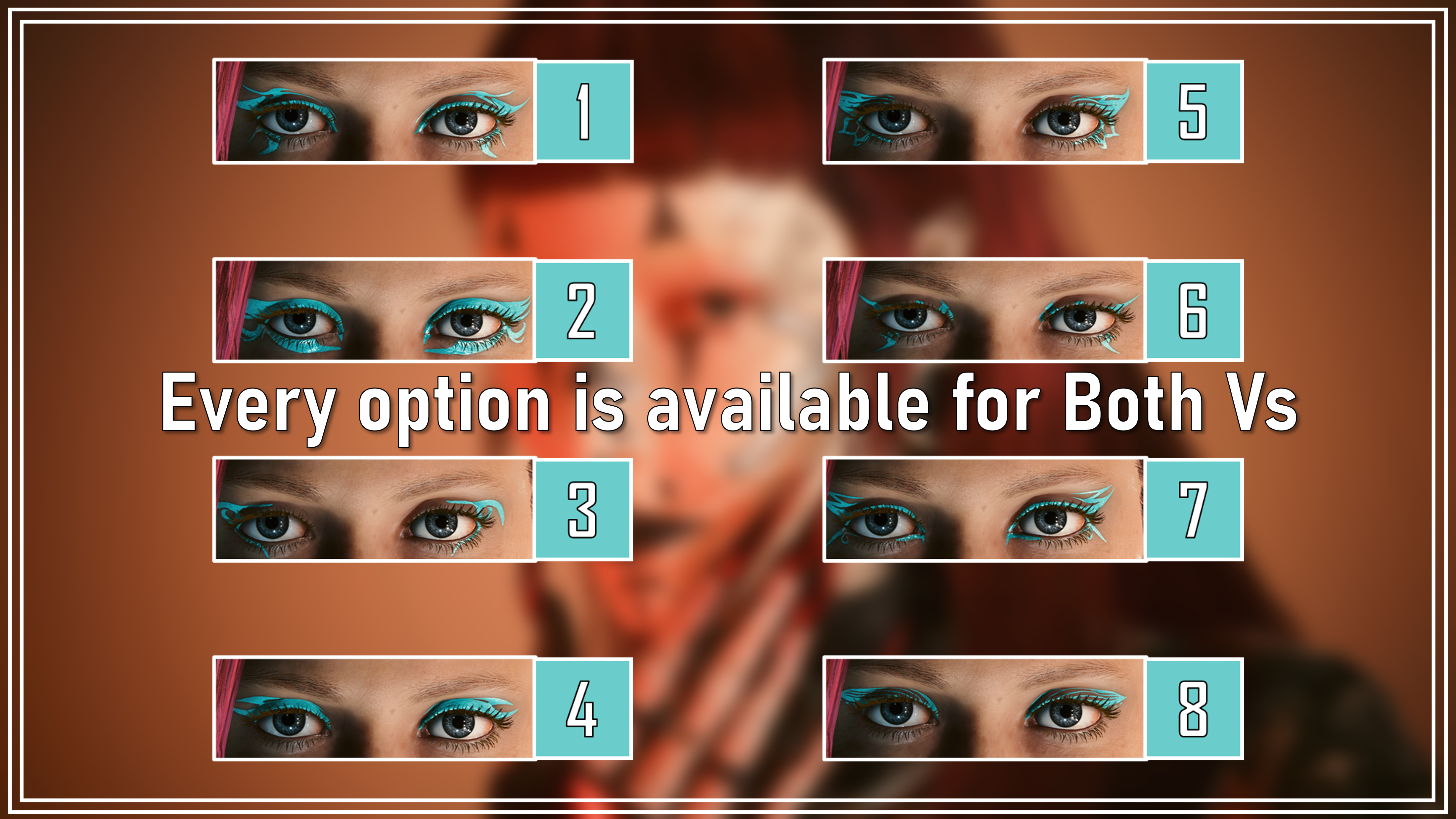
As you can see, there are a total of 8 options; and they all work with the Vanilla CC eye makeup colours. They are also available for Both Vs, as you can see I mentioned above. I always want my mods to be for Masc and Fem V, as I feel the former doesn't get as much love. Yes, I still took the screenshots with a Fem V. But that's my main V, Avery; of course I am going to use her.
And as with my Powder makeup, I separated everything!
These are the Zip files you can download:
Converted Angels Liner for Both Vs -> What it says on the tin; all the options for Both Vs contained within a single Zip file.
Converted Angels Liner Masc -> Every option for Masc V only, separated for convenience.
Converted Angels Liner Fem -> Every option for Fem V only, separated for convenience.
This means you can either have every single option in your game at once, or just pick and choose your favourites! If you want to know which one I used for the mod photoshoot, I used Option #1; in that lovely shade of red.
(The Zip file labelled 'READY FOR MOD PAGE' includes all the mod screenshots, as well as the basic eyeliner references)
Here's some Installation Instructions:
1) Download the right Zip file for your chosen V.
2) Extract the contents to somewhere on your Desktop/PC.
3) Grab the file or files you want; there are two parts to each option.
4) Put both of them into your mod folder. On Steam, the file path is as follows:
steam - steamapps - common - Cyberpunk 2077 - archive - pc - mod
(You put the files in the mod folder at the end of that file path)
5) Load up the game, and head into the Character Creator.
6) Scroll down to the Eye Makeup options. I reccomend just going back, so you don't have to cycle through the 30+ vanilla options.
7) You should then see my CCXL eyeliners and be able to use them with every colour!
(I tested every option several times, and I have over 700 mods installed, as well as my other CCXL eyeliner mod. If this mod doesn't work for you, it will be a weird mod conflict you have; or an installation error)
That about does it for this post! I hope you're all enjoying the new CCXL content! I will definitely be making more very soon. Take care of yourselves, and remember to check out the Discord if you haven't already! Also, keep an eye out for the new $1 tier that may be coming soon.
Files