Home Creators Posts Import Register Favorites Logout

Downloads

Content

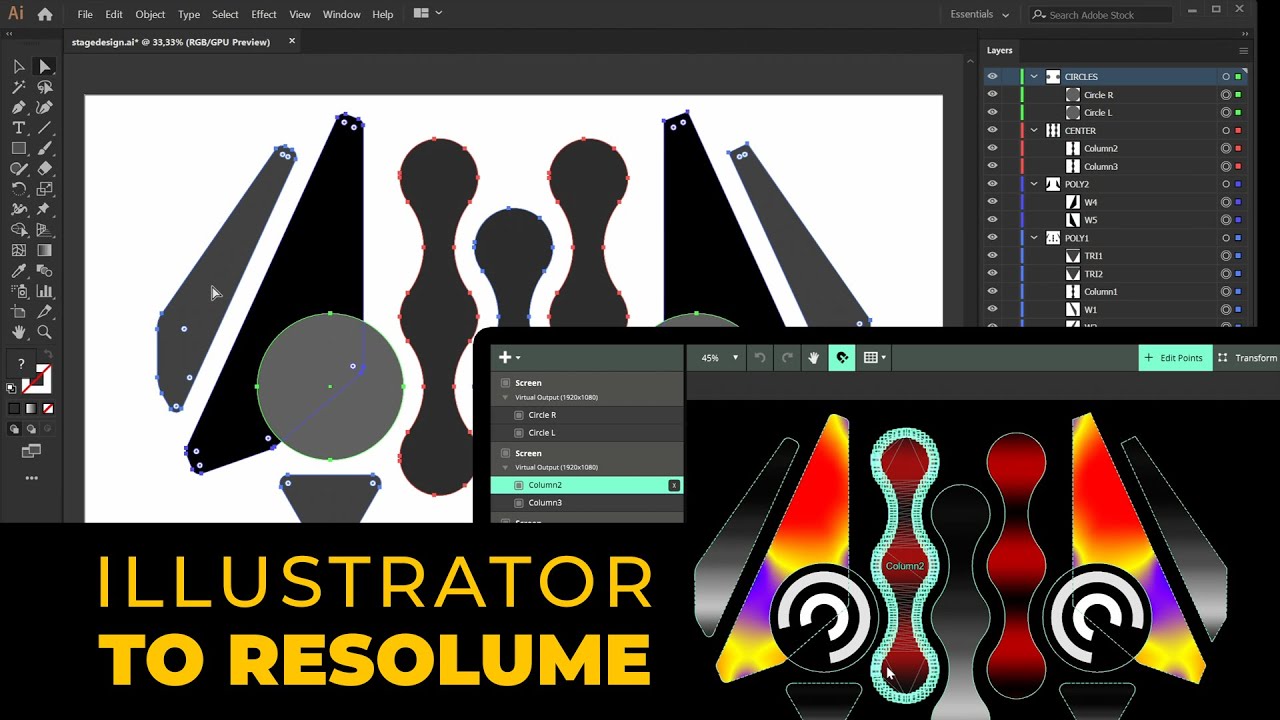
This script exports Adobe Illustrator vector directly into a Resolume Arena Advanced Output XML. Designed for fast, precise projection-mapping workflows.

Organize your design using layers. Naming is optional but recommended, especially when reimporting the XML into Resolume to preserve consistency. Use clean, closed shapes. Compound shapes are ignored. Expand appearance before export. To run the script, drag and drop it into Illustrator, or go to File → Scripts → Other Script…

Important

Use clean, closed shapes. No compound paths or groups.

- SVG layers > Resolume screens- SVG shapes > optimized polygons- Curves are automatically converted into optimized straight lines- Unnecessary points on straight lines are removed.

Files

Export Adobe Illustrator Vector Shapes Paths to Resolume Arena Advanced Output Polygons (Script)

This script exports Adobe Illustrator vector shapes paths directly into a Resolume Arena Advanced Output XML. Designed for fast, precise projection-mapping workflows. In Illustrator organize your design using layers. Naming is optional but recommended, especially when reimporting the XML into Resolume to preserve consistency. Use clean, closed shapes. Compound shapes are ignored. Expand appearance before export. To run the script, drag and drop it into Illustrator, or go to File → Scripts → Other Script… - Illustrator layers become Resolume screens - Shapes become Resolume polygons - Curves automatically converted to optimized straight segments Download the Script on my Patreon: https://www.patreon.com/posts/149876773

Comments

Simeon in 't Veld

This is crazy! I was literally just working with a programmer to make this.

Kosma

was looking for it to make slices, thanks !!

Optillusion

Wow! Just as I was about to buy VEXML, you drop this gem! Thank you!

VJ SCRUM

THANK YOU!!!

KAALA SEE

How to incorporate this without Adobe? Can I just use some online whatever to get that XML or whatever it's called file and just do it?

TCE Visuals

When I use the script. The xml works. When i use the html link it crashes resolume

TCE Visuals

updated version works perfect with groups!!!!

Rogelio Galindo

Amazing, there is no limits with you TAS

Hendri Mande

i just download it, and i test it with the TAS Visual demo.. i do the convert tuts for this visual demo and i got .xml file. but after i import it to Resolume Advance Output, there is a missing slice which is the CENTRE Slice (Round poligon) shape

Dennis Baptist

I tested the script with the provided AI file, and everything converted correctly except for the two CENTER shapes (columns 2 and 3). The center screen however was created successfully in Resolume’s Advanced Output, but for some reason the corresponding slices were removed.

Carlos Rodriguez

Hello thank you so much for this!! i did drag and drop the file into illustrator but its acting like i importing text... showing me a Text Import Options window...what i am doing wrong?

Carlos Rodriguez

Hello!!! thank you so much for this!!!! I did drag and drop file in to Illustrator bit its acting like u am importing text, showing me a Text Import Options window...what im doing wrong?

Kazeem Awe

I just joined this membership, I am completely new to AudioVisual and Resolume. I am currently planning to start an audiovisual relaxation performance for senior in my area, and I looking forward to learning some cool stuff from here. I am very interested in illustrator script and the colour drift for exporting my mandala patterns from illustrator to Resolume and to learn how to use them efficiently. I do have a question though regarding the colour drift, if the colours can be changed base on shows?

Ernesto Sola

i buy this but when save show a text file not a XML file

Ernesto Sola

can you help please, i just buy it from you