Home
Home

 Creators
 Search
 Recent
 Random
 Posts
Posts
 DMs
DMs
 Tags
Tags
 Random
 Importer
 Import
 FAQ
FAQ
 Account
 Register
 Login
Login
 Favorites
 Keys
Keys
 Logout
 Telegram

TAS Particle Delay (Resolume Effect 7.22.9+) (Patreon)
Downloads
Some files exceed the archive size limit and weren't saved: 1 file. Please note these limits are in place to keep this site running long term, without costing a fortune. You can favorite the creator though, certain milestones increase the limit.
Content
So this effect turned out kind of crazy. Thanks so much for your patience!
At first, I planned to release it as a beta, but I decided to put more energy into fixing and optimizing everything instead. I’d really love to hear your feedback and ideas on how to develop it further.
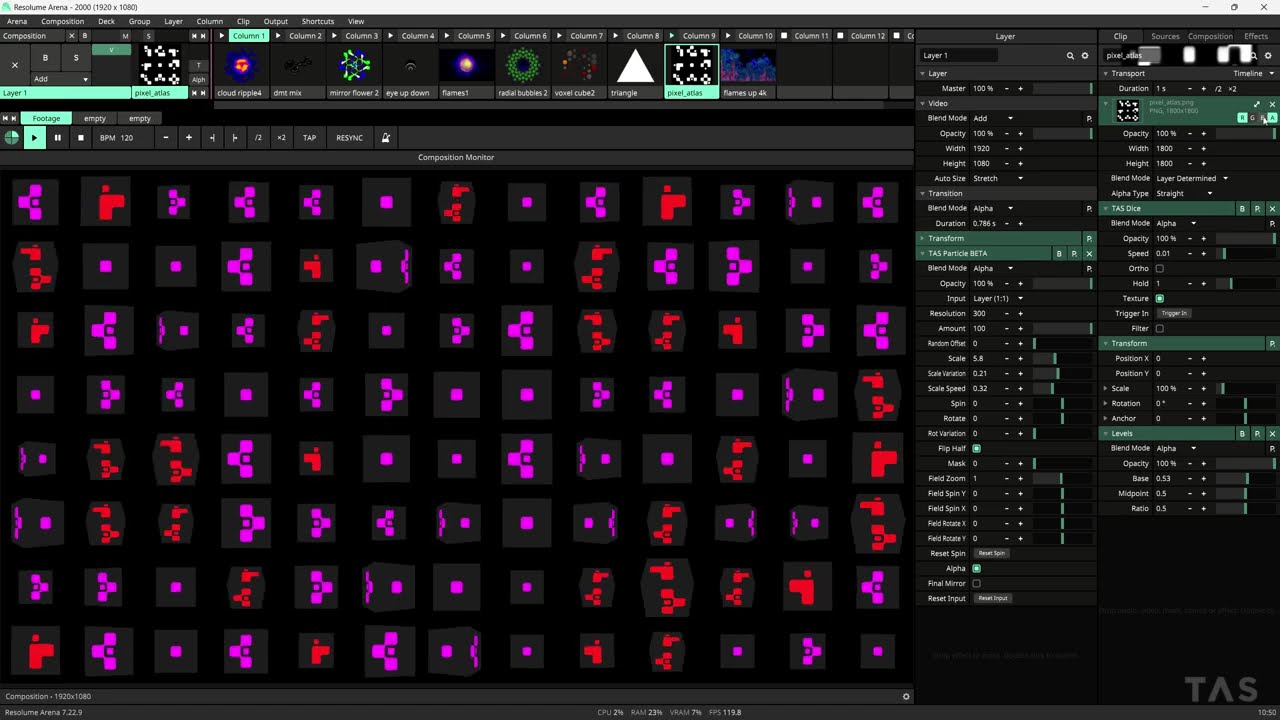
The time delay, which generates nine different particles with a 30-frame offset, is quite resource-intensive at full resolution, so it is downsampled to 300 × 300 px. I’ve optimized it as much as possible. I prefer to have the effect applied to a layer and to avoid multiple instances running at the same time.
In the video you can see a new effect called TAS Dice dropping soon !
A particle system with built-in frame delay.
The effect transforms one video source into a dynamic particle field. A built-in frame delay system offsets particles in time, creating subtle variation and depth. The result feels organic and alive, not repetitive.
This effect is still work in progress
Usage Notes
Apply the effect directly to a clip before Transform, or place it on a layer with Auto Size → Stretch enabled (recommended). For correct proportions, the input must be square (1:1). If you apply the effect directly to a clip and the source is not square, set Input Size → Fill to prevent stretched particles.
Core Features
• One video source• Adjustable particle amount• 9 frame-delayed particle instances• Global scale and rotation control• Per-particle scale and rotation variation• Continuous particle spin• Pulsing scale animation• 50% flip mode with reversed spin direction• Adaptive grid layout based on composition size• Randomized grid offset• Grid zoom control• Grid X and Y rotation• Alpha blend mode• Radial soft mask mode• Final output mirror