Home
Home

 Creators
 Search
 Recent
 Random
 Posts
Posts
 DMs
DMs
 Tags
Tags
 Random
 Importer
 Import
 FAQ
FAQ
 Account
 Register
 Login
Login
 Favorites
 Keys
Keys
 Logout
 Telegram

[UPDATE] Augur: Nexus - Hide all your secrets! (Patreon)
Content
Hey everyone, I just released Augur: Nexus 1.1.3.
This update is mostly made from user requests after the last release, and it focuses on two things that matter a lot during play: Making sites faster to use from the map, and letting GMs show players the connected world without showing them every secret behind it.
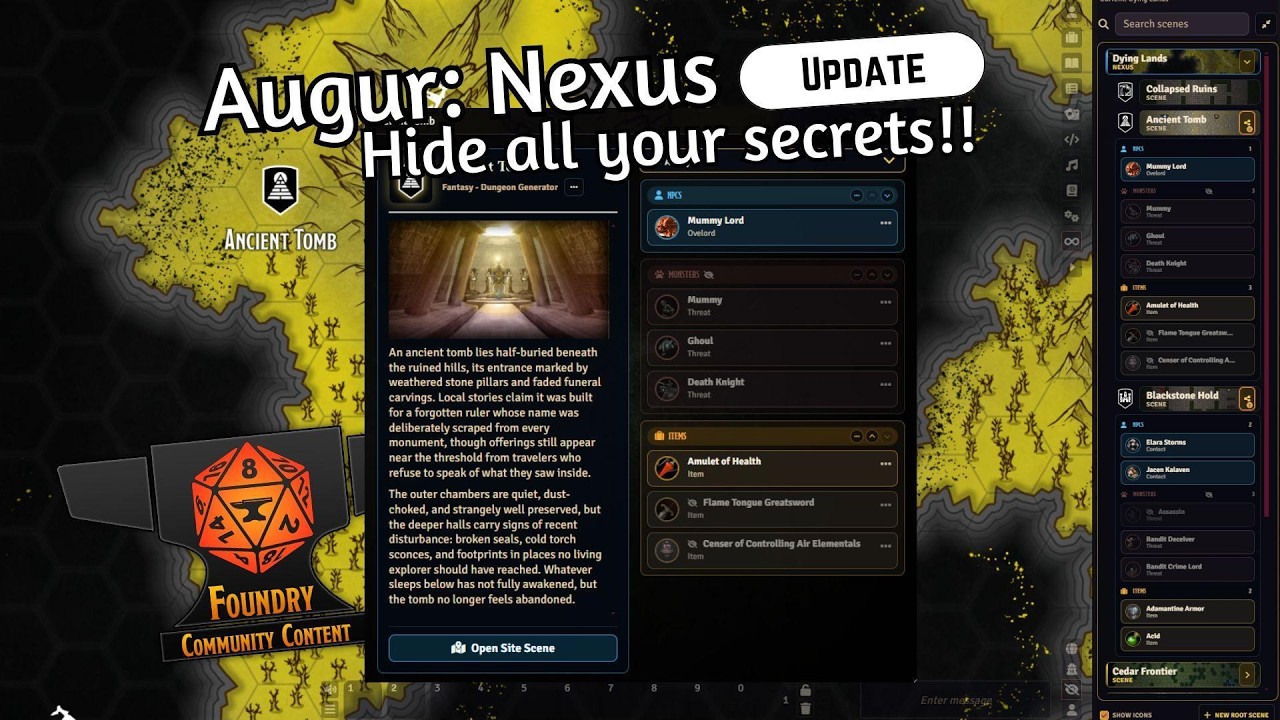
The biggest change is that Connections can now be hidden from players.
In Nexus, a Site can have Connections attached to it: NPCs, monsters, items, clues, journals, notes, images, threats, contacts, treasure, and whatever else helps define that place. Those Connections are useful because they let a location carry its actual table context instead of just being a marker that opens a scene.
But once players can browse parts of the Nexus, that creates an obvious GM problem: Some of those Connections are things players should know. Some are absolutely not.
So now GMs can hide individual Connections from players, or hide entire groups of Connections on a specific Site.
For example:
A town can show the tavern, blacksmith, quest board, and known NPCs, while the cult underneath the chapel stays GM-only.
A dungeon entrance can show rumors, known routes, and visible landmarks, while hiding the boss, secret treasure, trapped shortcut, and future encounters.
Hidden Connections stay visible to the GM with clear eye-slash markers, so you can still prep and run everything from one place. Players only see what they are meant to see.
You can also hide whole groups per Site. So maybe the Monsters group is hidden on one ruin, but visible on another location where the players already know what lives there. It is not a global switch. It belongs to that specific place.
That makes Nexus much more comfortable as a player-facing world tool. You can let players browse the connected world, follow the places they know about, and open the parts they are allowed to access, without exposing the prep you still need behind the screen.
The other big quality-of-life change is faster map interaction. Site pins now support Shift-click. If you are the GM, Shift-clicking a site pin jumps straight to its linked scene. You no longer have to open the preview panel first just to move through the map.
Site pins also now have a right-click menu for common GM actions: Open the site scene, edit the site, change whether players can see it, change whether players can open its scene, delete the site.
That sounds small, but it makes the map feel much less fussy to use at the table. The important site actions are now right there on the pin.
There are a few smaller improvements too:
hidden Nexus Tab entries now use a proper eye-slash icon instead of the weird missing-character glyph some users were seeing.
branch/scene deletion warnings are clearer.
cinematic scene transitions can now be disabled in module settings if you prefer simpler navigation or don't want to change the view of your maps.
site icons can now be non-square and still retain their aspect ratio.. meaning no more squashed custom icons.