 Home

 Creators
 Search
 Recent
 Random
 Posts
 DMs
 Tags
 Random
 Importer
 Import
 FAQ
 Account
 Register
 Login
 Favorites
 Keys
 Logout
 Telegram

spine-tingling
- Digital Art 4
- Pixel Art 4
- Music 6
- Writing 18
- Programming 12
- QA (Testing) 11
- Animation 3
- System Design 11
- Other (tell me!) 1
in recent posts, i've talked about our various backend tasks, including what spine is, and why we're switching to it. that's still in the works, so in this post i'm going to give you all a closer look at the process of doing the switching, and what sort of obstacles we deal with therein.
this is a coding post. you've been warned.
when we last left our heroes, we had been granted LEGS, and then proved that we could import all of our existing models to spine.


but... it wasn't... quite that easy from there.
shortly before we took our trip, i saw this:

ignoring how janky nova's existing model is under the best of circumstances......... it's not that janky. not as janky as it looks right there in game. that's her loaded through spine, and this is her loaded through dragonbones:

the scissors and pose are irrelevant; what's important is that the lines are smooth. not pixilated like in the above example. scaling the model to a workable size with spine was making it jagged, and this was not acceptable.
(if you played the demo and are thinking but didn't they all look jagged? you probably had to play on low-spec mode. default settings rendered them smoothly in the demo. as of writing this, i don't know how low-spec will interact with spine, but hopefully we can fix that someday if it's still an issue)
anyway, the dejankifying took most of the last couple days before we left. exactly because of the low spec difference, i thought maybe spine used a different rendering method... for a non-tech comparison: maybe it draws the graphics with colored pencils instead of felt pens? so we were first digging into the code to look at how to tell it to use the pens instead.
that turned out to be a goose chase, but researching exactly how texture filters and rendering worked brought us to something called mipmapping. what a silly word. doesn't that sound silly? i now want to know the origin of this term.
The letters MIP in the name are an acronym of the Latin phrase multum in parvo, meaning "much in little".[4]
ok elias lol
anyway, mipmapping is a way to optimize rendering things at smaller scales. if we need to display something small, rather than loading the image and then shrinking it every time, we just store a handful of pre-shrunken images in memory to make it easier:
i'll call on my good friend google to provide me with the literal first two image results to explain:

here you can see how the mipmapped version is smoother as it scales into the background, because the work of shrinking has been done in advance rather than by the renderer on the fly.
and here you can see an example of how those are stored:
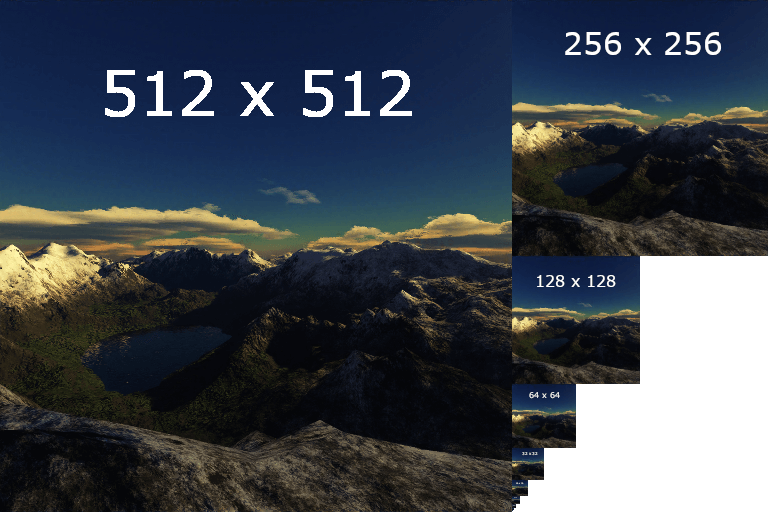
by storing progressively smaller versions of a texture or image, we reduce the processing needed to reach a given scale, and can thus smooth it out. apparently.
idk, don't ask me too hard about it.
anyway, you'll notice that those are all scaling down from powers of two. that's easy math right there, and it turns out for accurate and smooth mipmapping, we really need to store our textures as a power of two. again, don't ask me too hard about it, because that's going into the nittygritty of graphics rendering that i sure don't have the braincells to think about.
anyway, this is to say we had to really dive into the lower-level details to figure out that all we needed to achieve bippity-bop-mippity-map dejankification was to export our spine textures as a power of two like the above example. dragonbones apparently did that by default so I was nonethewiser as to its benefit. in the end, this is an example of something with a super simple solution that regardless took a few days to work out.
...and what about since then, huh?
since coming back to work, i've been hammering away a few hours a day at the rest of the compatibility. smooth scaling puts us at being able to render spine in game, but we still have to do all the work to actually make the renders work with the game in the same way that dragonbones did.
let's start with the summary screen, i thought. combat is obtuse and complicated, but the summary screen is simple-- we literally just render the image and let it vibe there.
for those of you who haven't yet played the demo, this is the summary screen:

and the model is animated on the right there.
so, okay, step 1: instead of rendering on an arbitary map, tell spine to render the model to render in the summary screen.
..................but how?
time for a code dive! in the demo, when we want to display a combat armature, we call this method!

this is: A) set up the information we need, B) send that information along to make the thing, C) tell the rest of the game a thing has been made
(code-literate friends: why not just pass two separate arguments to the object? ...look, i don't remember, but there was a good reason, trust me...)
the problem here is that B) is big "draw the rest of the fucking owl" energy.
...okay, so what's going on there:
okay so to summarize we have a Sprite_Armature which wraps information around an Armature which is composed of Sprites. okay? this is what i've done. yes, i am sorry, and no i do not intend to atone for my crimes
so we have to look at where, within the Sprite_Armature, the armature is actually constructed. it's probably right here:

build the armature, and then add it to the scene.
that PixiFactory class is part of the Pixi-Dragonbones library. Pixi is the code that actually displays images, and then the dragonBones plugin is a set of instructions to use pixi to display images in the shape of an armature.
but the point is that's a library plugin. it's code to make what we do work. in terms of development, it's like

trying to edit those would be like trying to remove the bottom piece of a jenga tower. and there's already no center.
so this tells me, okay, this is the place that i need to slide out the dragonbones code, and slide in the equivalent pixi-spine code.

you can see we're now working Sprite_Armature2. this way we can build spine stuff on the side without killing dragonbone stuff right away. the rest of this, beyond being changed from the previous example, doesn't really matter right now. let's put in a a nice little box for later. as a whole, it is just how we were able to render a spine model through pixi. then, the bottom piece calls the setArmatureInfo function once loading is complete. that function does things like say, how big should this armature be? at what x,y should we display it? should we even display it at all yet? and so on.
one kink in this process was that dragonbones' information is appended to a property of the Sprite_Armature object, .armature, and all of our existing code is written around that. however, spine's information has to be inside a Container (arbitrary object that holds other objects, like what it says on the tin (heh, get it--)) so it is all one level deeper. in order to avoid this, we just point the .armature property to the container's contents. we say, okay code, if you're asking about .armature? you're actually asking about what's in [this] instead. thankfully, the code listens, which saves us a lot of rewriting.
so, with that all done, we see if we can display the summary armature in spine:


and with a little extra finagling and tweaking of some easy settings, baddaboom:
you can see there's a couple recent changes in her design from the spine-side! she has dark tights now, and something bright in her hair? we'll talk about that later.
so at this point, we have displayed one (1) armature within the summary screen, but i note a handful of issues:
the first one just needs a rescue handler. the last one is a quick fix. but that second thing goes back to how [the information about the model and its data and images] is loaded and stored. we try to load it and it says uhhhhhhhhhhh dummy we can't load this becuz we already loadeded it, duh-doy
so in other words, i have to . : x X ~ * p r e l o a d * ~ X x : . it.
as i mentioned in another recent post, our preloading system has recently received a restructure, so while this wasn't included because we didn't have spine at home yet, it is nice and fresh for slotting in.
still, preloading is always a pain... fortunately kyra came to help me out with it.

so, at our current state in the story, the code does this:
let's talk about those last two steps rq. this is going to go back to our nice little box from earlier. here it is again:
one issue i struggled with earlier and band-aided over was that the step of [loading and drawing the armature] didn't actually complete before we ask to apply information to it.
so the game would crash because we say "hey build This and put Thing in it" and the game says "but how can i put Thing in This if This doesn't exist yet?????"
this is because the loading is done on the side! handy, but the tools to actually say "please wait until loading is done first" are a little more lacking than we'd like. if we aren't writing an entire eventListener structure, which is a lot of work to reinvent the wheel that exists within the armature once it's already loaded, the main option is setTimeout which says wait X amout of time and then do a thing. the problem is that, aside from that getting messy normally, it gets extra messy if someone has a really good or really bad system that loads something in a weird amount of time. we were able to get around it by using this onComplete bit in our nice little box above, but...
once we preload, the order of operations is more like this:
...and the problem there is that because the loading was done earlier, we no longer have an easy way to say wait until the loading is done. but the drawing step is -still- not fast enough to immediately apply information to.
so this was our headache for several days. thanks to kyra, we have now gotten it to work after continually hammering back and chipping away at the order of operations here. now instead of the above, it is more like:
this sounds reasonable as a change to the order of operations, but as far as code goes, reversing the order of this means we have to flip a few methods inside out, and that's never as simple in execution as it is in practice.
so, that brings us up through the summary screen. we haven't even gotten to battles yet. i think that might end up being a whole other post, but i'll give you some spoilers right now and say that we are apparently going to have to redo the entire handling of how it knows when attacks connect. this is okay because the old handling is Not Great, but it is a whole heap of work.
in any case, i hope this was interesting, informative, and gives you all a sense of why programming can Take A Bit. soon, i hope to be free from backend hell and can get back on to actually making changes and improvements to the game.
that aside, it is so nice to be actively working on it now as a main focus, even piddling through all of this is like, it feels like where i need to be right now and that is healing. love you all <3
Before we go, let's have some off-topic mentions!
first, i've gotten a devblog for starlight set up on the main site! it is currently empty, but you can go look at the empty lot if you so wish. i'm still working on finding a practical balance for what goes there vs what goes here, but in general i plan for the patreon posts to be more regular, and more detailed, with devblog posts being either just a summary of what's going on, or in some cases, perhaps patreon content reposted on a delay. so when it is detailed information going public, you all at least are still getting it early access. we'll see what kind of balance we strike, and i'm open to feedback with it.
regardless of real posts... i mean, we've got a new sidebar ripe for snark and out of context bullshit, c'mon.
secondly, here's another just-for-fun poll, because I've been curious recently. there's a lot of different roles and skills in game development, and I want to know how popular they are relative to each other.
so, regardless of your actual commitments, interest and skills
if you were going to get into game development, what would you most want to learn and do?
obviously there's a lot of niche roles so i'm mainly hitting the big beats here, whatever. vote multiple if you want, feel free to expand on your interests in the comments too, whatever! until next ramble!
