 Home

 Creators
 Search
 Recent
 Random
 Posts
 DMs
 Tags
 Random
 Importer
 Import
 FAQ
 Account
 Register
 Login
 Favorites
 Keys
 Logout
 Telegram

spine-tingling part 2 (Patreon)
Content
let's follow up from last time!
Firstly, we've now got a starting post up on the devblog which mostly is not new information to you all but does include a rundown of our current Dev Friend Squad, including a few new faces!
actually, let's just paste over here:

much love and appreciation to the newest folks for helping us out here <3
Secondly, the poll! Somehow I was surprised that art and music lagged behind categories like design, programming, and QA. And in the lead by a notable margin-- writing! Interesting!
Also, unfortunate! Given what we've talked about about writing being the thing that is the most difficult to share and involve others in. Still, I'm going to be thinking about how better to share my approach and perspective in that going forward, as I'd like these posts and future streams to be a point of education as well as interest. Much to think about... I have a couple ideas.
Anyway, let's get back to The Work! Last time we left off with getting Spine models functional in game-- we were on the threshold of venturing forth into actually integrating it into the battle code...
First, we have to look at the part of the battle code that actually sets up the armatures. This was one of the first things I did for the demo (similar to how it is the first time I'm doing coming back to it), so it's an old weirdly named function that isn't that great or efficient:

So this is the function that loads the battlers. It specifically does so mainly through the createBattler function...
But when you look at this... if you don't know code, the first thing you might think is what the hell is going on here?
We have two combatants in a scene, so we should need to draw two models. But you can see there are four createBattler commands there, and six if you count the ones that are commented out (green).
Therefore, if you -do- know code, the first thing you might think is what the hell is going on here?
Let's talk about it.
When I first started making the combat scene, I must have realized early on that the animations were going to be slower than I'd liked, because I tried to implement what I was calling an 'astra' feature from the start. If you know Fire Emblem games, you might know that Astra is the name of the Swordmaster's skill that allows them to hit five times in a row. In the GBA games, it looks like this:

here's an alternate/unique version in game context:
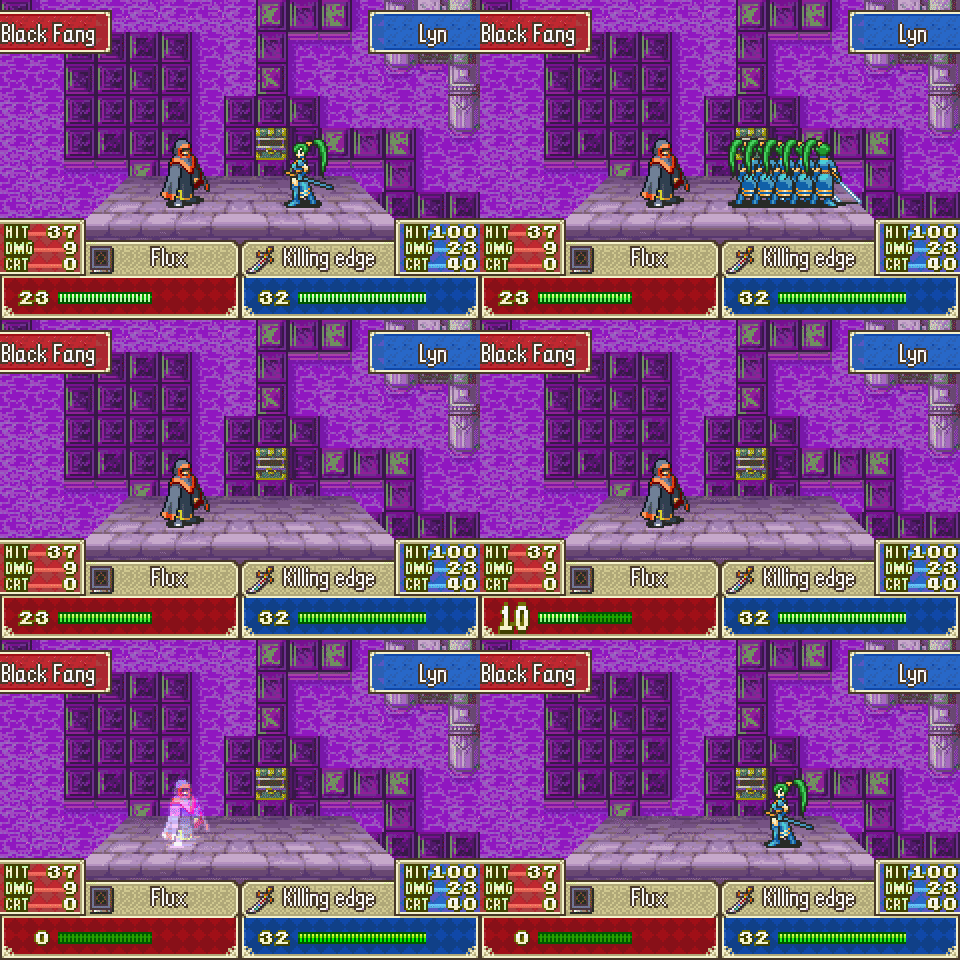
so i was trying to use code to mirror some of those effects by having multiple armatures which could, if there were multiple successive hits, fade in and out in such a way as to allow the actual input speed of combat to be unbound by the animation speeds, and maybe look cool in the process.
In practice, it didn't... um. well it definitely didn't not work, but it didn't exactly work either. I originally set combat up to use up to two astra models that would only appear at very high speeds, and then due to catty issues dialed it back down to 1, and I think it may have gone unused in the demo.
anyway, that's what we were trying to do here, and this might have been somewhat functional code, but it was confusing and not worth it and I sure do have some regrets. Aside from that, we have a different, simpler plan to speed up combat animations now. So, in order to figure out how to implement Spine properly, let's just yeet this system altogether! It'll be good for lower-ending processing as well, to not have two extra invisible models to worry about animating.
cutting out everything related to the astra bullshit, we get this-- much more manageable, moved into spine, and renamed:

i can breathe.
so we now load the armatures through spine, here's what our combat scene looks like:

...all right, so:
- there are two version of each armature on stage-- one in front of the pause screen and one behind. the duplicates are intentional here-- the ones in front are spine, and the ones in back are dragonbones to compare and make the spine ones match. intentional, that's fine.
- ...but why are the spine ones in front of the combat scene?
- and why is star hiding behind the ceremony like a shy girl on her first day of school?
- these are questions that have no answers.
before we could get to worrying about how these were looking though, we had another preloading issue. we got the above going by using setTimeout, which we described in last post, but asynchronous code* gets very messy so we didn't want to rely on it. I've actually already explained the point we ended up with here at the end of the last post so I won't repeat it, but please know that this is the point at which perry and I were banging our respective heads on the code trying to figure out the proper way to load these. it was painful, and took two days.
* What does Asynchronous Code mean?
It's code that isn't run in the same time as other code. Normally code says "Do A and then B and then C". But what if we want to run D and E at the same time as A and B? In a more advanced language, we would offload the work of D and E to another computer core and thread (a second set of instructions), but javascript does not do this. Instead, Javascript's implementation of asynchronicity (at least as far as setTimeout goes) basically waits for a break in between the processing of A and B and C, and then goes heywaitholdon before you keep going do D first-- and then waits for another break and heywaitholdon now do E while you're at it ok thanks
this might sound more messy explained here than it is in practice. in short doses, this function works perfectly well because there are usually plenty of low level 'breaks' in processing for it to interweave with. however for larger operations, it can get weird, and if a computer is particularly bad at processing and doesn't catch as many breaks, timing can be thrown off entirely.
...so, we want to avoid that for loading in the armatures, and by reversing the loading and storage order like we talked about at the end of last post, we did... But remember what we've said here about asynchronicity here, because it'll be a surprise tool for later.
As a bonus, when we fixed the loading, it also fixed the layering issue! I think this is because the armatures existed in time to actually apply proper layer information to them, but we love it when issues accidentally fix themselves.

the differences and size in positioning were mainly just a matter of tweaking some numbers, but i did have a quirky cat along the way where, because models are now preloaded rather than redrawn with each scene, properties of them were retained between combat... and therefore each time we loaded combat,
the models would just continually
get a little bit
smaller
each
time
but it was easily fixed too.
So we've now got our armatures displaying in combat correctly, it's time to make them Do Things. For basic cases-- idles, switching stances, etc-- this is easy, we already have a command to Play An Animation.
the problem is attacks.
let's take a look at the DB method to play an animation:

and now let's talk through it!
Step 1: first we get and save the length of the animation we're going to play! this is important because in DB we count down our frames to know when to do things like play sound effects, cause damage, and return to our idle animation.
so in order to step 1 but in spine, we need to know how information about the animation is stored, such as its length. the console makes this easy, so we take a peek through how that information is saved:

so we're looking at the details of the Animation object, and the duration of the animation is... 0.7332999706831 ???
...that's not a number of frames!
Uh Oh™
so it turns out that DB and Spine work differently this way. DB, at least in our implementation, operates on a frame-by-frame basis. Spine operates on a timescale. It has saved the length of the animation in a precise decimal of seconds. our systems are fundamentally incompatible. this does open the door for some cool features where it's much easier to do say slow motion or hyperspeed effects with Spine-- neat! but for implementing it, it's decided unhelpful.
we now have rework the way all of our attacks and systems work to be completely independent of frame progression. the way we do this is with Events.
Events exist within both DB and Spine and there's a theoretical world where I had the foresight to build our DB system off of events in the first place, but that isn't this world. Events are instructions added on the animation side that exist to just notify the code that something is happening. We already use them for sound effects in the demo, and that happily carried over to spine. Now we have to use them to detect when an animation finishes, and when an attack should do damage.
This is another one of those refactor things that is a little too large scale for me to show, so let's talk through the general before-and-after structure around attacks.
Dragonbones:
- decide what attack animation we're going to use
- know in advance what frame it's going to hit on
- with that knowledge, do some math to figure out when we need to start playing the attack hitstun animations relative to the combat scene
- queue those animations to play at that time
- when we reach the planned frame, play the animation
- if the attack is going to miss, play the dodge animation a few frames before when we know the attack will make impact
- when we reach the premediated impact frame, if the attack was not dodged, cause damage by incrementing a variable that's routinely checked
in short: the game plays animations and also does stuff on the side of and in time with, but ultimately independent of those animations
Spine:
- decide what attack animation we're going to use
- play the animation
- if the attack is going to miss, just play the dodge animation right away
- listen for an event on that animation that tells us it should be making contact
- when that event activates, cause damage by directly calling a damage function
in short: the game plays animations and the animations themselves cause things to happen
the spine implementation is actually much simpler in both concept and execution! again i want to iterate that while there are definitely no shortage of advantages to using spine over DB, this probably isn't one of them; we could have done a similar set up with DB had i known about events. unfortunately when we started using DB there was no english documentation for it, so. i didn't. lol.
but this is a general advantage to going through and refactoring these systems-- they become better and more efficient for long term use! i hope to do this once and never again. i am a fool for hoping so.
one example of refactoring was in the damage loop. I'm sure I had a reason for making the damage-handling part of the routine update thread in the past, but that doesn't really make sense, so while it technically unrelated to spine, i took the opportunity to go ahead and detach it from the update loop and make it part of the events caused by animations hitting each other.
this, as it turns out, was a Mistake™. more on that later.
once we had the timing issue sorted out, the work was mainly just in replacing all the old functions and that was easy. the core of spine is functional in battles, and now we just have some loose ends to tie up.
Loose End #1: Auto-Idling. after finishing an animation, we need to go back to the idle anim. DB does this by tracking frames! that implementation was messy and no long works.
the answer here was eventually to just set up another event for it, but i burned time on this because the internet told me spine had an animation queuing command (addAnimation) that would just play one animation after the other, and that Definitely Was Not Actually Happening! I still don't fully understand why beyond that apparently when an animation appears to end, it technically doesn't end.

I don't know. event-listening fixed it, next.
Loose End #2: Player Defense. after the update, combat worked when the player attacked, but enemies had a separate handling since they needed to start the attack, assume that the player would not dodge, and then be like oh wait okay fine no damage then when the player does dodge. this was just another example of updating and simplifying the order of events here, so it was easy. next.
Loose End #3: For Some Reason, Killing Units Stopped Working.
we started getting this message whenever we knocked someone out:

due to cass being funny, i had forgotten our error messages still call march a nerd and play The Price is Right's failure horn. it was a beautiful reminder. also i hated it.
anyway if you look at this error message and find it completely useless, congratulations, it is! an object in the graphic-rendering classes isn't getting passed to render somewhere, that's the shadow lands simba so it's probably not their fault, and I have no idea where or how to look.
this is a frustrating place to be in. i knew that it was somehow caused by what i did with damage processing (Mistake ™), because it broke in between me fixing something else and changing that, but the damage processing is just math and I didn't understand how changing only the way that's called would break something in the graphics rendering.
so perry was around helping me out. i did have a wrong call and he told me the right way to do it and saved me from going on a goots chase thinking that was the issue-- it wasn't. he also suggested i try a trace before the crash to see if i could get any more helpful information about what's going on. here's the trace:

if that looks completely useless to you, that's because it is! it's all exactly the same as the error message and then loops through itself repeatedly. why !!!! what is the point !!!! give me more information, you asshole!!!!!!
*the music freezes on a long, high pitched string note. i uncross my arms and look forward through gritted teeth.*
"Wait, go back--," I tell the unnamed lab technician in a gritty voice, clockwork spinning to life behind my eyes.
"What's that?" I ask, pointing a calloused, stubby finger at something entire indistinguishable in the blurry and technologically-inaccurate 90's era CCTV footage.
"Zoom in."

"Enhance."

*a viola crescendos to its highest tone as the face of the culprit is revealed*
The chain of events is like this:
- The animation notes that attack has made impact
- It wasn't dodged, so we do damage
- After calculating damage, reduce the target's HP
- After reducing HP, check if the target has died
- If the target has died, show it visually and close the combat scene because there's no more combat
Although it makes sense because it's not in the main update thread, I didn't entirely realize that the listeners for events are asynchronous.
So if you're running in an synchronous process and you try to close [the existing scene], what happens?
How could anyone know?
But apparently the answer is, it crashes the fuck its game because the scene that we're trying to close is fake!!!
The solution here is to just store a variable telling the scene (in the main non-asynchronous thread) that it should close itself instead of trying to do it right away from within the other thread.
Case closed.
Or so we thought...
Loose End #4: The AI broke????????????

What do you mean the AI broke??????????
We did not touch the AI!!!
Of all the things we have touched, the AI was not one of them!!!
Of all the things that exist that we could have touched, the AI was the least touched-est of them all!!!! what !!!!!!
So in contrast to the above which happened when the enemy died, this now only happened when we don't kill the enemy in combat. After the next time they enter combat-- boom, crasho.
Here's a gif of the sequence of events. It's beefy, sorry mobile readers. Combat closing early was intended for speed.

So we have now resolved this too.
How? I do not know.
After face-rolling on this for a day or so, I put on my best nat20 insight, took a guess, and nailed it. I probably saw something like this in the past-- the fact that it's the AI crashing is ultimately a huge red herring. The AI is just the first domino to fall so it gets the crash message.
What's actually stopping is... the entire game.
Okay, why! Why this, why now?
Well, the why now is that we changed the combat closure in response to the previous cat to just mark a variable. If that variable is marked, close combat.
However! Pay close attention-- coming out of combat, there is the diamond-shaped transition as the screen disappears.
Transitions take time!
Specifically, we need to do a thing, and then run code to do a different thing in a second-- and what do we use for that? setTimeout! Asynchronous code !!!!
Because we run that command to wait some time!
Time is marked in frames!
Frames have processing!
And processing runs that command!
So every time we try to close combat, we are actually closing combat 34 times!!! That is the number of frames that pass while we're waiting for the diamond to move across the screen!
Almost! You see, what if it was not 34! What if it was slightly less than 34!
When we are still waiting for the diamond, we skip over the actual scene-closing process
But if we have a different asynchronous scene-closing process running after the diamond has already finished, it will close the scene
Even if the scene we wanted to close, was already closed--
In that case, it closes a different scene-- the entire battle game!
The AI is crashing because the entire game was accidentally asked to stop because the fix to the previous cat asynchronously ran the code to stop the scene 34 times
haha oops
After a rewrite to remove setTimeout, everything runs perfectly, so the moral of the story is asynchronous code is the devil.
Loose End #5: On-hit animations. Whenever an attack connects, we play a different type of animation to draw particles, display a sound, and flash the attacked user with the damage color of our element. That was working inconsistently-- I found about four super minor issues with it, all of which should have either made it never work at all or not made a difference, but fixing them fixed the inconsistencies, so idk.
However, they did not fix the element-flash part of that. I thought it might work a little bit differently because we have to care about the differences in graphic structure between Spine and DragonBones. I was expecting this to be a slog-- and it has been-- but the flashing also, in the above inconsistencies, against all logic and reason has sometimes worked. There's something weird going on with the update loop that I don't understand, but that issue is evidently in our code and not the actual structure differences between programs, which should theoretically be much easier.
Theoretically.
Would someone do me a favor and put those words in the fridge for me? I may need to eat them later.
Loose End #6: Animation Smoothing
lol jokes this isn't even a loose end, but in the process of figuring out #1 I noticed a feature to help all the animations move into each other more smoothly, and reduce some of the animator-side work! it was easy to implement with one line, and has already helped a lot despite our transitional animation phase. Spine is doing work already!
...And with that, I am officially declaring that the Great Migration Over To Spine is done !!!!
there's still that loose end, and some work to do with cleaning up and compatibility for just a few of our specific models, DB is dead, murdered, and the body has been dragged out of the building and safely hidden where no authorities will find it.
I'm not out of the scripts yet, but next up it's time to make some visual progress. Stay tuned, folks.
