 Home

 Creators
 Search
 Recent
 Random
 Posts
 DMs
 Tags
 Random
 Importer
 Import
 FAQ
 Account
 Register
 Login
 Favorites
 Keys
 Logout
 Telegram

jugdralian squaredancing (Patreon)
Content
when i ran through the new development breakdown one of the things i mentioned doing was pivoting to a style of combat animation more inspired by Fire Emblem 4 than Fire Emblem 7. when we were working on spine, there were a handful of scenarios that came up when talking to the folks on the animation team where i'd have to say okay yeah but dont worry about that yet because idk how that's gonna change when we change combat styles. and thus, that pivot slowly rose in priority to where it is today-- being the second thing done after the spine migration.
firstly, let me just get this out of my system, "jugdralian squaredancing" has been my branch name on git for this project and it might be my favorite branch name ever. if you're wondering wtf that means, 'jugdral' is the name of the continent/world in FE4, and squaredancing is just me being silly about the movement, because that game is brutal and dark. but it is my favorite solely because when i'm switching branches i see this:

and that just makes me feel *twirls hair* idk, some kind of tourist? like oh hey hon what do you want to today, let's go check out the jugdralian squaredancers, i hear they tap their heels funny and sacrifice children to the dark lord!!!!
it's the little things.
okay so wtf are we actually doing here, firstly lemme show for all the folks who've never played Fire Emblem or those who've never played that Fire Emblem. so far our combat has mainly been styled after the GBA era games, not necessarily 7 in particular but they have this incredible style of sprite anims:
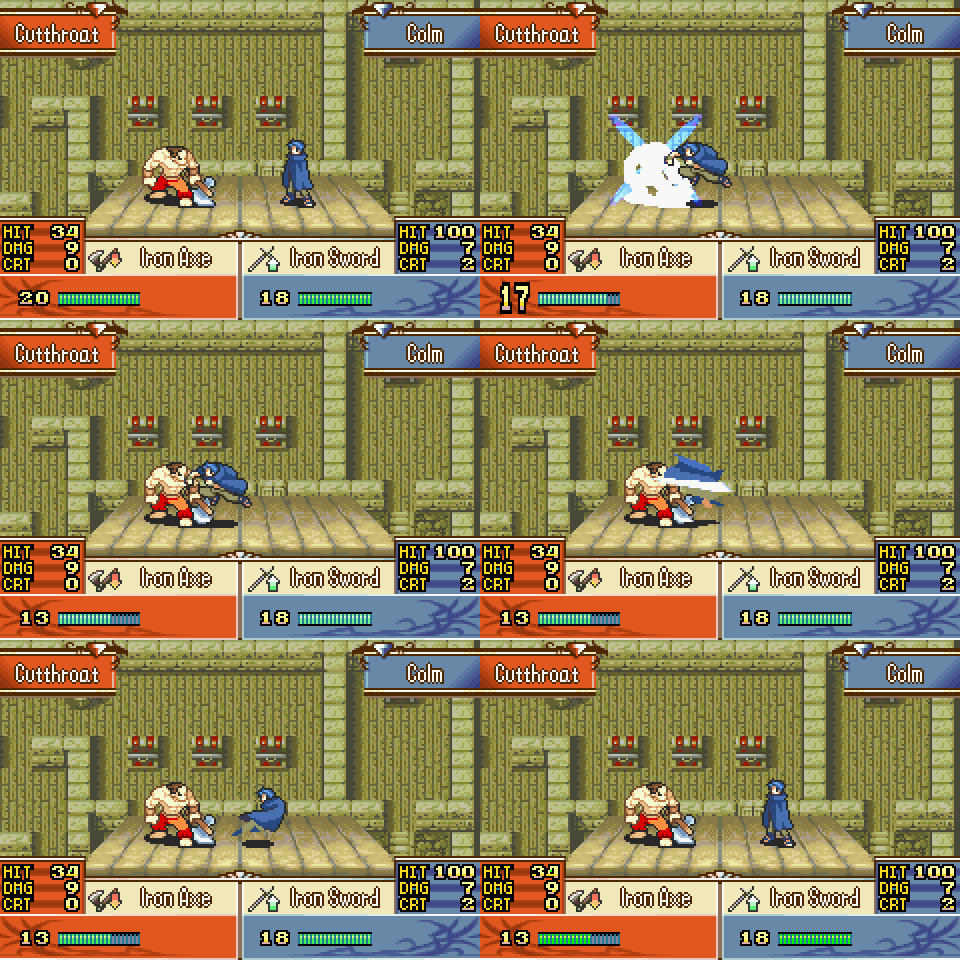
the style has a lot of charm and these games make very liberal use of screen flashes and shake effects to give the attacks a lot of power. and that's even before the out of this world critical hit animations.

absolutely wild. so i'm sitting there as a twelve year old who wants to make my own tRPG someday, sparkles in my eyes, and i'm like yeah i want my game to look like that. so naturally these are the kinds of things that i had in mind when i first designed the combat system and style of animations for starlight.
but the important part here is that these animations are, with a million smears and extra flare, ultimately always jump forward > hit > step back. three parts.
the problem we discovered during the demo is that we don't actually have the luxury of as many frames as we want to make ridiculous hit and crit animations like these games-- we have to care about timing. Fire Emblem's combat happens as an autonomous animation-- the battle has been chosen and now these things proceed independent of the player's input. we're just watching a movie here.
but starlight's combat is very deliberately not a movie-- we need you to be on your toes, not taking a nap. and further, we need the animations to respond to player input in a way that feels snappy, which realllllllly limits the number of frames we need to have an attack connect by, and if we're jumping forward and back and forward and back and forward and back (then put one foot forward), we just don't have a lot of time for anything else.
and then last year cass and i played FE4 after years of hearing from every veteran fire emblem player about how lit it is. and it turns out, yeah, it's pretty lit. there are rumors of a remake and lemme tell you im not the hype type but im so 👀👀👀 for whatever happens with that.
but let's talk about the combat animation in that game.

this one's on the SNES and in the year 199fuck so it's not quite as flashy as what's going on on the GBA,
but i see this and i'm like oh
it's not as flashy but look at what's going on here-- the characters engage all at once and then maintain proximity and just wail on each other in attack animations of just a few frames each. there's a slight knock back effect with each attack to give it a little bit of life, but in general
it is beautiful in its simplicity
and it is perfect for what i need.
so pivotting to this has been my project over the last handful of days. i'm really excited for this despite being like a 'basic' change because-- our combat system as it was is like the first dot on the map, it gives us a starting point to get our footing. and then this is like, we take our first step in the direction we actually need to go.
i'm not gonna walk you all through the full hoops of implementing this because this frankly went really well code-side, but let's talk about i break down the implementation and figure out the steps from A to B.
we start with a combat scene like this. it's functionally as it was in the demo, though running on spine (20 mb gif sorry mobile folks):

forward back forward back forward back. anyway, basic steps:
- so the first step is the animations themselves. i want to code around them but i can't code around them if i don't take a shot and make them in the way i want to code around. that means separating out the jump forward into its own animation and cutting out the jump movement from attacks.
- then play that animation if we're attacking from at least a certain distance away!
- once we've done that, we need to figure out how to tell the code to move the battlers to a different X position
- and then we need to figure out how to tell the code to do that at the right time, which is mid-dash animation. for this, we use an eventListener like we described in the previous post to have the animations cause the jump forward.
- but that instruction is just 'appear in X spot', not 'move to X spot over Y frames'. next we need to do that. so we create a method in the update loop (update loop: a set of instructions the game runs through every single frame) to receive and care about positional instructions
- and then we make our eventListener update that for instructions over multiple frames instead! and we add a slow in and slow out effect for smoothness.
- correct the distance so it looks appropriate
- now knockback! on damage, we can use the same method we made just before to move the target back a little bit each time its hit
- and for spice, let's have crits knockback extra. maybe even extra if they die to a crit???? the scene closes too fast but we can't all be virgo vs the zodiac
- next we make the attacker do the same, just advance a liiiitle bit on each attack if we're too far away.
- ...corral a cat where i got the left-right value of the distance backwards so on every attack star would just appear to be like, inching further and further away from the battle screen. tactical retreat???
- now, what about when we knock the opponent too far to the side of the screen? fortunately, we already have the ability to scroll the battlers and background from long-range combat. we apply that here to keep people on the center of the screen.
- here you can see babie helping me with that part of things:

- move the background less than we do the battlers to create an illusion of distance perspective
- ...corral a cat where i got the check for being off screen backwards so instead of scrolling back on screen the edges of the game screen actually just sucked the characters off of it into a void...
- ...corral another cat where it tried to re-center the battlers while it was already re-centering, which caused it to re-center twice at the same time and thus yeet everyone off into the void beyond. i really should've gotten gifs of these, this is my failure as a creator here.
- now that we've done all that, we can adjust the spacing of between blocks and lower the attack cool down to match!
...okay let's talk about that last thing!!!! that's actually why we're doing this!!!!! i want to make that clear, if this was a matter of just cosmetics, i wouldn't worry about this. but the corner i dug myself into before was that we could not speed combat up beyond a certain point because we had to wait for the animations to finish-- or else make a stupid convoluted astra system running multiple armatures to handle edge cases where a character is attacking a lot of times in quick succession. but you can see in the above combat gif that there's a lot of empty waiting space between each attack. that's because of the style of animations!
soooooo switching to this is how we speed up the pace of combat. and that allows us to speed up the pace and feel of the game! that is big and important !!!!!
with all of that said and done, we can look at how things are now. this gif doesn't show off all of the visual features i've added like crit knockback and screen scrolling-- that stuff is neat, but like i said, not the point.
what this does show is how, in a potential extreme, we can now ask the player to hit a flurry of attacks and we're able to handle them in a way we couldn't before...
...and perhaps importantly for our mobile users, it allows us to make a gif of half the time size:

as always, thanks for tuning in. up next: suffering!!!!!!!
