Home Creators Posts Import Register Favorites Logout

Hi,

Thank you for your support!

The latest release of my work is Volumetric Clouds Release 5, you'll find below a copy of the download post with a permanent link you can use to redownload version 5 after your access expires.

For a detailed list of what's new and included, you can check out the full changelog here.

Thank you again for being a part of this journey.
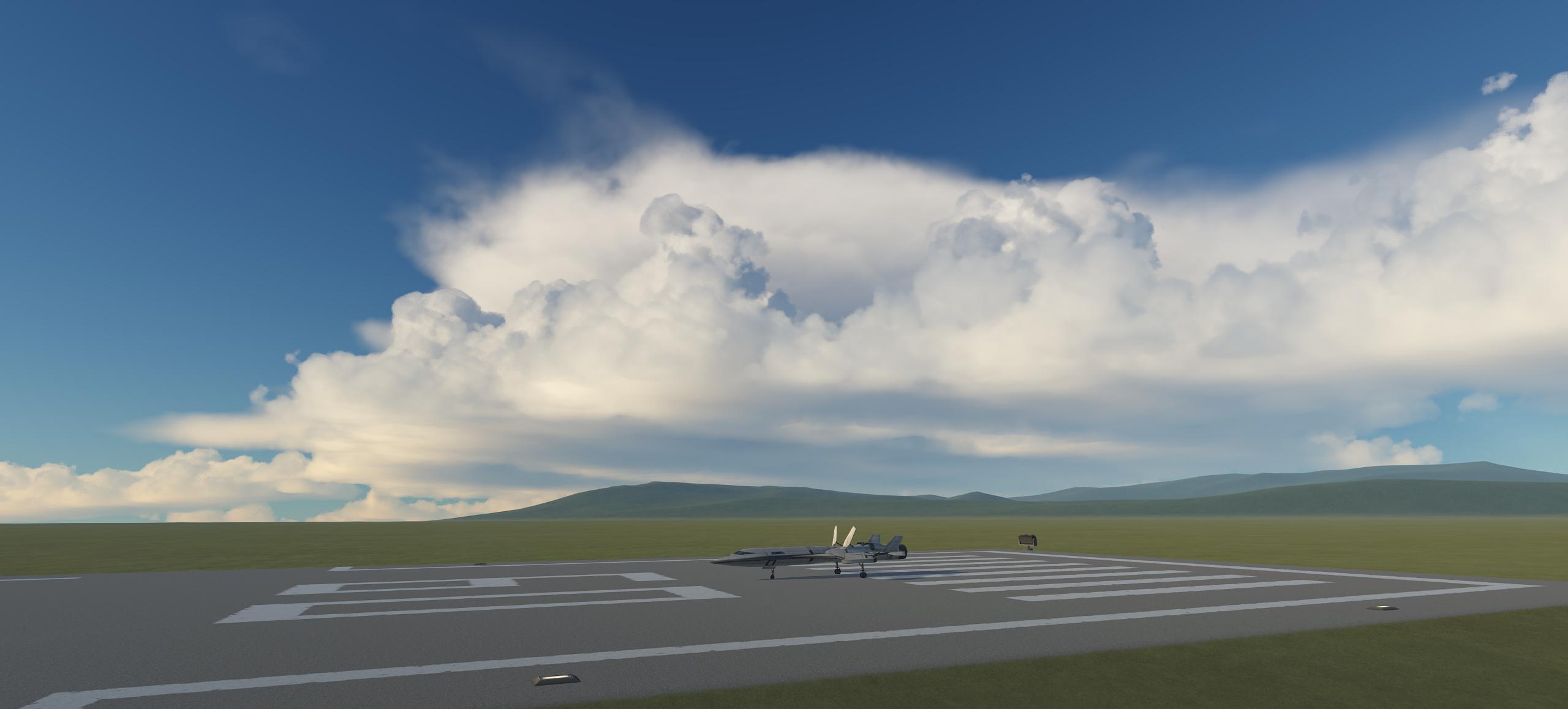
Download and installation instructions

Go here if you prefer a video guide (by Goddchen on youtube, covers recommended mods + volumetrics, although skip Planetshine since it's obsolete with Deferred), otherwise follow my instructions:

  1. Download and install Release 5 [Drive link] To install remove any existing config packs for EVE (BoulderCo, AVP, SVE, Spectra, 64k clouds, KSRSSVE, etc), remove any existing versions of Scatterer and EnvironmentalVisualEnhancements, then merge your GameData folder with the one included in the zip (drag and drop the included GameData in your KSP directory and they will get merged, do not put GameData inside GameData). When done you should see the following folder structure:

  2. Download and install deferred

    Needed for puddles, screen-space reflections, and generally better lighting. Get CKAN and use it to install Deferred. CKAN is recommended because it automatically handles dependencies and mod conflicts. If you want to install it manually go here and follow the instructions.

  3. (Optional) Install TUFX

    Optional but the ambient occlusion added by TUFX works well with Deferred and is important for good lighting. Use my TUFX profile or your profile of choice with ambient occlusion enabled. If you want to use my you can select it in-game from TUFX menu (see image)

  4. (Optional) Install Parallax-Continued

    Parallax-Continued uses detailed PBR textures to make the terrain look amazing and adds dense vegetation and grass as well as improving how the planet surfaces look from orbit. Highly recommended.

  5. (Optional) Configs for RSS and OPM/MPE/JNSQ planet packs I only make and provide configs for the stock system, if you play with other planet packs you need an appropriate volumetric config.

    1. RSS: Sol by BallisticFox is recommended

      1. CKAN Install instructions by BallisticFox and Hayden copied from BallisticFox's discord:

        Open CKAN, go to Settings → CKAN Settings. Under "Metadata Repositories", click "New". At the bottom of the "Add Repository" list, select "Sol". Click "Add". Close the CKAN settings window.

        Select Sol-Configs, hit apply, it should guide you through everything! If you're using RP-1, select the express install and on the Graphics selection page, select Sol Core

    2. OPM/MPE: OPM/MPE Volumetrics

    3. JNSQ: JNSQ Volumetrics continued

Documentation

You can read the wiki here, it covers everything about how the volumetrics work, how to configure them and what the different textures do.

Reporting issues

To report an issue please add screenshots of the issue, reproduction steps and your KSP.log file, you can then share a link to these via filebin or google drive, these elements help the issue be properly diagnosed and fixed.

Updates since initial release

  • 15/08/2026

    • Make scaled space scattering shaders depth-buffer based to fix compatibility with Mirage and Parallax scaled

    • Fix cases of TAA smearing on Parallax trees and Parallax/Mirage scaled planets

    • Fix EVE puddles shifting periodically when the craft is in movement

    • Fix scatterer ocean and stock ocean displaying on top of each other in some cases, causing a "marbled" ocean look

    • Small cloud and scattering performance improvements

    • Add an interactive curve editor in EVE gui for editing the coverage and density float curves, curve edits apply to clouds in real time.

    • Make clouds part in map view on mouse over or camera proximity to reveal terrain, to help navigation/landings

    • Fix EVE GUI tanking performance when open

    • Add collapsible GUI lists and collapse cloud types, painter tiles, and masks by default.

    • Add global EVE ambient/lighting sound volume controls and respect KSP volume settings

    • Fix empty lists in EVE affecting GUI layout

    • Fix issue with legacy cloud particles appearing through terrain with deferred

  • 14/03/2026

    • Fixed pixelated puddles after a long time in-game

  • 03/01/2026

    • Documentation update

    • Improved cloud upscaling:

      • Fix pixelation in motion when thin clouds/fog passes in front of thicker clouds, this was especially bad when very thin fog passes in front of farther away clouds and causes them to pixelate.

      • Fix smearing on overlapped cloud layers at long distances

      • Reduce trailing artifacts on clouds on fast camera movements

    • Add ability to set cloud layer linear speed relative to the planet's radius, or as angular speed instead of defaulting to linear speed at layer's altitude. Makes it easier to sync layers to each other and avoids them desyncing when rescaling the planet's radius (eg planet rescales that don't modify the cloud configs). Default to existing behaviour (linear at layer altitude) for compatibility

    • Fix singularities in cloud flowmaps causing visible discontinuities/artifacts on Jool

    • Improve Jool 2d (orbit view) flowmap

    • Fix puddles shifting/moving around in some cases

    • Improve ocean generation and scene switch times by generating ocean spectrum and variance on the GPU. Thanks to @Phantomical/steamroller for the tip and initial parallelized CPU version.

    • Small performance improvements in ocean FFT shader

    • Fix square artifacts on ocean surface on NVidia 50 series GPUs

    • Fix some case sensitive cloud texture paths for Linux. Thanks to @pipai for the tip

  • 12/10/2025

    • Scatterer

      • Fix scatterer causing darker ground ambient/reflection in reflection probes

      • VR fixes by JonnyOthan

      • Fix duplicate instance message when switching scenes in editors

    • Deferred (download separately)

      • Fix nested reflections in reflection probe causing overbright reflections on minmus flats

  • 30/09/2025

    • Fix Scatterer causing parts in the VAB to become dark.

    • Deferred fixes (download/update separately)

      • Fix Deferred SSR getting "phantom" bright white reflections on Minmus when there is nothing to reflect

      • Fix some issues with SSR becoming black

      • Force-enable reflection probes to fix some users getting no ambient lighting because they disabled it

  • 29/09/2025:

    • Fixed a serious issue causing kraken attack when switching to map view.

Added: 2026-08

Hi there,

Welcome, and thank you for joining!

The latest release of my work is Volumetric Clouds Release 5, which includes major new features and improvements.

As a free member, you can check out the full changelog and see everything that's included here: Changelog

If you like what you see and want to get the latest version, you can unlock the download by becoming a patron: Release 5 download

Note that my other mods are publicly available including Deferred, Scatterer and Singularity.

For the next versions of volumetric clouds, I plan to add volumetric rocket plumes and lighting from other celestial bodies that affects clouds, atmosphere and parts in a performant manner (like planetshine but working on everything), as well as other bugfixes and performance improvements.

Thanks again for your interest.

-Blackrack

Added: 2026-08

Hi,

Thank you for your support!

The latest release of my work is Volumetric Clouds Release 5, you'll find below a copy of the download post with a permanent link you can use to redownload version 5 after your access expires.

For a detailed list of what's new and included, you can check out the full changelog here.

Thank you again for being a part of this journey.

Download and installation instructions

Go here if you prefer a video guide (by Goddchen on youtube, covers recommended mods + volumetrics, although skip Planetshine since it's obsolete with Deferred), otherwise follow my instructions:

  1. Download and install Release 5 [Drive link] To install remove any existing config packs for EVE (BoulderCo, AVP, SVE, Spectra, 64k clouds, KSRSSVE, etc), remove any existing versions of Scatterer and EnvironmentalVisualEnhancements, then merge your GameData folder with the one included in the zip (drag and drop the included GameData in your KSP directory and they will get merged, do not put GameData inside GameData). When done you should see the following folder structure:

  2. Download and install deferred

    Needed for puddles, screen-space reflections, and generally better lighting. Get CKAN and use it to install Deferred. CKAN is recommended because it automatically handles dependencies and mod conflicts. If you want to install it manually go here and follow the instructions.

  3. (Optional) Install TUFX

    Optional but the ambient occlusion added by TUFX works well with Deferred and is important for good lighting. Use my TUFX profile or your profile of choice with ambient occlusion enabled. If you want to use my you can select it in-game from TUFX menu (see image)

  4. (Optional) Install Parallax-Continued

    Parallax-Continued uses detailed PBR textures to make the terrain look amazing and adds dense vegetation and grass as well as improving how the planet surfaces look from orbit. Highly recommended.

  5. (Optional) Configs for RSS and OPM/MPE/JNSQ planet packs I only make and provide configs for the stock system, if you play with other planet packs you need an appropriate volumetric config.

    1. RSS: Sol by BallisticFox is recommended

      1. CKAN Install instructions by BallisticFox and Hayden copied from BallisticFox's discord:

        Open CKAN, go to Settings → CKAN Settings. Under "Metadata Repositories", click "New". At the bottom of the "Add Repository" list, select "Sol". Click "Add". Close the CKAN settings window.

        Select Sol-Configs, hit apply, it should guide you through everything! If you're using RP-1, select the express install and on the Graphics selection page, select Sol Core

    2. OPM/MPE: OPM/MPE Volumetrics

    3. JNSQ: JNSQ Volumetrics continued

Documentation

You can read the wiki here, it covers everything about how the volumetrics work, how to configure them and what the different textures do.

Reporting issues

To report an issue please add screenshots of the issue, reproduction steps and your KSP.log file, you can then share a link to these via filebin or google drive, these elements help the issue be properly diagnosed and fixed.

Updates since initial release

  • 14/03/2026

    • Fixed pixelated puddles after a long time in-game

  • 03/01/2026

    • Documentation update

    • Improved cloud upscaling:

      • Fix pixelation in motion when thin clouds/fog passes in front of thicker clouds, this was especially bad when very thin fog passes in front of farther away clouds and causes them to pixelate.

      • Fix smearing on overlapped cloud layers at long distances

      • Reduce trailing artifacts on clouds on fast camera movements

    • Add ability to set cloud layer linear speed relative to the planet's radius, or as angular speed instead of defaulting to linear speed at layer's altitude. Makes it easier to sync layers to each other and avoids them desyncing when rescaling the planet's radius (eg planet rescales that don't modify the cloud configs). Default to existing behaviour (linear at layer altitude) for compatibility

    • Fix singularities in cloud flowmaps causing visible discontinuities/artifacts on Jool

    • Improve Jool 2d (orbit view) flowmap

    • Fix puddles shifting/moving around in some cases

    • Improve ocean generation and scene switch times by generating ocean spectrum and variance on the GPU. Thanks to @Phantomical/steamroller for the tip and initial parallelized CPU version.

    • Small performance improvements in ocean FFT shader

    • Fix square artifacts on ocean surface on NVidia 50 series GPUs

    • Fix some case sensitive cloud texture paths for Linux. Thanks to @pipai for the tip

  • 12/10/2025

    • Scatterer

      • Fix scatterer causing darker ground ambient/reflection in reflection probes

      • VR fixes by JonnyOthan

      • Fix duplicate instance message when switching scenes in editors

    • Deferred (download separately)

      • Fix nested reflections in reflection probe causing overbright reflections on minmus flats

  • 30/09/2025

    • Fix Scatterer causing parts in the VAB to become dark.

    • Deferred fixes (download/update separately)

      • Fix Deferred SSR getting "phantom" bright white reflections on Minmus when there is nothing to reflect

      • Fix some issues with SSR becoming black

      • Force-enable reflection probes to fix some users getting no ambient lighting because they disabled it

  • 29/09/2025:

    • Fixed a serious issue causing kraken attack when switching to map view.

Added: 2026-08