Home

 Creators
 Search
 Recent
 Random
 Posts
 DMs
 Tags
 Random
 Importer
 Import
 FAQ
 Account
 Register
 Login
 Favorites
 Keys
 Logout
 Telegram

Version Release v36 [Playing States] (Patreon)
Content
Ooh boy, this took a while eh, finally its done and released though! This update mainly focuses on Playing States, Vorecade-wide performance and experience improvements, a download manager rewritten from scratch to be more resilient and bunch more! I'll be leaving the usual changelog down below alongside with the feature highlights, but before I do that, I'd like to thank certain someone who had a big impact on this update, you're the best! and thanks for your continued support in Vorecade!
Main Feature Highlights
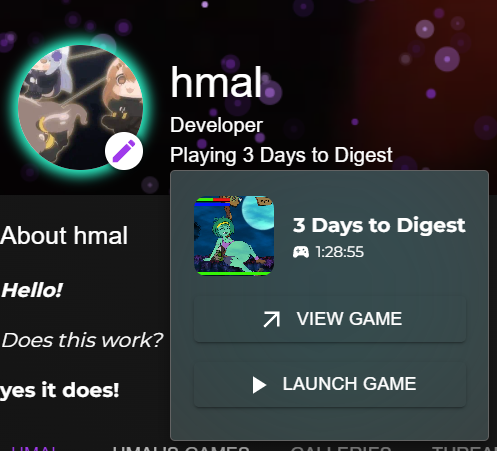
Playing States
Recent Activities tab in the user profile
Improved File Manager performance and QoL
Reworked Download Manager
Thanks for your continued support in Vorecade!
The changelog is below as usual
- Game videos now have the volume control when they are the first in the carousel without requiring to go back and forth for it to appear.
- Vorecade now utilizes the page title, showing related information to the current page and action.
- Vorecade client now has a better DNS resolver, which should fix some connection/download issues.
- Vorecade now has a "Playing" status on the user's profile page, showing the current game the user is playing. The feature is opt-in and can be enabled in the user settings. Vorecade will prompt you once after this update to enable it. You can also enable it in the user settings > "Privacy" section whenever you want.
- Vorecade now has a new profile tab where your last game activities in the past 2 weeks are displayed. Your total playtime as well as the last time you played the game will also be displayed.
- A bug that let you stay on the "Create Game" screen even when you didn't agree to the terms has been fixed.
- Fixed short descriptions not being displayed properly on the game page.
- Game sorting has been moved to the server side for better performance, reliability and consistency.
- Popularity algorithm now favors games with more reviews and higher ratings.
- File manager does not flicker when you drag a file over anymore.
- Data deduplication system has been reintroduced.
- Added a low RAM/memory warning, will appear once every session if your computer has less than 2GB or 256MB of free Physical Memory available.
- Fixed the image cache not behaving properly. It should now work as intended.
- The folder "AttachedFiles" now has a special icon to differentiate it from the rest of the folders.
- Added Sorting options to the file manager. You can sort files by name, size, date created and type. Also includes a "folders first" option.
- Added a File Lock system to the file management system. This will prevent files from being deleted if something depends on that file. You shouldn't really have any issues with this, but if you do, please report it. This feature has been added as a sanity check primarily.
- User avatar/banner not updating visually when changed has been fixed.
- User profile effects now has the user's color theme applied to them, if the user hasn't set a custom color theme, the default purple colors will be used.
- Turns out the default theme wasn't really set to purple for some reason (v31-Hotfix, it should be now.)
- Game Playtimes now also save when you last played the game, existing entries will show "Never Played" until you play the game again due to data not being saved prior to this update.
- Game installation notifications now show the game's library icon on the notification.
- Download system has been reworked to use a more reliable and efficient method. This should fix some download issues. Downloads shouldn't fail as often as before as the new system includes an automatic retry mechanism.
- Long lived downloads that has been in the paused state no longer fail to resume.
- Downloads now continue from where they left off even if the client is restarted or the network connection is lost.
- The "Looks like you're new here" message has been changed to appear only once per client if the user hasn't created any games yet.
- Games on the user profiles has been adjusted to be more visually appealing.
- Renderer's DNS resolver has been reverted to the default behavior due to some issues with the custom resolver in this update. No guarantees that it will be reintroduced in the future, but I'll try!
- This update has been partly possible thanks to some external honse intervention, so I want to thank them dearly for their help! (You know who you are!)
(Did you really read till here? wow, you might as well join the Vorecade Discord Server then!)
Files