Home Creators Posts Import Register Favorites Logout

Content

The game DOES USE/APPLY Xbox and PS5 HDR Calibration settings but not PC ones.

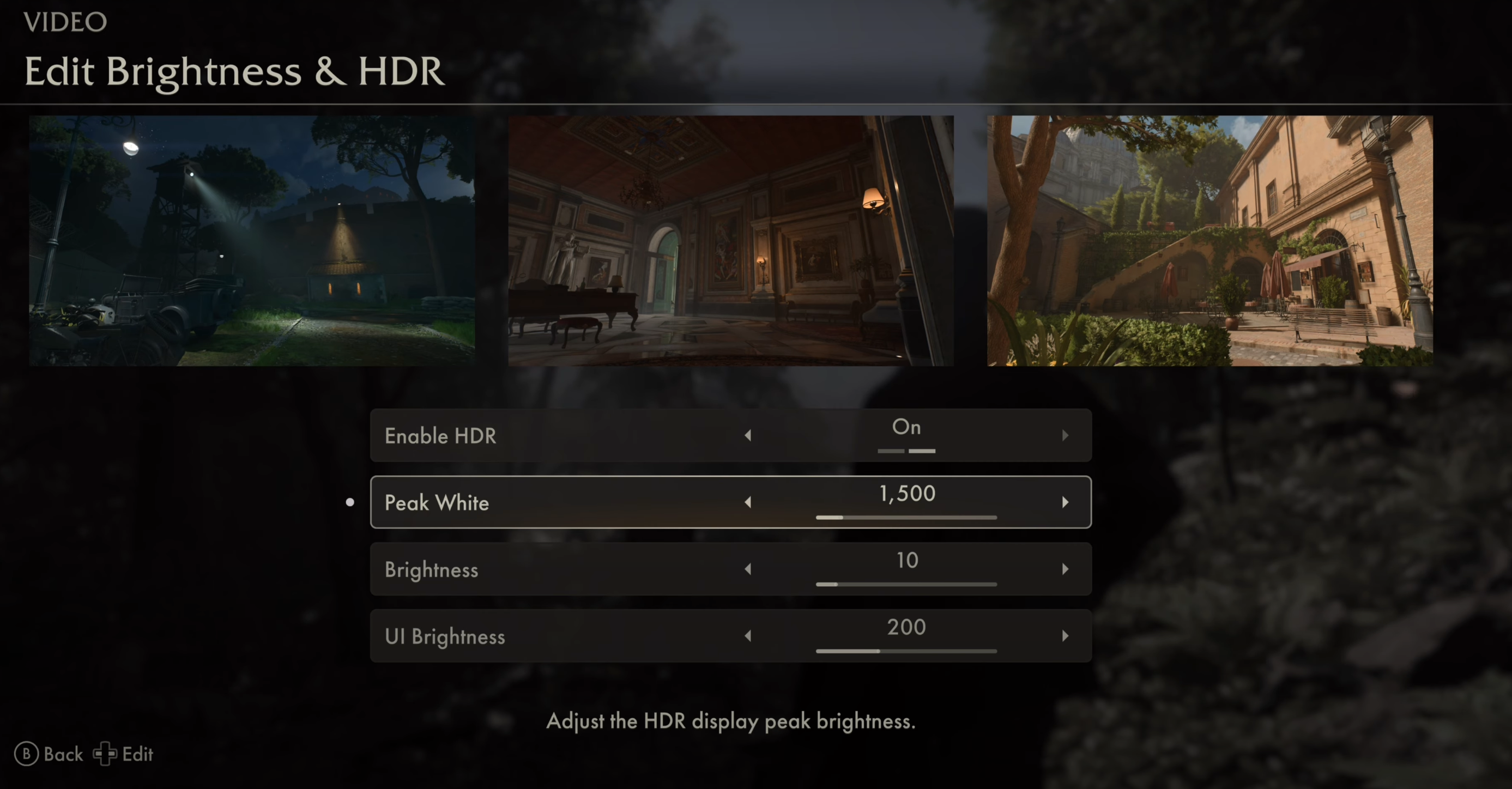
The game has a good HDR implementation as it correctly leverages Xbox HDR Calibration while it offers an in-game Peak HDR Luminance slider (in nits) on PC which can go up to 10.000 nits along with other HDR controls while also providing good black levels.

The only problem on PC is that the value you put in-game for Peak HDR Luminance doesn't correspond exactly to the actual in-game Peak HDR Luminance (you need to aim higher to match what you want during actual gameplay) but we'll see that in a moment :)

For PC only:

If you have an LG OLED and:

> you're using Dynamic Tone Mapping or Dynamic Contrast:

Set Peak White slider to: 4000 (nits)

> you're using HGIG:

Set Peak White slider to: 1.000 (for 800 nits) or 1.200 (for G2/C4) or 2.000 (for G3/G4)

If you don't have an LG OLED and:

> you don't have an HGIG option:

Set Peak White slider to: 1.200 (for around 1.000 nits)

> you're using HGIG:

Set Peak White slider  to the corresponding real Peak HDR Luminance of your TV in "nits" considering the following in-game values:- 1.000 = 800 nits- 1.200 = 1.000 nits- 1.700 = 1.300 nits- 2.000 = 1.500 nits- 2.500 = 1.800 nits- 2.800 = 2.000 nits- 4.000 = 2.500 nits

For PC and Xbox:

Set the regular Brightness slider to 28 to fix an otherwise slightly too contrasted image and improve specular highlights without raising black levels.

Set UI Brightness slider to 200 for a balanced value.

BONUS:

Disable Chromatic Aberration & Disable Film Grain: by setting it to 0, to improve picture clarity

On PC: Set Motion Blur to Medium: as default High is a bit too much (especially with Frame Generation)

On PC: the game is VERY heavy when using Full Ray Tracing (or Path Tracing) so if you want to use that make sure to not exceed your VRAM limit (e.g. decrease DLSS preset to Performance and decrease Textures quality until your VRAM has some free room again)

On PC: DLSS Frame Generation is currently broken (it will stutter intermittently). Hopefully this will be fixed with later patches -> FIXED WITH PATCH 1.02 (but if you still have issues with frame pacing: Disable Low Latency Mode: Ultra from classic NVCP (only for this game)

Enjoy :)

-P

Files
Comments

Vlad760

Hello, what recommendations do you have for the in-game sharpening and film slider? Thanks Series X LG c3

AcePython92

so increase the regular brightness from 10 (on xbox) to 20?

Omar Mansour

Hello, is it correct to only see a brightness and UI brightness slider on Xbox under “video?” Also I do not see an area to switch to performance mode or not

techoptimized

Yes, like I mentioned Xbox uses system HDR Calibration for the peak HDR part, so it's normal you don't see it. They removed the perf option with latest patch apparently: it's always 60 now.

Anton Protasov

Small correction, the game does not have quality or performance mode on xbox. It was built to run at 60fps from the git-go. It runs at 1800p 60fps. Thats id tech 7 for ya 😃

Josh Trebilcock

Hello buddy. Turning off low latency mode in the Nvidia settings doubled my frame rate on path tracing mode. 1440p dlss quality, no frame gen, max settings. Was nearly 30fps with low latency mode now it's well above 60-70. No noticeable difference in lag either.

techoptimized

Yeah it seems bugged at the moment but NVIDIA should have fixed it with an OTA update for drivers 566.36 (while it works correctly with previous 566.14)

Hasnain

where do u measure the peak brightness? when im in gizeh i look at the sun and get 797 nits when in game peak is set to 1150

haris mohammad

Hey man does hdr need to be set higher still or was hdr patched? If no update, then what value should I use to achieve 1100 nits in game?

Timo

So, in a LG OLED CX: 0nits min luminance, 800nits max luminance (HGIG) and in-slide game HDR put the brightness to 28?

techoptimized

For Xbox: Min/Max is ok for Xbox HDR Calibration, then in-game Brightness slider to 28, also correct

Timo

Thank you for the help, mate. One last question: do you think the Dolby Vision is better or worse for this game?

Timo

Thanks again. I don't wanna be a pain in the ass, but can you tell me about VRR vs Freesync on Xbox Series X. In my LG CX I always turn VRR on and Freesync off. This is correct, right?

Rene Kollmann

Will you retest HDR with the newest Patch? Seems like there is a change in Lighting. Also Artefacts got fixed like in dark areas of bushes and in the eyes.

techoptimized

HDR rendition is the same. What they have fixed/added is Full Ray Tracing + now with DLSS Ray Reconstruction too

Riccardo

Ciao/Hi, stutter animations in cutscenes with dlss on, is there any way to solve it? I have tried them all, thank you!

techoptimized

No way to fix it as the game auto-disables DLSS FG during cutscenes (creating stutters) and re-enable it automatically when they end. Only devs can fix it

techoptimized

Cool to know for keeping FG enabled with that mod, but animations stutter may also be related to FG itself with the game

David Soto

Should sharpening be turned off?

techoptimized

No, leave it default on Xbox/PS while if you use 4K DLSS Performance + FG + RR to have Path Tracing on PC increase in-game Sharpness to Max

Jai Sharma

Hi any change for PS5 settings?

nERv

Still same HDR settings with new Indiana Jones DLC Order of Giants?

Omar

Are the Brightness and UI brightness settings for PS5 aswell?

nERv

Are this settings up to date with the latest update https://steamdb.info/patchnotes/22715278/ ? In patchnotes they say it fixes some HDR stuffs! I will try lately and i will do a comparison between default and recommanded!

Jai Sharma

Hey could you please re-visit these settings after recent updates? The sun and any daylight scenario is looking extremely bright with the current settings. I'm playing on PC on LG G3 with HGIG on