Home Creators Posts Import Register Favorites Logout

Content

The idea behind having the same calibrated system-wide HDR settings (or "metadata") for all HDR games is noble and both Microsoft and Sony really tried to make this a reality in order to finally fix the pain in the ass the average user is facing manually adjusting in-game HDR to the real HDR capabilities of the TV in a different way: every time, on every game. (if he's lucky enough to have the bare minimum control over it, of course).

Unfortunately, even if system HDR Calibration is a reality for years now, very few games (and devs) actually leveraged on it.

For those cases, let's see the Optimized values for Playstation HDR Calibration app.

If you have an LG OLED and:

> you're using Dynamic Tone Mapping or Dynamic Contrast, set:

First screen / Max Luminance: +25 clicks (starting from 0; all the way to the bottom)

Second screen / Max Luminance: +25 clicks (starting from 0; all the way to the bottom)

Third screen / Min. Luminance: 0 clicks (all the way to the bottom)

> you're using HGIG:

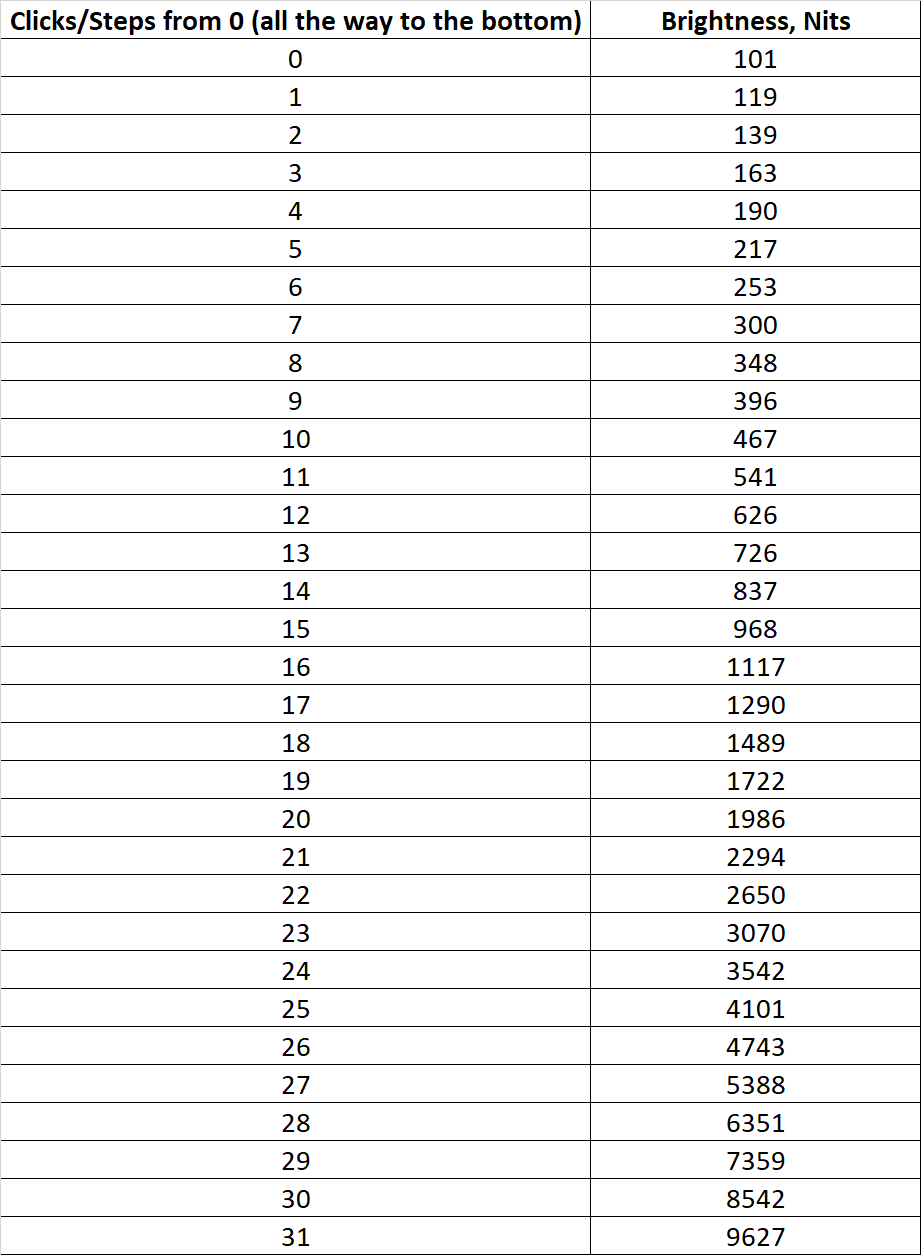
First screen / Max Luminance: +14 clicks (starting from 0; all the way to the bottom) or +15 clicks (for G2/C4) or +18 clicks (for G3/G4/C5/C6) or +22 clicks (for G5) or +23 clicks (for G6)

Second screen / Max Luminance: +14 clicks (starting from 0; all the way to the bottom) or +15 clicks (for G2/C4) or +18 clicks (for G3/G4/C5/C6) or +22 clicks (for G5) or +23 clicks (for G6)

Third screen / Min. Luminance: 0 clicks (all the way to the bottom)

If you don't have an LG OLED and:

> you don't have an HGIG option:

First screen / Max Luminance: Increase it until the logo will totally disappear

Second screen / Max Luminance: Increase it until the logo will totally disappear

Third screen / Min. Luminance: 0 clicks (all the way to the bottom).

> you're using HGIG:

First screen / Max Luminance: Set your real TV Peak HDR Brightness (see the table below for details);

Second screen / Max Luminance: Set your real TV Peak HDR Brightness (see the table below for details);

Third screen / Min. Luminance: 0 clicks (all the way to the bottom).

Files

Comments

David Soto

I have a LG CX and at 13 clicks using HGIG the picture is barely visible, should I go up one more click?

Laurens

If I don’t have an LG Oled and no HGIG option do I have to turn of tone mapping before I calibrate HDR ?

techoptimized

Turning off tone mapping = HGIG. So you can do that if you prefer for games, otherwise if you have tone mapping on stick to 1.000 nits in that case.

ejinn

I’m using a 77 G3 and using your FILMMAKER + ALLM settings for HDR with DTM on PS5 and it clips at 21 clicks. Do I still go all the way to the 25?

Larry Wesby

Is the sharpness setting supposed to be at zero in game optimzer as well?

Larry Wesby

One more question where is “use HDR Cinema + Movies” settings for ps5. is it filmmaking mode?

Moxify

Ill try these HDR settings for sure on my C3. Most of the games I play is HDR I believe. I just use your HDR Filmakermode + ALLM for that. PS5 tells us to barely see the «sun» in HDR calibration so Ive just sticked to that for now… So you tell us the first and second page should be max, like when the sun is MAX visible? And last one should be lowest, like invisible? :) Will games even look better? :O

Tyler Pickney

Do the OLED settings also count towards a non-LG QD-OLED monitor?

Shane O'Connor

Paolo, did you get a PS5 Pro? I've got a CX with DTM on, and +25 seems to be too much now. Curious if you've tested the PRO yet.

Emil Mathisen

So on the lg g2 you say use +15 clicks but it clips at 16 for me? Is that normal should i still use 15?

Emil Mathisen

Intresting so on ps5 pro at 15 clicks the sun is less vissible then on ps5

Mark

I have LG C4 '42' size, and this TV have less brightness than larger types. So my question is when i use HGIG the HDR Calibration with PS5 is +15 clicks or +14? What the best?

Nanofoo

Hello Paolo! I have a LG G5. How many clicks do I need to do for the Max luminance if I use HGIG?

haris mohammad

Hello so for a 1100 nits tv I would do 16 clicks to be a litter over than under 1100? Since it’s my first time calibrating on ps5 for death stranding 2 and I see it’s not a scale like on Windows.

techoptimized

UPDATE 2025/07/16 - Added clicks for LG G5/C5 OLEDs

Jai Sharma

Same settings for PS5 pro as well?

Tyler Pickney

I just got an update on my PS5 Pro and it forced me to redo my calibration. I have a G3 with hgig enabled. In PS5 Pro I’m getting the image to disappear at +15 clicks. Is that normal or should it be disappearing at +18?

??? ???

hey. i just joined your patreon because i was hoping you could answer my question. i have an old LG oled tv B7V model from 2017 i believe. it doesnt support hgig or dtm and im trying to run the ps5 hdr calibration but your guide doesnt mention how to set it if you dont have hgig or dtm but still have an oled unless i just didnt see it. in my case, what would be the "correct" way to set it on all 3 screens via the ps5 hdr calibration? peak brightness at 10% is 768 and i also read that to set it correctly since i dont have hgig or dtm id need to know what the maximum toned mapping luminance is which i dont because im no technical expert. hope all of this makes sense and you can help me correctly. thanks again.

HydroRam

With LG C3 & regular PS4 does this apply as well?

Bob Shoecraft

Love the guides you put together. They're absolutely worth the sub. Quick question for you - What changes, if any, would you recommend for me if my PS5 Pro and LG C4 are in a pretty bright room with two windows? I recently moved downtown to an apartment, so the room they're set up in is my only option.

LeonSKennedy

Are your recommended PS5 settings the same for PS5 Pro?

LeonSKennedy

And for e.g. LG OLED HGiG "First Screen" you're clicking Up or Down on the controller? (You have a + sign but then say "all the way to the bottom" so it's confusing.)

Felipe

Hi Paolo. I have a LG C5. I've already calibrated it for HGIG (using the Professional Sliders 100) and calibrated the PS5 for 18 clicks. When you indicate that a certain game runs better with DTM, do I need to activate DTM on the TV and make the 25 clicks on the PS5? Or do I only need to activate it on the TV and leave the 18 clicks of the console's HGIG config?

Jess

Is it normal for the first and second screen to take a different number of clicks for the picture to clip? For me the first screen takes 28 and the second screen takes 21. Which screen should I be taking as my peak brightness for games?

Илья Кузенко

If I using on c5 fmm-dtm off , pro sliders 100, it like a hgig also 18 clicks? I don’t see a sun on 17

De Santa

E se ho un Sony Bravia 8 II e non voglio fidarmi dell’Auto HDR Tone Mapping proprietario che faccio? 18 o 19 click?

Ádám Papp

Hi. Im using an LG65NANO81T3A nanocell tv. My question is that if im using HGIG and i do the HDR calibration as i should then why my picture looking so grey and washed out at the same time?

De Santa

Se la mia tv (calibrata) in hdr oscilla tra i 1560 nit e 1660, mi consigli di impostare 18 clic o 19 clic? Se 18 equivale a 1500 e 19 a 1700, come devo comportarmi?

techoptimized

UPDATE - 18/08/2026 - Updated Peak HDR Luminance for C6/G6 after latest TV firmware updates.

Jason Tsorlinis

After watching Vincent's videos for a while now, I was under the impression that for most Sony TV's you want it set to 15/15/0 which sets the peak to ~1000. If I leave "Gradation Preferred" DTM on and follow the on-screen instructions I get something closer to 20 for the first 2 clicks. Which is more correct? TV is an X90J if that makes a difference