Home
Home

 Creators
 Search
 Recent
 Random
 Posts
Posts
 DMs
DMs
 Tags
Tags
 Random
 Importer
 Import
 FAQ
FAQ
 Account
 Register
 Login
Login
 Favorites
 Keys
Keys
 Logout
 Telegram

God of War - HDR Optimized Settings (Patreon)
Content
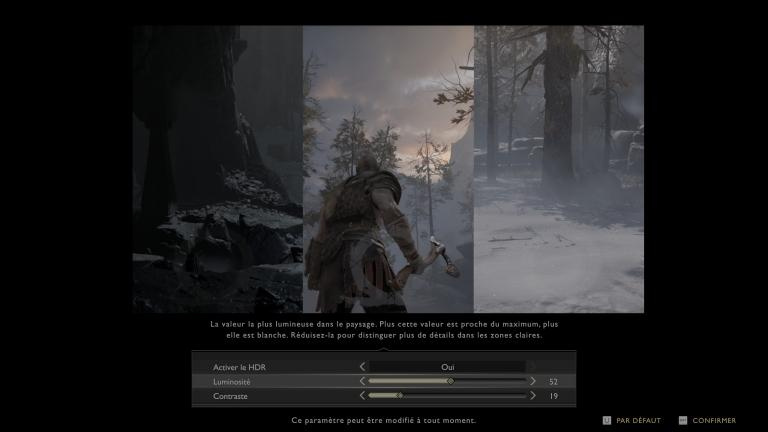
The game is NOT using/applying Playstation HDR Calibration app settings.The HDR implementation could be better.The in-game luminance controls are confusing: they do not correspond in exact values in nits and any change to one of the settings provided ("Brightness" or "Contrast") will alter the rendition of the other:UPDATE: After the game landed on PC, HDR options actually improved adding numerical values (also on Playstation), therefore I updated my suggestions accordingly as shown below.First thing to do is making sure to have in-game SDR Brightness to 50 in all cases (it will influence HDR as well), then proceed with the in-game HDR controls.If you have an LG OLED and:> you're using Dynamic Tone Mapping or Dynamic Contrast:
Set HDR Brightness to: 50
Set HDRContrast to: 39
> you're using HGIG:
Set HDR Brightness to: 50 or 52 (for G2) or 55 (for G3)
Set HDRContrast to: 39
If you don't have an LG OLED:
Set HDR Brightness to: 52
Set HDRContrast to: 39
Dynamic Tone Mapping is still recommended over HGIG as, even when setup correctly, it may look too often too dim.BONUS:
Disable Film Grain: to improve both clarity and contrast of the picture.
Files