Home Creators Posts Import Register Favorites Logout

Content

Hi folks! Another Cinebingers.ca feature update is now out and available! This is a big feature update and we've tested it as best as we can with our few devices, its likely there are niche bugs and specific user cases we've not thought of, so if you found any bugs please let us know in the comments here or in the Technical Questions Chat. Thanks!

New Cinebinge Video Player!

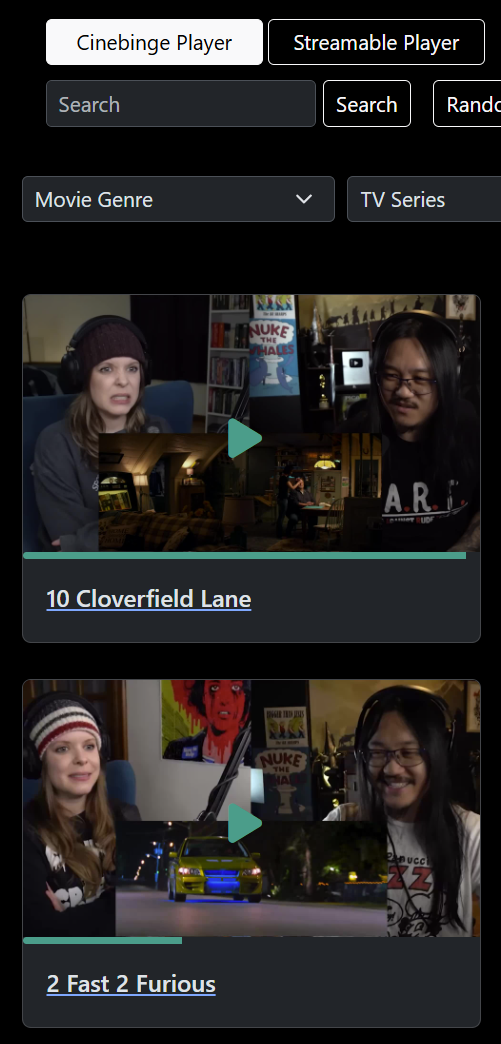
When visiting the front page, you will notice a new toggle at the top called "Cinebinge Player" and "Streamable Player". This video player toggle will allow you to switch back and forth between our custom player or the classic Streamable video player at will!

The Cinebinge player contains the following features

Playback memory. The player will now remember where you last left off each video!

Airplay option for all iOS devices within the player itself! Though for android users this will continue to require chrome-casting the browser or device screen itself. Android does not allow casting to be added to the video player itself and limits that feature to the app level only, and since the browser IS the app, the casting would have to be done via the browser.

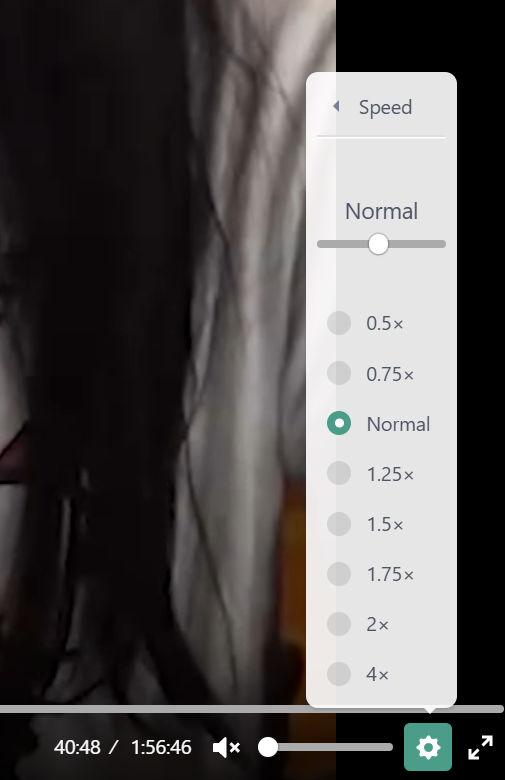
More precise playback speed! Click on the gear icon and select Speed and within you will see a selection of preset playback speeds, as well as a slider that will allow you to set the play back at more precise percentages.

Full Screen Mode - On mobile devices, when the video is set to full screen, it should now auto rotate.

Black bars/pillars regardless of browser!

Theres more features coming down the road that we're still working on, and we really appreciate everyones feedback so far, be it with the site itself or with any mistakes found in the "No Sync" videos. Please keep them coming! The site is for all of you, so your feedback and preferences is the only thing that matters!

Files
Comments

Matt

First Try!

Wormtongue

Cheers for all the hard work... o7

Todd

So awesome. The only thing that I can think of that would be an improvement, for me at least, is 1) captioning and 2) a way for your website player to indicate whether a video has been watched. The latter would be especially helpful for tv episodes. If I’m just missing either of these, someone please let me know. I realize that you don’t usually watch content with your own captioning on, but to have captioning for the whole video including you would be helpful. Sometimes you guys are quite a bit louder than the source material that you’re watching (I just binged the Harry Potter movies, and at many points it was difficult to hear what they were saying and I had to look up the script online to know what was being said). I should’ve used ChatGPT to better articulate this screed. Hopefully you can understand it.

Jeff K.

I almost wish, George, that the link you provided had been a Rick Roll instead of the actual site with its new updates. Because, apparently, I'm an asshole and more of a troll than I realized and, as I think about it, maybe that's something I need to work on after this self reflection. Thank you for helping me find a deeper understanding of myself on this journey. ...yeah, I have no idea how we ended up here either but random stream of consciousness attempts at jokes just feel fitting around these parts, don't they?

Eric Wilson

As an android user your videos have always casted fine. From the video player itself, not having to cast the entire web page.

Cinebinge

oh? interesting. what browser/device are you using? and does the browser have any extensions or plugins? more over, are you still able to do it with the cinebinge player?

DopeGhoti

Thanks for the hard work, but something in your update today is preventing me from authenticating with Patreon; it just loops back to the "Log In with Patreon confirmation" flow.

Eric Wilson

I cant with the cinebin player just tried it. It worked fine on my Note 10 plus when I had it, my new S25 ultra, and it works on my cheapo android phone I got for work. No extentions. I think it works on my computer as well, but I cant remember which of my computers I tried it with and I do have a ton of extensions, but my phone it is just from the chrome browser directly from the video player. https://drive.google.com/file/d/1XCTzmoy2jWXD8FkUtUS_7UfkrtnfqZ__/view?usp=drivesdk

Cinebinge

hi there, yep we're getting some reports of this happening to some but not all users. we're looking into it, could you tell me what browser and device you are using? others have reported success after completely clearing cache/cookies/browsing data/password from their browser. or just logging in via a fresh new browser. its not ideal and a pain in the ass to have to relogin to everything, but its a work around for now while the issue is being investigated.

Cinebinge

hm, interesting. will look into this for sure. thank you for the information.

DopeGhoti

If it helps, I see the following error on my browser's JS console after clicking 'Allow': Uncaught (in promise) Error: A listener indicated an asynchronous response by returning true, but the message channel closed before a response was received

Cinebinge

would you mind giving it another try? just made some adjustments.

DopeGhoti

Chrome on Windows for me. I was going to try Firefox, but now I'm getting an HTTP/500 error in both Firefox and Chrome. Edit: Looks like the HTTP/500 was transient. Firefox is working; Chrome still has the login loop; hope that's helpful!

DopeGhoti

Firefox is working; Chrome still has the login loop; hope that's helpful!

Raven Blackrose

This is so much effort for a reaction channel to put in. Genuinely impressed, thanks for making my work days go by happier

Eric G

Is casting being considered as a future feature for the desktop? Like, I go to the website on my desktop and cast the video to my TV, which has Chromecast integrated. Here's the doc from Google: https://developers.google.com/cast/docs/web_sender/integrate I could swear that I've cast stuff from a web player on my Android phone... but it's been a while so I'll take your word that it isn't possible.

lalaland

if youre already on desktop, why not just use a cast extension?

Eric G

A cast extension? Would you have a link or a name? I can't say I've ever heard of one that didn't sound dodgy.

DopeGhoti

I've tried it too, and it still bounces me into the login loop.

mike moake

This is great, so much easier to seek now. The color tones of the old seek bar were so close together in color, and there wasn't a grabby ball.

John Doe

There's a feature added to the YouTube player that I'd love to see on the CineBinge player: hold left click or spacebar to speed up video to 2x. There's also double click left or right side of video to go back or forward a few seconds.

Jartist extraordinary

Works great, I now no longer have to workaround the ipad to apple TV casting issue i had previously. Thanks!

DopeGhoti

Hello, me again, new thread - whatever changed in the last few minutes appears to have resolved the issue I was having with Chrome. Thanks for banging away on it; I know what it's like to be captured by a puzzle like this but I also know what the long hours can take out of you. Excellent work!

Logan Kerlee

I super appreciate the page, you guys! It makes it so much easier to browse content and watch things. Just earlier today I was watching Superman on there and I totally enjoyed it. :) lol, there are some movies that I actually enjoy more when I'm watching the reaction along with it. :) So big thank you for that, as well! lol, figure you both get that a lot but I wanted to mention it anyway. :D <3

jay

god, you guys are genuinely the greatest. i'm super high right now and honestly it's making me so emotional how much you guys care about your community it really makes me feel so appreciated even though i prefer to sync on my own lmao. i'm so excited to stick w/ ya guys and watch you grow and progress even more down the line ❤️ you guys are honestly the only channel i watch regularly, even just outside of reactions etc, anytime i'm having a bad day i decide then that i'm going to move one i've been meaning to watch with you guys to the top of my watch list! never stop being you, you guys rock

Lola Lirola

This is incredible work The biggest thing I find myself missing is the "back 10 seconds" button (or double tap, or however you wanna do it). Particularly as a foreign audience, since English is not my first language, I find myself going "wait, what did they say?" often, and trying to go back manually on the play bar is impossible. Maybe the feature already exists, and I'm just doing it wrong, in which case, help, how do I do it? Anyway, that's my 2 cents. Really cool that you have such a great archive!

Apollo

Small tweak- refresh on the page sorts items a-z as default, would like newest first to always see your new content first. Thanks!

Tom Hess

I love you guys.

Mykel

Love the new website. You guys are killing it. 🏆

Cinebinge

will fix soon, definitely a bug. '

Cinebinge

hi John, if the issue is still there, would you mind trying again? we've made some more changes.

IR4TE

Only question, how's the resolution handled and can I force it to always max it out?

Shibby

Yay you guys are the best

Logan Nelson

G&S for the win... You guys are great!!! (Ala Tony the tiger)

Christian Valdersnes

is it just me who can't access the Cinebingers site? i have the second tier so i should be able too.

Cinebinge

hi Christian, could you tell me what you see when you try to access the site? is it a access restriction message or if its the site thats unable to load?

Doug S.

If you're using desktop, open Patreon in a tab first, then open the Cinebingers site in a new tab. I've found that it helps authenticate Patreon properly.

Doug S.

Did the desktop version of the player lose keyboard shortcut usage during the videos, or is it just me? Spacebar doesn't pause the video for me and the right and left arrows don't skip forward and backward by a handful of seconds like they did yesterday.

cincassette

I just tried it too, and there seems to be some sort of bug where it only registers keyboard shortcuts after interacting with one of the controls on the playback control bar (play, mute, settings, etc). as soon as I click anywhere else, deselecting the control, the keyboard shortcuts stop working again :/

ExquisiteCapybara

Gotta admit, i was very sceptical when you annoucned this. I mostly still prefer to sync my own copy, since i can put the movie in a larger window. However personally i love it for rewatching older content (or hard-to-get-stuff). So keep it up :) On that Note: In Breaking Bad 509-510 youre listening/watching a poem reading in the beginning (keeping it spoiler free). That poem-video is not part of the cinebingers version, so its a kinda funny experience of watching two people reacting to a poem we dont hear. maybe something for the backlog to update?

Doug S.

Thanks for that tip, it worked after trying that!

Drew Acheson

Not sure if someone has said this yet, but my only feedback on this is it would be great if the new player responded to the standard keyboard shortcuts (space to play/pause, F for full screen, M for mute, etc). Otherwise, awesome work George!

Jpsynergy

My favorite feature I've had on any Patreon just got better. You guys are the best, thanks for all the effort.

Mike Cummins

The new player does not seem to have the ability to screen cast like the old one. Is that feature coming? Or maybe it's there and I'm missing it? Just tried it on the close encounters video using chrome on android.

Mike Cummins

I can still cast my phones browser to the TV but it shows up super tiny on the TV and is surrounded by black bars on all sides. The video is maybe 20% of the display while the rest is black and if I turn my phone screen off casting is interrupted.

Cinebinge

hi Mike, thanks for the feedback. as far as we know video players on browser for android cant have casting implemented unless its a dedicated app, rather than just a video on a browser. but we could be wrong about this and just havent found a way yet. we'll continue to look into this, if you prefer the casting from the old player, on the front page of cinebingers.ca at the top of the page, there is an alternate choice to Cinebinge player that will switch back to the previous version. Just click that toggle and you will be back to the old player.

Cinebinge

hi folks, we've made some changes to the keyboard controls, please give them a try and let us know how it feels. thanks!

Mike Cummins

Oh snap! I didn't see the option for the old player. Thx so much for pointing that out!

Mike Cummins

Old player works like a charm. Thx for point that out and leaving that as an option while implementing new tech. IT departments would be very proud of you for thinking ahead like that. Lol. Love ya guys!

Cinebinge

hi Lola, so for the 10 second jumps, the player has the 2 arrow controls next to the play button that does it, and for desktop you can also do so with the arrow keys on your keyboard. that being said neither of us have ever utilize these functions on YT for example so we arent exactly sure what the common preferences are with tablets/mobile. is there a particular type of swipe or tap on mobile that is always used for forward/backwards by 10 seconds?

Lola Lirola

Well, that's odd, because I can't seem to make those arrows appear! I'm tech clumsy, so it's surely me, but I'll paste some screenshots so you can see how it looks like for me. The function usually is a double tap left for the back 10 seconds, and double tap right for forward 10 seconds. Particularly useful when you're on full screen and the lower bar is hidden Then YouTube and other players also overlay a nifty arrow icon on the screen so I know I pressed where I needed, but that's not really a necessity. I'll try doing desktop a d working with the keyboard arrows meanwhile!

Lola Lirola

Well, crap. I can't post pictures. But trust, there's only a big play/ pause button and a progress bar, but I can't find anything else.

Cinebinge

hi Lola, just to confirm. when you go to the home page at cinebingers.ca, at the top of the page there is a toggle between Cinebinge Player and Streamable Player. is Cinebinge player selected? or is Streamable Player selected. the latter is the old player with a lot less functions, this may be why. If it says Cinebinge Player selected, try switching to Streamable then switching back, and check on a video again to see if the arrows appear

Lola Lirola

It was definitely Streamable's fault, because I just switched, and the arrow buttons are there! Miracle!! 😅 Then the only thing is: when I click on your "no sync required here" link, it selects Streamable by default. I definitely won't mind switching every time now that I know, but it'd be nice to use your own much better player by default, wouldn't it? Anyway, thanks for the help with the very obvious tech clumsiness!

Cinebinge

hm, yeah thats a bug and shouldnt be. will look into it.